- Khurram Shahzad
- WordPress
- 47
- 0
If you are choosing a platform for a new website, or wondering why your current one is not ranking, the Wix vs WordPress SEO question comes up fast. Some people say Wix is bad for SEO and that serious sites must use WordPress. Others say Wix fixed its old problems years ago and is now just as good. Both camps usually have a point, and both usually leave out the part that matters most for your situation.
Here is the honest short version. Both Wix and WordPress can rank on the first page of Google. Neither platform will rank a weak page, and neither will stop a strong page from ranking. Where they differ is in how much control you get over technical SEO, how far you can tune speed, how well each one copes as a site grows, and how much work it takes to get the setup right.
This guide compares Wix and self-hosted WordPress across every area that affects search performance: on-page SEO, technical SEO, speed and Core Web Vitals, SEO tools and plugins, blogging, ecommerce, local SEO and AI search. It also covers what each platform does badly, what good SEO costs on each, how to choose, and how to move from Wix to WordPress without losing rankings.
Quick answer: Wix vs WordPress for SEO Both can rank well. Wix is a good choice for small business and local sites that want SEO handled through simple built-in tools, with hosting and security managed for them. Self-hosted WordPress gives far more control over technical SEO, speed, site structure and scale, which matters most for content-heavy sites and growing stores. In both cases, content quality and links matter more than the platform.
Wix vs WordPress SEO at a Glance
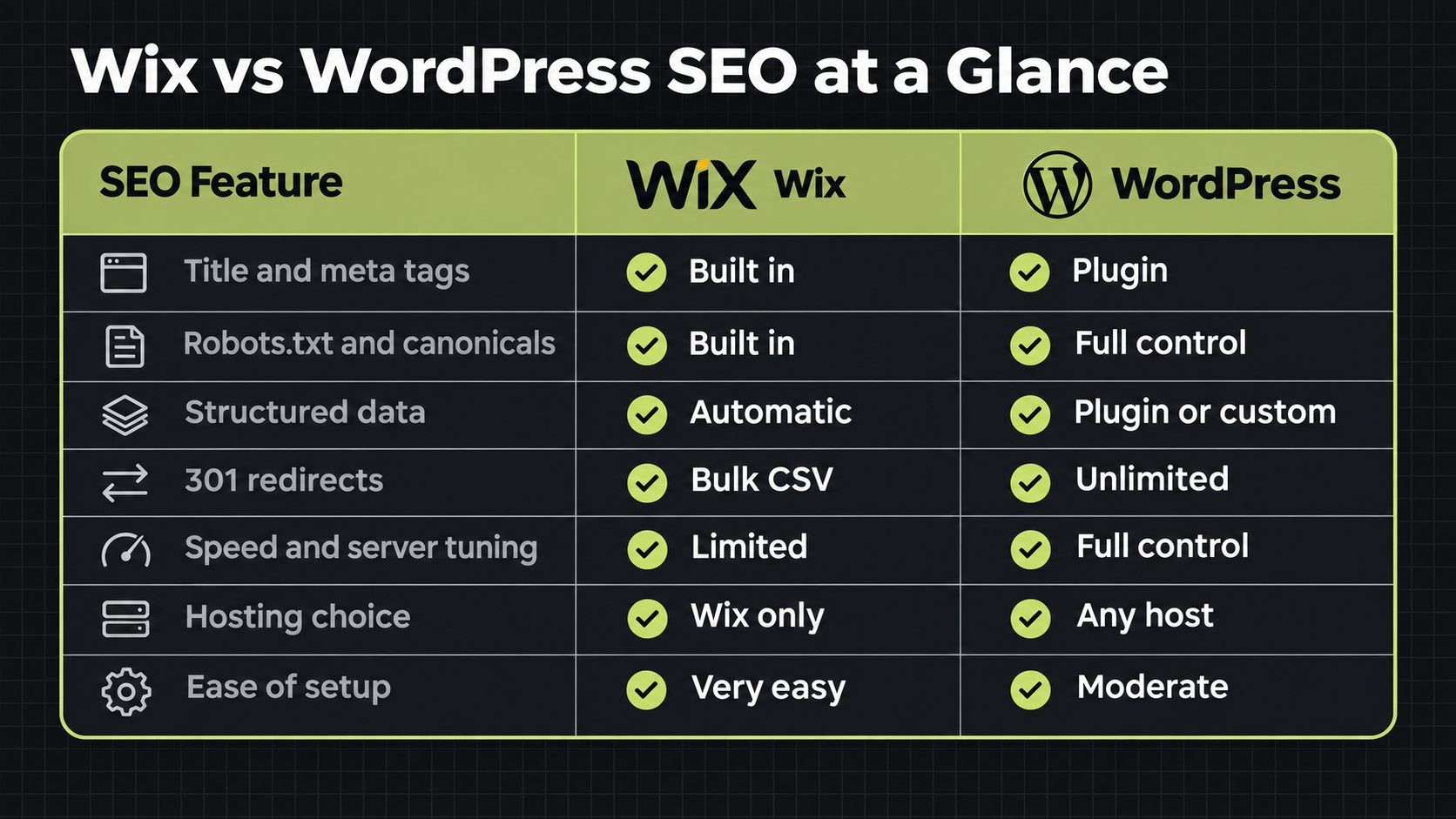
Before going section by section, here is how the two platforms compare on the SEO features most site owners care about.
| SEO area | Wix | WordPress (self-hosted) |
|---|---|---|
| Title tags and meta descriptions | Built in, with per-page edits and templates | Through an SEO plugin such as Yoast, Rank Math or SEOPress |
| URL and slug control | Editable slugs and URL structures | Full permalink control |
| Robots.txt | Built-in editor | Full control through a plugin or the server |
| Canonical tags | Set by default, customizable | Set by plugins, fully customizable |
| Structured data | Added automatically on key pages, custom markup allowed | Through plugins or custom JSON-LD |
| 301 redirects | Built in, including bulk CSV import | Through a plugin or server rules |
| XML sitemaps | Generated automatically | Generated by core or an SEO plugin |
| Speed and server tuning | Managed by Wix, limited control | Depends on your hosting, theme and plugins |
| Hosting choice | Wix only | Any host you choose |
| Extensions | Wix App Market | Thousands of plugins |
| Ecommerce SEO | Wix Stores | WooCommerce |
| Ease of SEO setup | Very easy | Easy to moderate, with more to learn |
One clarification matters before going further: WordPress.com and WordPress.org are not the same thing. WordPress.com is a hosted service with plan-based limits, while WordPress.org is the free, open source software you install on your own hosting. This guide compares Wix with self-hosted WordPress, because that is the version most people mean when they talk about WordPress SEO.
How Wix and WordPress Handle SEO Differently
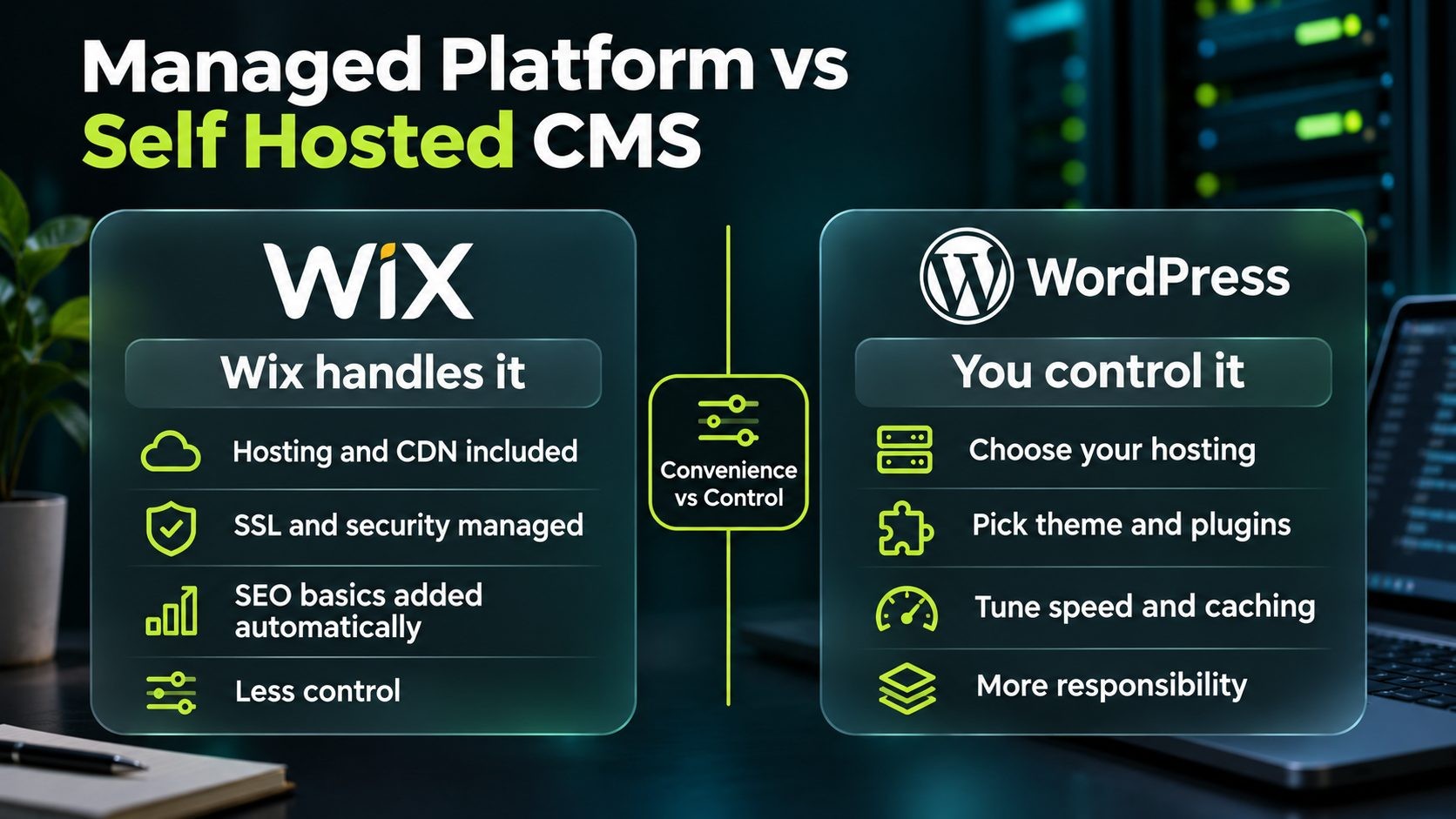
The biggest difference between the two platforms is not a single feature. It is who controls the website underneath the content you write.
Wix: a managed, all-in-one platform
Wix is a hosted website builder. When you build a site on Wix, the hosting, content delivery network, SSL certificate, security updates and much of the technical setup are handled for you. Wix renders pages on its servers, which it says helps search engines read your content fully, and it adds a lot of SEO basics automatically, such as canonical tags, sitemaps, robots meta tags and structured data on key page types.
That makes Wix SEO easier to get right for a beginner. There is less to configure and fewer ways to break something. The trade-off is control. You cannot choose your server, install your own caching layer, edit server configuration or change how Wix builds its pages. You work within the options Wix provides, and those options, while broad, have limits.
WordPress: an open source CMS you host yourself
Self-hosted WordPress is content management software that you install on hosting you choose. You pick the hosting company, the server type, the theme, the plugins and the caching setup. That freedom means almost any SEO change is possible, from custom URL structures to advanced schema to server-level performance tuning.
The trade-off is responsibility. A WordPress site is only as fast, secure and well configured as the choices you make. Cheap hosting, a heavy theme or too many plugins can hurt SEO just as much as good choices can help it. WordPress gives you a higher ceiling, but it also has a lower floor if nobody looks after it.
On-Page SEO Compared
On-page SEO is where the two platforms are closest. Both let you control the main elements Google reads on each page.
Title tags and meta descriptions
Wix includes an SEO Settings area where you can edit the title tag and meta description for each page, and set default patterns for page types such as blog posts and products. It also generates Open Graph tags for social sharing, which you can customize. For most small sites, this covers everything needed.
WordPress does not offer full title and meta description control in its core software, so nearly every site adds an SEO plugin. Yoast SEO, Rank Math and SEOPress all let you set titles and descriptions per page, create templates for post types and preview how a page may appear in search results. This on-page SEO checklist covers what to put in these fields on either platform.
URLs and slugs
Wix lets you edit the slug of each page and, through its URL settings, customize URL structures for many page types, and it updates redirects, sitemaps and canonicals when you change them. Earlier versions of Wix had fixed URL prefixes for blog posts and products, which is one reason older articles criticize its URLs.
WordPress gives you full permalink control. You can choose a structure for the whole site, such as a simple post name, and set custom slugs for every page, post, category and product. For large sites with careful URL plans, that flexibility is useful. For a ten-page business site, Wix's options are usually enough.
Headings and content editing
Both editors let you set heading levels from H1 to H6 and structure content clearly. The common mistake on both platforms is the same: a template heading that looks right visually but uses the wrong tag, such as a decorative H1 used in several places, or a section title that is really just styled text. Whichever platform you use, check that each page has one clear H1 and that headings follow a logical order beneath it.
Images and alt text
Wix compresses uploaded images automatically and may serve them in the WebP format where browsers support it, which helps speed. You can add alt text to every image. One long-standing criticism is that Wix gives images machine-generated file names on its servers, rather than keeping a descriptive file name, which some SEOs see as a small disadvantage for image search.
WordPress keeps the file names you upload, so you control them fully. Image compression and WebP conversion usually come from a plugin, a CDN or your hosting. On both platforms, the basics are the same: compress large images, write descriptive alt text and use sensible dimensions.
Structured data
Wix adds structured data markup automatically to pages such as products and blog posts, and it lets you add your own custom markup to pages when you need something beyond the defaults. For most small business sites, that covers the important types.
WordPress handles structured data through SEO plugins, dedicated schema plugins or custom JSON-LD added by a developer. This gives more flexibility for complex sites, such as nested schema for products, FAQs, how-to content, events or organizations. On either platform, validate your markup and make sure it matches what the page actually shows.
Technical SEO Compared
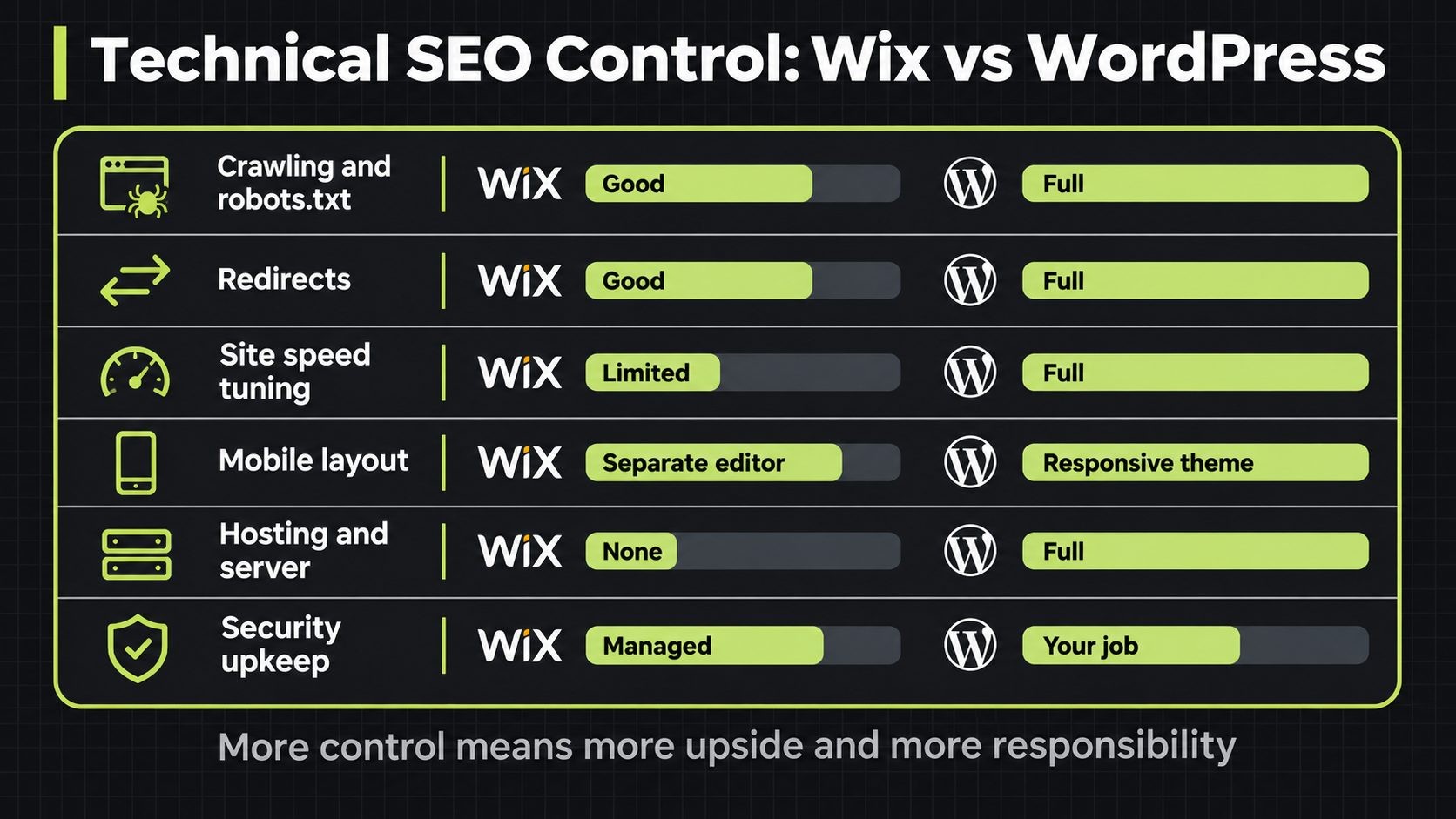
Technical SEO is where the differences become clearer. Wix covers the essentials well, while WordPress offers deeper control for sites that need it.
Crawling, indexing, robots.txt and canonicals
Wix generates a robots.txt file and includes a robots.txt editor, adds robots meta tags with presets you can change per page or across many pages, sets canonical tags by default with the option to customize them, and creates sitemaps automatically, including image sitemaps. It also integrates with Google Search Console for domain verification, sitemap submission and a site inspection tool that checks indexability across your pages. You can see the full list in Wix's full list of SEO features.
WordPress generates a basic sitemap and a virtual robots.txt in its core software, and SEO plugins extend both. Because you have access to the server, you can control every crawling and indexing setting, including noindex rules for archive pages, custom canonical logic and server-level rules. For most sites, both platforms handle crawling well. The difference shows up on large or complex sites where fine control matters.
Redirects and URL changes
Wix includes built-in 301 redirects and a bulk redirect tool that supports CSV import of up to 500 URLs, and it adds redirects automatically when you change a page's URL in many cases. That makes routine URL changes safe even for non-technical owners.
WordPress handles redirects through plugins such as Redirection, through SEO plugins that include redirect managers, or through server rules for large migrations. There is no practical limit on the number of redirects you can manage, which matters when restructuring a large site.
Site speed and Core Web Vitals
Wix runs on its own infrastructure with its own CDN and caching, and it compresses images automatically. Its performance has improved considerably over the years, and many Wix sites pass Core Web Vitals. But the limit is that you cannot tune the server or remove code the platform adds, so if a Wix page is slow, your options are mainly to simplify the design, reduce apps and optimize media.
WordPress speed depends almost entirely on your choices. On good hosting, with a lightweight theme, a short plugin list and proper caching, WordPress sites can be very fast. On cheap shared hosting with a heavy page builder and dozens of plugins, they can be very slow. You have every lever, but you have to pull them. This guide on how to improve INP covers the responsiveness metric many sites still fail, and this comparison of WP Rocket vs LiteSpeed Cache explains the two most common caching options for WordPress.
Mobile optimization
Google uses mobile-first indexing, so the mobile version of your page is the one that counts. Wix creates a mobile version of your site automatically, and its editor lets you adjust the mobile layout separately. That is convenient, but it means you need to check the mobile layout yourself, because changes on desktop do not always look right on mobile. Most modern WordPress themes are responsive by design, so the same layout adapts to every screen. Whichever you use, test key pages on a real phone. Check that menus open easily, buttons are large enough to tap, text is readable without zooming and nothing important is hidden on smaller screens, because content missing from the mobile version may not count.
Hosting and server control
This is the clearest dividing line. On Wix, you cannot choose your hosting, add server-level caching, change PHP or database settings, or put the site behind your own CDN configuration in the way you can with self-hosted software. Wix manages all of it.
On WordPress, hosting is a major SEO decision. You can choose shared hosting, managed WordPress hosting or a VPS, and add tools such as Cloudflare for caching and security. That flexibility lets a growing site scale its performance as traffic increases. It also means you can move to a better host at any time without rebuilding the site, which is not possible on a hosted builder. If your current host becomes slow or unreliable, the fix is a migration rather than a new website. This guide to shared vs VPS vs WordPress hosting helps you pick the right type, and this guide to Cloudflare settings for WordPress covers caching and security rules.
Security, SSL and uptime
Wix includes SSL on every site and handles security and uptime for you. That removes a whole category of risk for small business owners who will never update software or review plugins. On WordPress, security is your job or your host's: updates, backups, secure plugins and login protection. A hacked or frequently offline site can lose rankings, so this matters for SEO, too. This WordPress security checklist covers the steps that protect a site.
SEO Tools and Plugins
Both platforms give you tools to manage SEO, but they work very differently.
Wix built-in SEO tools
Wix builds its SEO tools into the dashboard. The SEO Setup Checklist walks you through the basics step by step, including connecting Google Search Console and setting up key pages. Wix Analytics includes SEO reports built from Search Console data, showing clicks, impressions and queries. Bot log reports show how search engine bots crawl your site, including response status over time, which is something many hosted platforms do not offer. Google Business Profile integration lets local businesses manage their profile, reviews and insights from the Wix dashboard. Developers can also use SEO APIs through Velo to change meta tags, link tags and structured data with code.
The benefit is that everything is in one place and designed for non-specialists. The limitation is that you can only use what Wix provides, plus the apps in its market.
WordPress SEO plugins
WordPress relies on plugins. Yoast SEO is the most widely known and focuses on content analysis, titles, sitemaps and schema. Rank Math offers a wide feature set in its free version, including schema types and redirect management. SEOPress is a lighter option with a clean interface. Any of the three covers the core SEO needs of most sites.
The benefit is choice and depth. The risk is running more than one SEO plugin at once, or piling on plugins until the site slows down. Pick one SEO plugin and configure it properly. To see Search Console and Analytics data inside WordPress, Google's own Site Kit plugin connects those services to your dashboard, which gives you a view similar to Wix's built-in reports. For checks outside WordPress, this list of free SEO tools covers options for audits, speed tests and meta tag checks.
Blogging and Content at Scale
For a site that publishes regularly, the platform's content structure matters.
Wix includes a capable blog with categories, tags, authors and SEO settings per post, and it is a reasonable choice for a business that publishes a few articles a month. As a blog grows into hundreds of posts, though, the limits of a hosted builder become more noticeable: less control over archive pages, taxonomy URLs, pagination handling and custom templates for different content types.
WordPress started as a blogging platform, and content at scale is still where it is strongest. You can create custom post types, design separate templates for guides, case studies and news, control how category and tag archives are indexed, and build hub pages that organize related content into clear topic clusters. That structure helps search engines understand your expertise and helps readers find related content.
Whichever platform you use, the principles are the same: group content into clear categories, link related posts to each other, build hub pages for your main topics and avoid thin tag archives that duplicate your categories. This guide to site architecture for SEO explains how to plan URLs, categories and hubs so a growing site stays organized.
Ecommerce and Local SEO
Many Wix vs WordPress decisions are really about selling online or attracting local customers.
Online stores
Wix Stores lets you sell products with SEO settings for each product page, automatic product structured data and built-in payment and shipping tools. For a small catalog, it is simple to set up and manage, and the SEO basics are handled.
WooCommerce, the main ecommerce plugin for WordPress, offers more control for stores that plan to grow. You can manage product schema in detail, control how filtered and faceted URLs are indexed, customize category pages and scale to large catalogs on hosting suited to the load. That control matters because large stores often create duplicate or thin pages through filters and variations, and handling them well is a real SEO advantage. If you are also comparing hosted store platforms, this WordPress vs Shopify comparison covers the trade-offs.
Local businesses
For local businesses, Wix has a practical advantage: Google Business Profile integration inside the dashboard, so you can manage your profile, respond to reviews and see insights without switching tools. Combined with automatic SEO basics, that makes Wix a good fit for a plumber, salon or clinic that needs a solid site without technical work.
WordPress handles local SEO through local business schema, plugins and well-built location pages, and it can scale to many locations more easily. Either way, the most important local SEO work happens outside the website itself: your Google Business Profile, reviews and consistent listings. This small business SEO checklist puts those steps in order.
Wix vs WordPress for AI Search and AI Overviews
AI search features such as Google AI Overviews and AI Mode have added a new question: does your platform affect whether AI tools cite your pages? In practice, the platform matters far less than the content and technical basics.
Google's AI features draw on its core ranking and quality systems, so the same things that help pages rank also help them appear in AI answers: clear, direct answers to real questions, accurate information, structured data that matches the page, and content that search engines can crawl and render easily. Both platforms can deliver all of these. Wix renders pages on its servers and adds structured data automatically on key pages. WordPress gives you full control over markup and server configuration.
The bigger risk on either platform is content that AI tools cannot read: important information hidden inside images, text loaded only after user interaction, or pages blocked from crawling. Keep key answers in plain HTML text near the top of each page, use clear headings that match the questions people ask, and keep your structured data accurate. This guide on how to get cited in AI search covers the details for ChatGPT, Gemini and Google AI Overviews.
Does the Platform Actually Decide Your Rankings?
This is the question behind most Wix vs WordPress SEO debates, and the evidence points in one direction: the platform matters less than what you do with it.
Google's John Mueller has said that Wix is fine for SEO, a comment covered in Ahrefs' guide to Wix SEO. Google does not rank pages based on the software that built them. It ranks pages based on relevance, quality, links and page experience, as explained in Google's SEO Starter Guide.
The most cited evidence against Wix is an Ahrefs study from 2019 that analyzed over 6.4 million websites and found that far more WordPress sites received organic traffic than Wix sites. But Ahrefs itself later noted that the study's methodology was weak and could not be properly rerun, and the gap was largely explained by the people behind the sites, not the platforms. WordPress is widely used by businesses, publishers and agencies that invest heavily in SEO, while Wix attracts many hobby and small sites that do little SEO at all. That is correlation, not proof that the platform causes better rankings.
What actually moves rankings on either platform is the same list: content that answers searches better than competing pages, links from relevant sites, a clear site structure, fast and stable pages, and no technical problems blocking crawling or indexing. This list of technical SEO issues covers the problems that most often hold sites back, whatever they are built on.
The platform does matter at the edges. If you need advanced control over speed, structure or scale, WordPress gives you more room. If you need a simple, reliable site with SEO handled for you, Wix removes many ways to go wrong.
A practical test is to look at the sites already ranking for your main keywords. If the top results are small local business sites, a well-built Wix site can compete. If they are large publishers or stores with hundreds of well-organized pages, you will likely need the structure and control that WordPress offers to keep up as your own site grows.
Where Each Platform Falls Short
Neither platform is perfect for SEO. Knowing the weak spots helps you avoid them.
Wix SEO limitations
- Limited speed and server control. You cannot tune hosting, caching or the code Wix adds, so performance depends on Wix's infrastructure and your design choices.
- Image file names. Wix stores images under machine-generated names, which removes one small signal for image search.
- Less control over sitemaps and multilingual URLs. Automatic sitemaps are convenient but harder to customize, and Ahrefs notes that users do not get full control over URLs for different language versions.
- Platform lock-in. Your site lives on Wix. Moving away means rebuilding the site elsewhere, because you cannot export a Wix site as a working WordPress site.
- Scale. Very large sites, complex stores and content-heavy publishers can run into the limits of a hosted builder.
WordPress SEO pitfalls
- Plugin bloat. Every plugin adds code, and too many can slow pages, cause conflicts and create security risks.
- Cheap, slow hosting. Low-cost shared hosting is one of the most common causes of poor WordPress performance.
- Security neglect. Outdated plugins and themes are a leading cause of hacked WordPress sites, and a hacked site can lose rankings.
- Conflicting SEO plugins. Running two SEO plugins can create duplicate meta tags and conflicting sitemaps.
- Duplicate archive pages. Tag, author and date archives can create thin, duplicate pages unless you control how they are indexed.
Most of these WordPress problems come from setup and maintenance, not the software itself. This guide to why your website is slow covers the causes and fixes for performance problems on any platform.
What Good SEO Costs on Each Platform
The cost of SEO is not just the monthly plan. It is the plan, the tools and the time.
On Wix, your plan covers hosting, SSL, security and the built-in SEO tools. Paid plans add features such as a custom domain, more storage and ecommerce. You may add paid apps from the Wix App Market. Because the platform handles the technical side, your main SEO cost is time spent on content and links.
On WordPress, the software is free, but you pay for hosting, a domain, possibly a premium theme, and optional premium versions of plugins. Good hosting matters here, because it directly affects speed and uptime. You also pay in time or developer help for updates, security and configuration.
Pricing changes often on both sides, so check the current pricing pages before deciding. A useful way to compare is to estimate the total over two or three years, including the time you or a developer will spend. This guide to website costs in the US breaks down costs by project type.
Which Should You Choose for SEO?
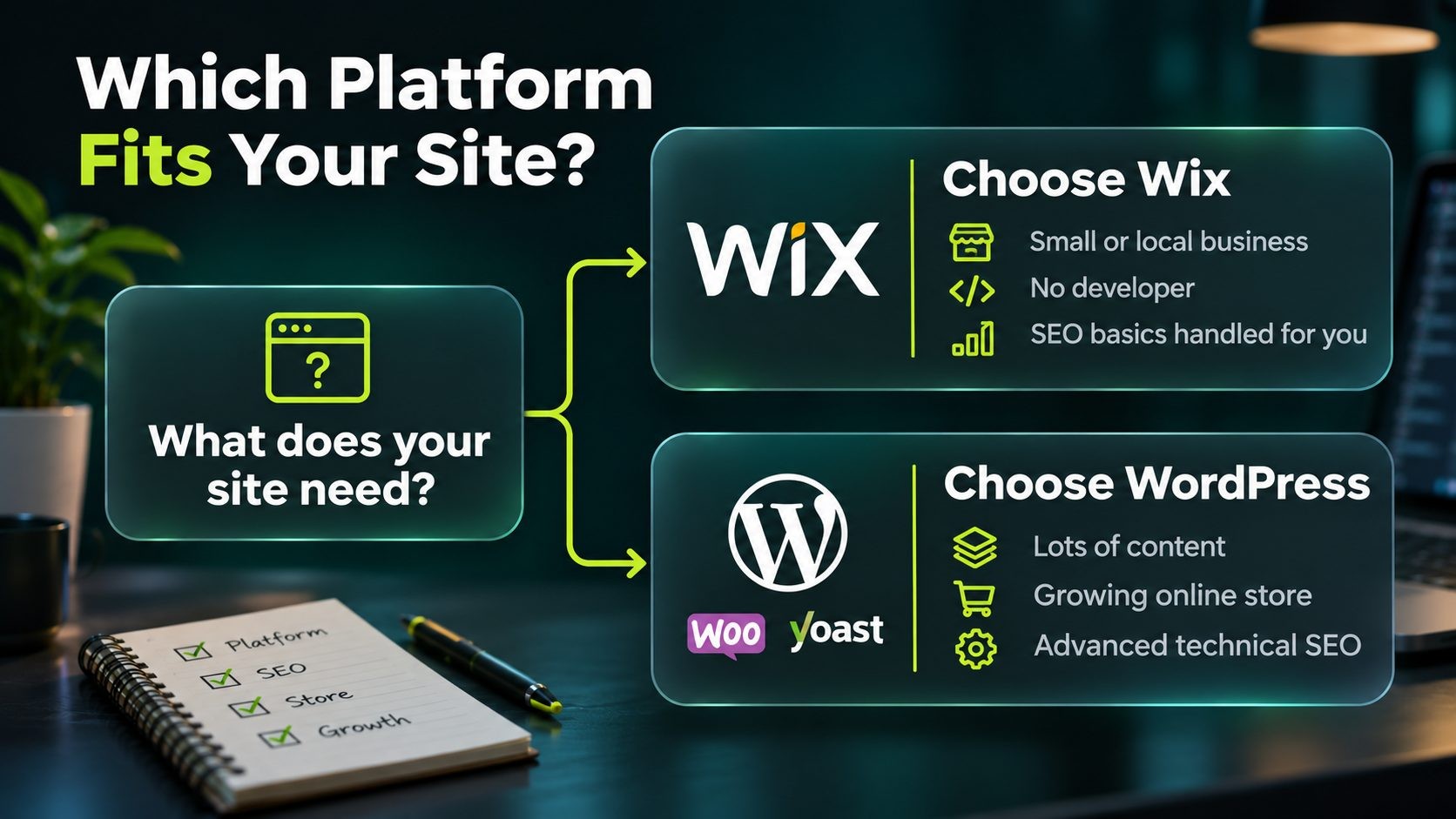
The right choice depends on what your site needs to do now and where it is heading.
Choose Wix if
- You run a small or local business with a site of a few to a few dozen pages.
- You do not have a developer and do not want to manage hosting, updates or security.
- You want SEO basics handled automatically, with a guided checklist and Search Console reports in one dashboard.
- You value speed of setup over deep customization.
Choose WordPress if
- You plan to publish a lot of content and want full control over structure, templates and archives.
- You run or plan to grow an online store with a large or complex catalog.
- You need advanced technical SEO, such as custom schema, detailed indexing control or multilingual URL control.
- You want to choose your own hosting and tune performance as traffic grows.
- You want to own your site and be able to move it to another host at any time.
If you choose WordPress, hosting is the decision that most affects speed and reliability. A WordPress-optimized plan, such as Nexi Bloom's WordPress hosting, gives you a setup built for the software rather than generic shared hosting.
A simpler option worth considering
Some site owners want neither the limits of a big hosted builder nor the upkeep of WordPress. For a straightforward business or portfolio site, a simpler builder such as Sitelyx can be enough. And if your project needs custom features beyond what any builder or CMS offers, a custom build may be the better path, as covered in this comparison of Laravel vs WordPress.
Moving from Wix to WordPress Without Losing Rankings
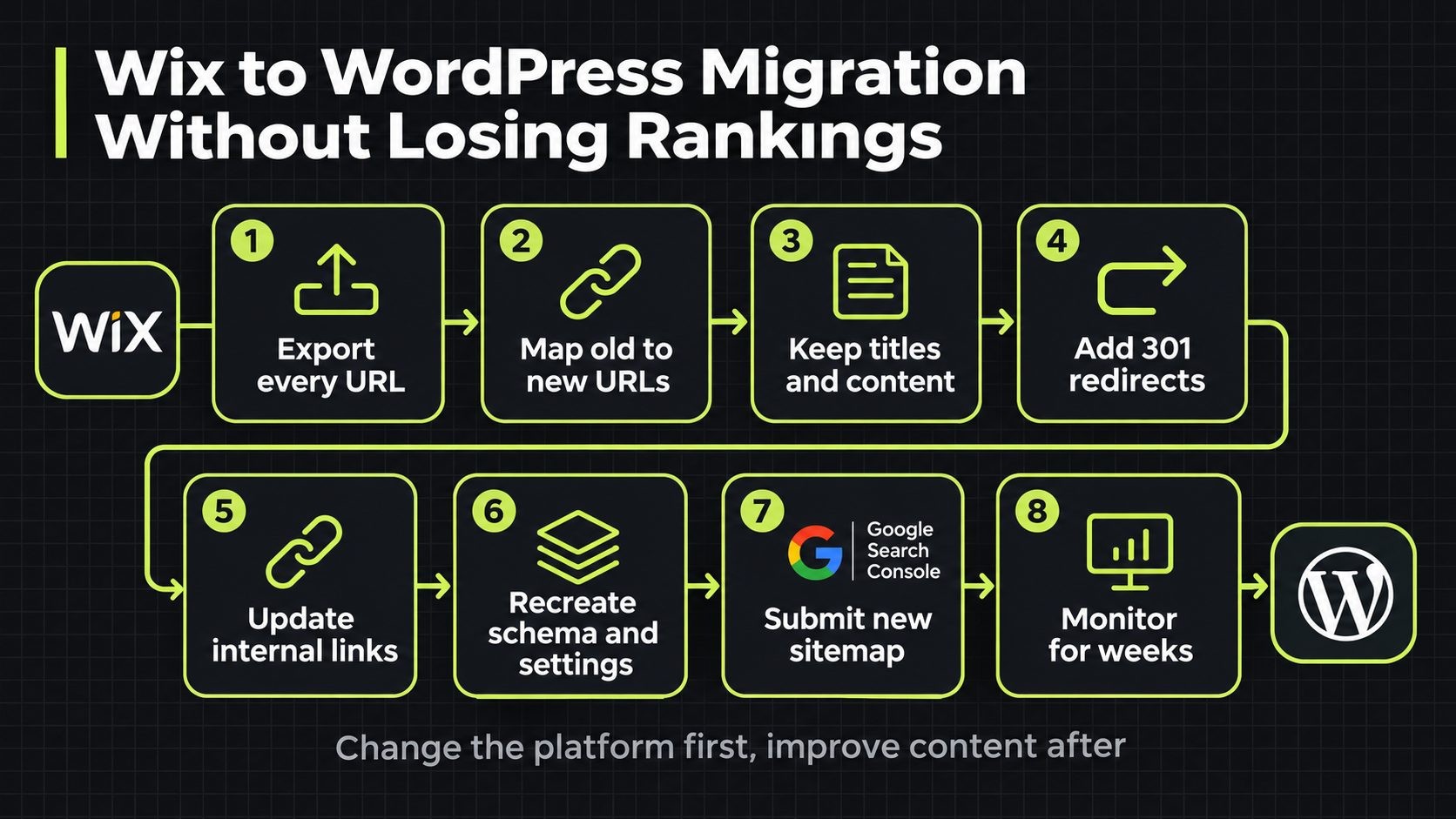
Many businesses start on Wix and later move to WordPress as they grow. A migration can keep your rankings intact if you plan it carefully. Because you cannot export a Wix site directly into WordPress, the move is a rebuild, so the SEO work is in preserving what Google already knows about your pages.
- Crawl and export every URL. List every page, post, product and image URL on your Wix site, plus your titles, meta descriptions and key headings.
- Map old URLs to new URLs. Decide the new URL for each old page. Keep URLs the same where possible, and match every old URL to its closest new equivalent.
- Keep content, titles and metadata. Move content over without major rewrites at first, so Google sees the same pages. Improve them after the move settles.
- Set up 301 redirects. Redirect every old URL that changes to its new URL. Missing redirects are the most common cause of lost traffic after a migration.
- Rebuild internal links. Update links inside your content to point to the new URLs directly, rather than through redirects.
- Recreate structured data and settings. Add schema, set indexing rules and check canonical tags on the new site.
- Submit the new sitemap. Verify the site in Google Search Console and submit the WordPress sitemap.
- Monitor for several weeks. Watch Search Console for crawl errors, indexing problems and traffic changes. Some short-term movement is normal while Google processes the changes.
The mistakes that cause the biggest drops are predictable: launching without redirects, changing every URL at once, dropping pages that had traffic or links, and redesigning content during the move. Keep the migration as boring as possible. Change the platform first, then improve design and content once rankings are stable on the new site.
This technical SEO audit checklist is useful for checking the new site before and after launch.
FAQs
Conclusion
The Wix vs WordPress SEO debate comes down to control versus convenience. Wix gives you solid SEO foundations with almost no technical work, which suits small and local sites that want a reliable website without managing hosting or updates. Self-hosted WordPress gives you full control over technical SEO, speed, structure and scale, which suits content-heavy sites, growing stores and businesses that want to own their platform.
Neither platform will rank a weak page, and neither will hold back a genuinely strong one. Choose the platform that fits how you will actually run your site, then put your effort into what ranks pages on any platform: helpful content, a clear structure, fast pages and links from relevant sites.
Choosing WordPress for SEO? Start on hosting built for it. Nexi Bloom's WordPress hosting gives your site a setup designed for WordPress, so speed and reliability support your SEO from day one.
Get new posts by email
New guides and alerts, sent when they are published. No spam. Unsubscribe anytime.


Comments (0)