Choosing the right web hosting plan affects more than your monthly bill. It can influence your website’s speed, reliability, security, maintenance workload, and ability to handle growth. Choose a plan with too few resources and your site may struggle as it grows. Pay for more infrastructure than you need, and you may spend money on capacity or management features that provide little practical benefit.
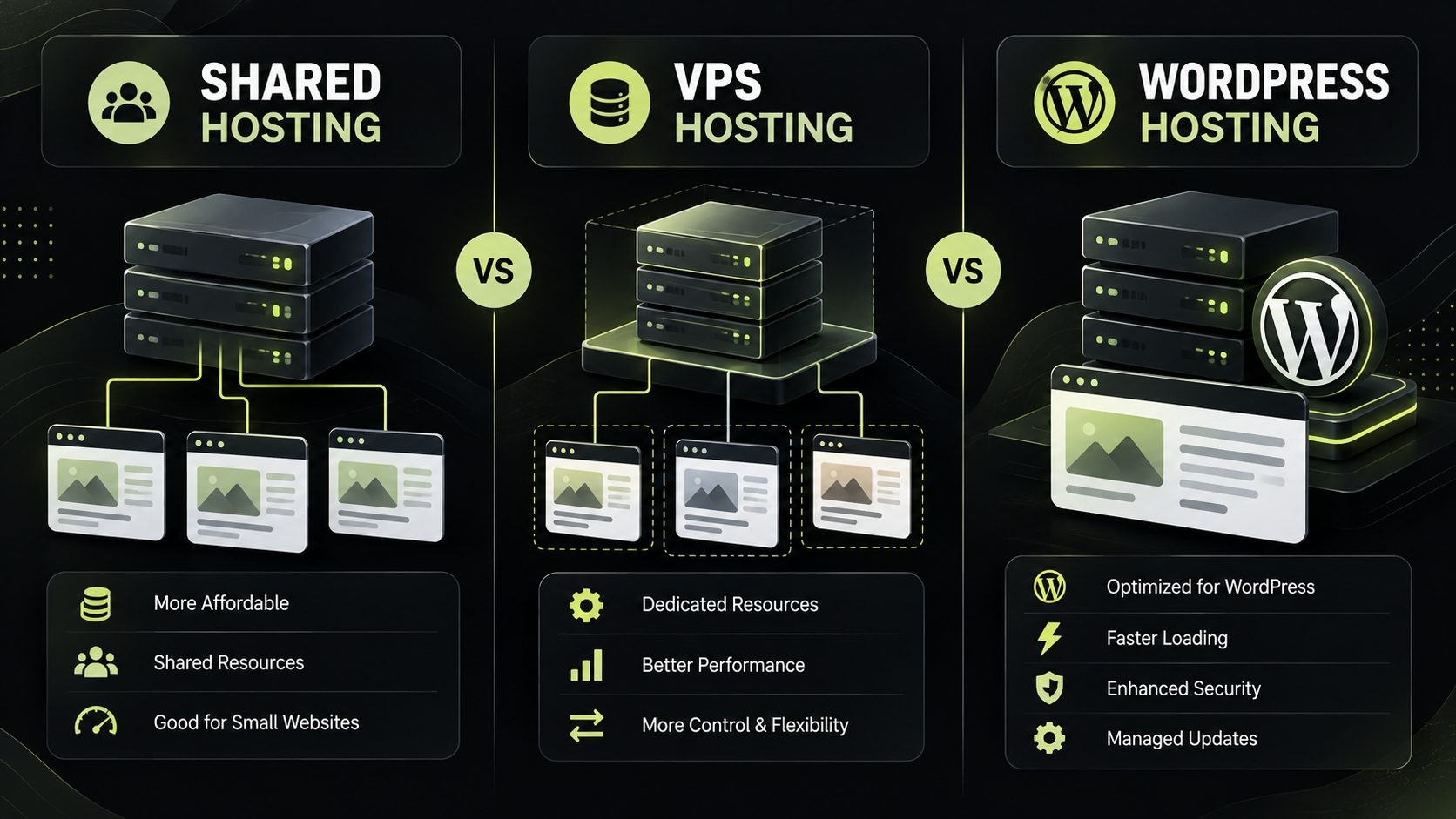
The choice often comes down to three options: shared hosting, VPS hosting, and WordPress hosting. Each serves a different purpose, but they are not three completely separate technologies. Shared hosting describes an environment where multiple customers use the same server, VPS hosting provides an isolated virtual server environment, and WordPress hosting describes a service designed or optimized for WordPress websites.
For many beginners, shared hosting is a sensible starting point. A VPS may be a better fit when a website needs more control, dedicated resource allocations, or custom software. WordPress hosting can be useful when platform-specific support, backups, staging, and maintenance features matter most.
This guide compares shared vs VPS hosting and explains where WordPress hosting fits, what each option costs, how they differ in performance and security, and how to choose the right plan for your website.
Shared vs VPS vs WordPress Hosting at a Glance
Use this table as a starting point, then compare the actual specifications and support included with each hosting plan. Providers use different plan names, so the label alone does not tell you everything you need to know.
| Factor | Shared hosting | VPS hosting | WordPress hosting |
|---|---|---|---|
| Best suited for | Beginners, small websites, and modest workloads | Growing websites, custom applications, and users needing more control | Websites built with WordPress |
| Infrastructure | Multiple customer accounts use the same server | A virtual server runs in an isolated environment on a physical host | May use shared infrastructure, a VPS, cloud infrastructure, or another platform |
| Resource control | Usually limited by the hosting plan | More control over allocated resources and configuration | Depends on the underlying infrastructure and plan |
| Server access | Usually limited | Often includes root or administrator access on unmanaged plans | Often restricted on managed WordPress plans |
| Maintenance | Most server administration is handled by the provider | Customer-managed or provider-managed, depending on the plan | May include WordPress-specific updates, backups, and support |
| Ease of use | Usually beginner-friendly | Requires more technical knowledge if unmanaged | Often designed to simplify WordPress administration |
| Performance | Can be sufficient for small sites; workload and provider quality matter | Can offer more predictable resources when properly configured | Depends on infrastructure, caching, and provider optimization |
| Flexibility | Limited server-level customization | High, especially with root access | Optimized for WordPress, with possible plugin or configuration restrictions |
| Cost | Usually the lowest entry price | Usually costs more than basic shared hosting | Ranges from budget plans to premium managed services |
| Common examples | Personal blogs, portfolios, small business sites | Laravel apps, APIs, custom applications, demanding sites | WordPress blogs, business sites, publishers, and WooCommerce stores |
The key distinction is that shared hosting and VPS hosting describe how server resources are provided, while WordPress hosting describes a service tailored to a particular content management system. A WordPress site can run on shared hosting, a VPS, or a managed WordPress platform.
What Is Shared Hosting?
Shared hosting is a web hosting arrangement in which multiple customer accounts operate on the same physical server. Those accounts share the server’s underlying hardware and system resources, although providers may use account isolation and resource limits to keep individual websites separate.
For website owners who want to publish a site without managing a server, shared hosting is often the simplest and most affordable option.
How shared hosting works
The hosting provider maintains the physical server, operating system, and much of the underlying infrastructure. Customers typically manage their own websites through a control panel or hosting dashboard. Depending on the plan, the dashboard may provide file management, database tools, email accounts, SSL configuration, backups, and one-click application installation.
You generally do not need to configure a web server from scratch. You upload your website or install WordPress, connect a domain, and configure the features available in your plan.
Advantages of shared hosting
Affordable starting cost: Shared hosting is usually cheaper than renting a virtual server with more control and resources.
Beginner-friendly setup: Hosting dashboards and application installers make it easier to launch a website without advanced server knowledge.
Less server administration: The provider handles much of the server-level maintenance, which can save time for business owners and bloggers.
Useful built-in features: Many plans include SSL support, email accounts, databases, backups, and WordPress installation tools. Confirm which features are included because they vary by provider.
Suitable for modest workloads: A small website with optimized pages and limited traffic may work well on a good shared hosting plan.
Limitations of shared hosting
Resource limits: Plans often impose limits on CPU usage, memory, processes, storage, or other resources. Heavy workloads may exceed those limits.
Less server-level control: You usually cannot install arbitrary system packages or customize every server setting.
Variable performance: Other workloads on the same infrastructure can affect performance, depending on how the provider allocates and isolates resources.
Limited application flexibility: A custom application may require software or configurations that a shared plan does not support.
Potential need to migrate: If your website consistently exceeds its plan limits or needs more control, you may eventually need a higher-tier plan or another hosting environment.
Who should choose shared hosting?
Shared hosting is a practical option for personal blogs, portfolios, brochure websites, small business sites, and new projects with modest resource requirements. It can also support many WordPress websites, provided the plan meets the site’s needs.
Do not assume that shared hosting is automatically poor or that every website needs a VPS. A well-maintained shared plan may be entirely adequate for a small, optimized website.
What Is VPS Hosting?
VPS stands for Virtual Private Server. VPS hosting uses virtualization to create separate virtual server environments on a physical host. Each VPS has its own operating system environment and a defined allocation of resources, depending on the provider’s technology and plan.
Compared with shared hosting, a VPS generally provides more control over the server environment. That flexibility is valuable for developers and businesses running applications with specific requirements.
How VPS hosting works
A virtualization layer divides a physical server into multiple virtual environments. Each VPS can run its own operating system and supported software. Depending on the plan, you may receive root or administrator access, allowing you to configure services, install packages, manage databases, and tune the web server.
Resource allocation varies between providers and plans. A VPS may have specified CPU, RAM, and storage allocations, but performance can still depend on the host hardware, virtualization technology, provider policies, and how the application is configured.
Advantages of VPS hosting
More control: You can often configure the operating system, web server, PHP version, database, firewall, and other services.
Defined resource allocation: A VPS typically gives you an allocation of CPU, memory, and storage, which can make performance more predictable than a basic shared plan.
Application flexibility: Developers can deploy custom applications and install supported software that may not be available on shared hosting.
Room to grow: Many providers let you upgrade a VPS plan as resource requirements increase, although the process and downtime depend on the platform.
Useful for custom projects: Applications built with Laravel, Node.js, APIs, background workers, and other custom stacks may benefit from VPS-level control.
Limitations of VPS hosting
Higher cost: VPS plans often cost more than entry-level shared hosting, especially when you add management, backups, control panel licenses, or premium support.
More responsibility: On an unmanaged VPS, you may need to handle operating system updates, firewall rules, SSH security, web server configuration, monitoring, and backups.
Configuration affects results: A VPS does not guarantee fast performance. Poorly configured services, inefficient application code, or insufficient resources can still cause slowdowns.
Security requires attention: Greater control means you must configure and maintain the environment responsibly unless those tasks are covered by a managed service.
Potentially steeper learning curve: Users unfamiliar with Linux administration may find an unmanaged VPS challenging.
Managed vs unmanaged VPS hosting
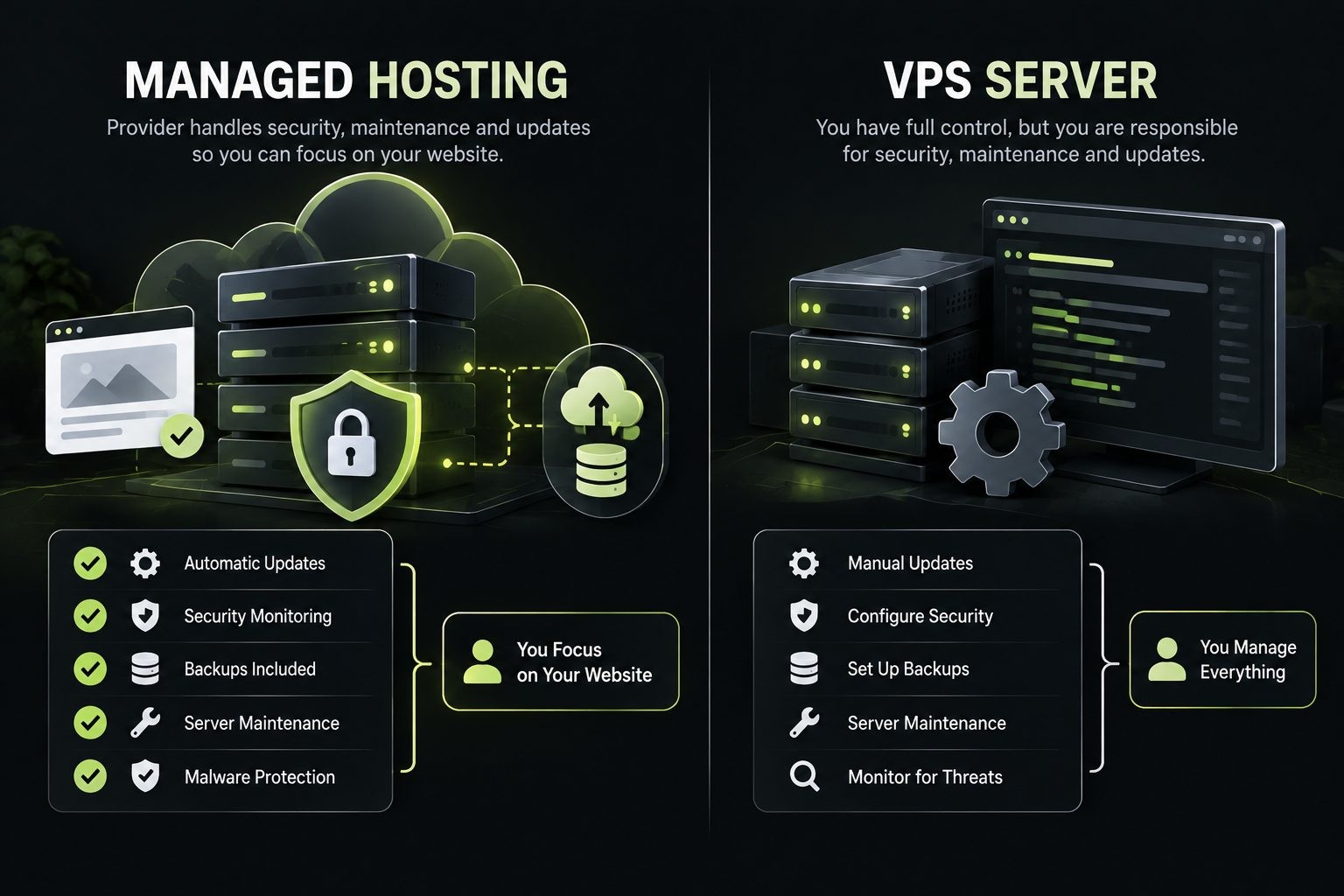
With an unmanaged VPS, the provider generally supplies the virtual server and underlying infrastructure, while you take responsibility for most server administration. The exact division of responsibility varies by provider.
With a managed VPS, the provider may help with server setup, updates, monitoring, security configuration, backups, or troubleshooting. Do not assume all these services are included. Review the support scope and service-level terms before purchasing.
Who should choose VPS hosting?
A VPS may be a good fit for growing websites, custom web applications, APIs, ecommerce projects, and developers who need server-level control. It can also suit WordPress sites with demanding workloads, provided the server is configured and maintained properly.
A VPS is not automatically the best option for every growing website. If you do not need server access and prefer the provider to manage WordPress-specific tasks, a managed WordPress plan may be more convenient.
What Is WordPress Hosting?
WordPress hosting is a hosting service designed or optimized for websites running WordPress. Depending on the provider, it may include a simplified WordPress setup, platform-specific support, caching, automated backups, staging tools, security features, or update management.
The important point is that WordPress hosting does not describe one specific server architecture. Some WordPress plans run on shared infrastructure, while others use VPS, cloud, or specialized managed infrastructure.
What makes WordPress hosting different?
WordPress hosting providers may tune parts of their environment for WordPress workloads. They might offer WordPress installation tools, compatibility guidance, caching integrations, staging environments, automated backups, or support teams familiar with the platform.
The actual benefits depend on the plan. One provider may offer only a convenient WordPress installer, while another may include extensive managed services. Compare the features rather than relying on the name alone.
Shared WordPress hosting vs managed WordPress hosting
Shared WordPress hosting runs WordPress within a shared hosting environment. It is often an affordable way to start a blog or business website. Server resources and customization options are typically limited by the shared plan.
Managed WordPress hosting is designed to reduce the amount of routine WordPress administration the customer must handle. Depending on the provider, it may include automated updates, backups, staging, caching, security features, and specialized support.
Managed WordPress hosting is not necessarily the same as VPS hosting. The provider may use a range of infrastructure types behind the service, and the customer may not receive root access.
Advantages of WordPress hosting
- Simpler WordPress management: Setup and routine tasks may be easier to handle.
- Platform-specific support: Support staff may be more familiar with common WordPress issues.
- Convenient maintenance features: Some plans include staging, backups, updates, and restoration tools.
- Performance features: Provider-level caching and WordPress-specific configuration may help, depending on implementation.
- Reduced server administration: Managed plans can save time for people who prefer to focus on publishing or running a business.
Limitations of WordPress hosting
- Potentially higher prices: Managed plans may cost more than basic shared hosting.
- Platform restrictions: Some providers limit plugins, server access, or configuration options.
- Variable feature sets: Backups, staging, updates, and security features differ by provider.
- Limited suitability for other applications: A WordPress-specific plan may not support unrelated custom applications.
- No automatic performance guarantee: Site speed still depends on themes, plugins, media, caching, third-party scripts, and the hosting environment.
Who should choose WordPress hosting?
WordPress hosting can suit bloggers, publishers, business owners, agencies, and WooCommerce store operators who want an environment tailored to WordPress. Managed WordPress hosting is particularly worth considering when specialized support and reduced maintenance work are valuable.
If you are comfortable managing Linux and want full control, a VPS configured for WordPress may offer more flexibility. If you simply need to launch a small WordPress website affordably, shared hosting may be enough.
Shared vs VPS vs WordPress Hosting: Which Does Your Site Need?
The best option depends on what your website does, how much control you need, what your budget allows, and how much maintenance you are willing to handle.
Choose shared hosting for a new or small website
Shared hosting is a sensible starting point if you are launching a personal blog, portfolio, brochure website, or small business site. It generally offers a lower entry cost and a simpler setup than an unmanaged VPS.
Choose a plan with enough storage and resources for your site, a clear backup policy, SSL support, and responsive customer support. If you use WordPress, check that the provider supports your WordPress requirements and that the plan's limits suit your expected workload.
You do not need to upgrade just because your website is growing slowly. Upgrade when you have evidence that the current plan is limiting performance, reliability, functionality, or future development.
Choose VPS hosting when you need control and flexibility
VPS hosting is worth considering when you need custom server settings, supported software that shared hosting does not offer, more control over deployment, or a clearer allocation of server resources.
It can be suitable for Laravel applications, APIs, custom PHP projects, Node.js services, and websites with demanding background jobs or database workloads. A VPS can also host WordPress, but you need to account for server setup, updates, security, backups, and monitoring unless those tasks are covered by a managed service.
Before selecting a VPS, estimate your CPU, memory, storage, and bandwidth needs. Choose a plan you can maintain, not simply the largest plan within your budget.
Choose WordPress hosting for a WordPress-focused workflow
Choose WordPress hosting when WordPress is the core of your website and platform-specific convenience matters. Depending on the plan, useful features may include staging, automatic backups, WordPress updates, caching, security tools, and specialist support.
A managed plan can be valuable if you would rather spend your time on content, sales, or client work than on server administration. However, verify exactly what the provider manages. Some plans automate updates but leave plugin conflicts, malware cleanup, or advanced troubleshooting to the customer.
A managed WordPress plan may cost more than basic shared hosting, but the additional cost can be worthwhile if the included services save time and reduce operational risk.
Recommendations for common website scenarios
| Website scenario | Likely starting point | Why |
|---|---|---|
| Personal blog | Shared hosting | Usually affordable and simple to maintain |
| Portfolio website | Shared hosting | Often has modest resource needs |
| Small business website | Shared or WordPress hosting | Choose based on platform, support, and maintenance preferences |
| Content-heavy WordPress site | WordPress hosting or VPS | Workload and maintenance requirements matter |
| WooCommerce store | Managed WordPress hosting or managed VPS | Consider checkout reliability, backups, database workload, and traffic peaks |
| Laravel application | VPS or suitable application hosting | Requires a compatible runtime and deployment environment |
| API or background processing service | VPS or application hosting | May need custom processes and server configuration |
| Agency managing client websites | Managed WordPress hosting or VPS | Consider account separation, support workload, and centralized management |
| High-traffic publisher | Depends on measured workload | Caching, database performance, architecture, and traffic patterns matter as much as the hosting label |
Traffic volume alone does not determine hosting needs. A highly cached content site may handle more visits with fewer resources than a smaller application that performs expensive database queries on every request.
The simplest decision rule
- Choose shared hosting if you need an affordable, low-maintenance starting point for a relatively simple website.
- Choose VPS hosting if you need server-level control, custom software, or more control over resource allocation.
- Choose WordPress hosting if you run WordPress and value platform-specific features or managed support.
Compare the specifications of the actual plans before making a decision. Two plans with similar names can provide very different levels of performance, support, and control.
Shared vs VPS vs WordPress Hosting for Performance and Core Web Vitals
Hosting can influence website performance, but it is only one part of the picture. The server, application code, database queries, caching, images, fonts, themes, plugins, and third-party scripts all contribute to the experience visitors receive.

Which hosting type is faster?
A VPS can offer more predictable performance than a basic shared plan because it provides a defined allocation of resources and more configuration control. That does not mean every VPS is faster than every shared hosting plan. Hardware quality, virtualization, resource contention, server configuration, and application workload still matter.
WordPress hosting can perform well when the provider uses effective caching, suitable infrastructure, and WordPress-aware configuration. A well-optimized WordPress site on quality shared hosting can also be fast.
Instead of choosing based on marketing claims, test your actual site and investigate the bottleneck.
How hosting affects Core Web Vitals
Google's Core Web Vitals measure aspects of the real user experience:
- Largest Contentful Paint (LCP): Measures loading performance, focusing on when the main content becomes visible.
- Interaction to Next Paint (INP): Measures responsiveness to user interactions.
- Cumulative Layout Shift (CLS): Measures unexpected visual movement during page loading.
Time to First Byte (TTFB) is another useful diagnostic metric for server response time, but it is not itself one of the three Core Web Vitals.
Slow server responses can delay the start of page rendering. However, a faster server will not automatically fix a large hero image, render-blocking scripts, layout shifts, or slow third-party tools.
How to evaluate performance before upgrading
- Test representative pages with tools such as PageSpeed Insights and browser developer tools.
- Review field data when available, not just a single laboratory test.
- Check server response times and database performance.
- Optimize oversized images, caching, scripts, and plugins where appropriate.
- Review hosting resource usage and plan limits.
- Upgrade only when measurements suggest that the hosting environment is a meaningful bottleneck.
For additional guidance, see Google's Core Web Vitals documentation.
Security, Backups, and Reliability Compared
No hosting type is automatically secure. Security depends on the provider's infrastructure, account isolation, server configuration, software maintenance, application quality, and the actions taken by the website owner.
Shared hosting security
The provider typically maintains the underlying server, while customers are responsible for their own website accounts and applications. Look for account isolation, SSL support, clear malware policies, and a reliable backup and restoration process.
Keep WordPress core, themes, and plugins updated. Use strong passwords and multi-factor authentication where available, limit administrative access, and remove software you no longer need.
VPS security
A VPS can give you more control over firewall rules, SSH access, installed services, and security policies. That control also creates more responsibility on an unmanaged plan.
Use SSH keys where appropriate, disable unnecessary services, keep the operating system and software patched, configure firewall rules carefully, and monitor logs and resource usage. Establish automated backups and test that you can restore them. If you do not have the time or skills to manage these tasks, consider managed VPS hosting.
WordPress hosting security
WordPress-focused providers may include automatic updates, malware scanning, backups, or platform-specific protections. These features differ by provider and do not remove the need for good account security or careful plugin selection.
Check whether the plan helps with malware cleanup, whether restoration costs extra, and which updates are handled automatically.
Questions to ask before purchasing
- How often are backups created?
- How long are backups retained?
- Are backups stored separately from the hosting server?
- Can I restore a backup myself, and is restoration included?
- What uptime commitment does the provider publish?
- What support is included during a security incident?
- Who is responsible for operating system and application updates?
- Are staging environments available for testing changes safely?
A backup is only useful if it can be restored. Review the process before an emergency occurs.
Whichever hosting you choose, the site itself still needs hardening. My WordPress security checklist lists the 25 steps that matter most, from updates and logins to backups.
Shared vs VPS vs WordPress Hosting Costs
The cheapest advertised price does not always represent the lowest long-term cost. Hosting plans can differ in billing periods, renewal rates, included services, resource limits, and management responsibilities.
Compare the full cost, not just the introductory price
Check whether the advertised rate applies only to the first term and whether renewal prices are higher. Confirm the billing period required to receive the promotional rate. Compare plans using the same time period, such as one year, and account for taxes where applicable.
Shared hosting usually has the lowest entry price because the provider spreads infrastructure costs across many customers. VPS hosting often costs more, especially when you need more resources or managed administration. WordPress hosting ranges widely, from low-cost shared WordPress plans to premium managed services.
Additional costs to consider
Depending on your needs and the provider, additional costs may include:
- Domain registration and renewal.
- Backup storage or restoration fees.
- Premium security services.
- Control panel or software licenses.
- Managed server administration.
- Email hosting or external email services.
- Migration assistance.
- Monitoring and maintenance.
- Additional storage, bandwidth, or resources.
Some plans include many of these services, while others charge separately. Compare the actual inclusions rather than assuming every provider follows the same model.
Calculate the total cost of ownership
A useful way to compare plans is to estimate the annual cost of running and maintaining the website.
Annual hosting cost = plan fees + required add-ons + management costs
For example, a low-cost unmanaged VPS may appear inexpensive until you account for the time required to maintain it or the cost of hiring someone to manage it. A managed plan may have a higher monthly fee but include services that reduce your maintenance workload.
Your own time has value, too. If server administration takes you away from content production, client work, or business operations, a managed service may be worth the difference.
Ease of Use, Server Management, and Technical Skills
The right hosting plan should match the amount of technical work you can comfortably handle.
Shared hosting for beginners
Shared hosting dashboards usually provide access to files, databases, domains, SSL settings, email, and application installers. The provider manages most of the underlying server infrastructure, so you can focus on the website itself.
This is useful for beginners and business owners who do not want to maintain a server. However, you should still understand how to manage website updates, user access, backups, and basic troubleshooting.
VPS hosting for developers
An unmanaged VPS may require familiarity with Linux, SSH, web servers such as Nginx or Apache, PHP or Node.js runtimes, databases, firewall configuration, software updates, and deployment practices.
That flexibility is valuable when your application needs custom software or a specific server setup. It also means you need a plan for security updates, monitoring, backups, and incident response.
Managed services as a middle ground
Managed VPS and managed WordPress services can reduce the amount of administration you handle yourself. Before paying for one, confirm which tasks are included, what support hours apply, and whether advanced troubleshooting or application-level fixes cost extra.
A useful rule is to buy the amount of control you need and can maintain effectively. More control is beneficial only when you can use it safely or have a provider or administrator who can.
Scalability and When to Upgrade Your Hosting
You do not need to upgrade simply because your website has been online for a certain number of months. Upgrade when the current environment can no longer meet your requirements reliably or when you need capabilities the plan does not provide.
Signs your website has outgrown shared hosting
Consider reviewing your plan if you regularly encounter:
- CPU, memory, process, or other resource-limit warnings.
- Slowdowns during predictable traffic peaks.
- Repeated server errors linked to resource exhaustion.
- Application requirements that the host does not support.
- Performance problems that remain after you have optimized the application.
- A need for custom services or server-level configuration.
Before migrating, make sure the problem is actually hosting-related. Inefficient queries, unoptimized images, excessive plugins, and poorly configured caching can cause problems on a more powerful server, too.
When to move to VPS hosting
A VPS may be appropriate when you need root access, custom software, greater configuration flexibility, or more control over resource allocation. It may also be a good fit when you have the skills or budget to manage the server responsibly.
If the application is business-critical and you lack server administration experience, consider a managed VPS or a suitable managed application platform instead of moving to an unmanaged server without a maintenance plan.
When to upgrade to managed WordPress hosting
A managed WordPress plan may make sense when your WordPress site needs specialized support, staging, automated maintenance, or more capable performance features. Compare the actual resource limits and included services with your current plan before moving.
Plan a migration carefully
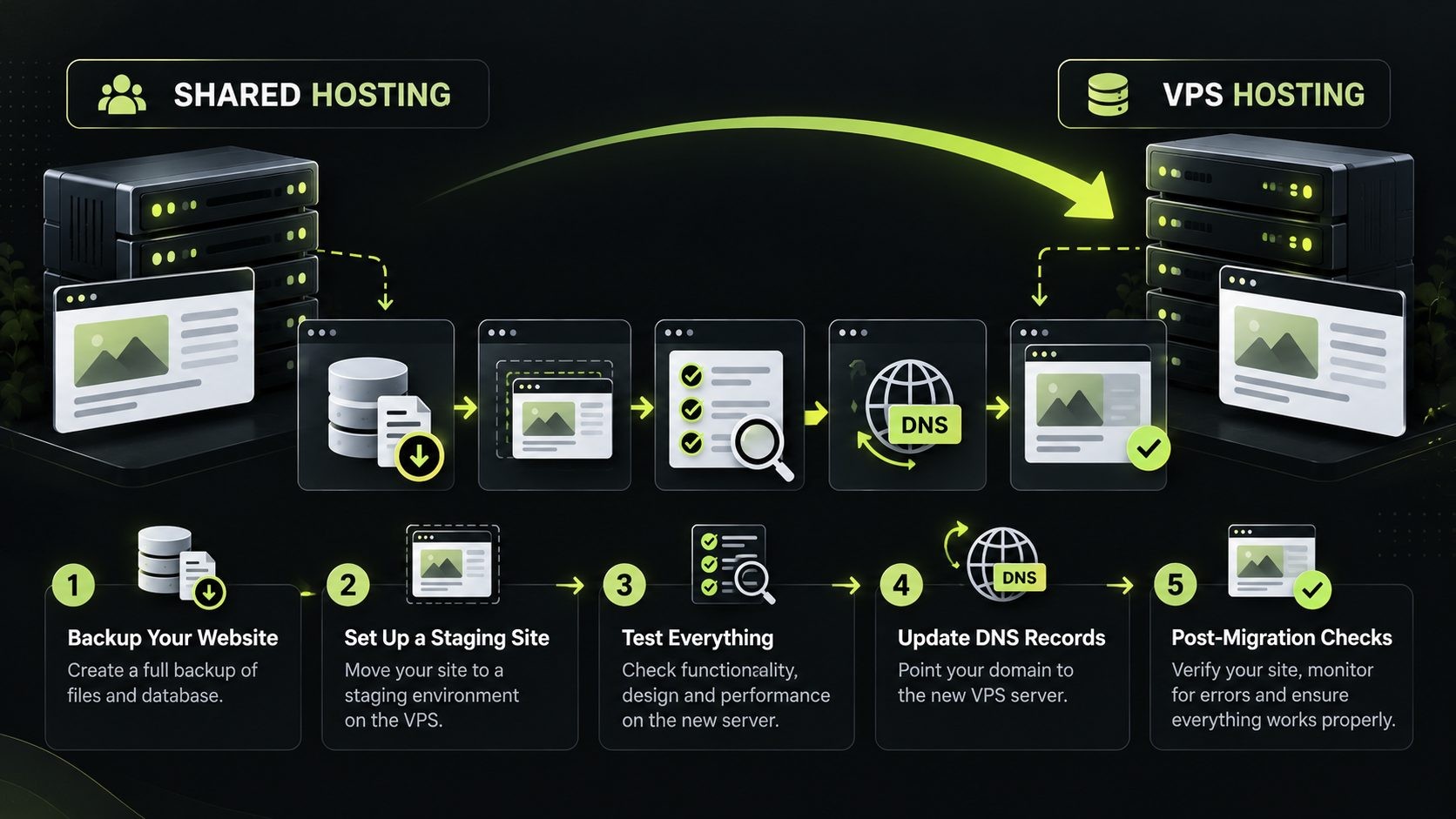
A safe migration usually includes:
- Create a complete backup of files, databases, configuration, and email where relevant.
- Prepare the destination environment and confirm software compatibility.
- Migrate the site and test it on a staging URL or temporary domain.
- Verify forms, logins, checkout, scheduled tasks, redirects, SSL, and integrations.
- Plan DNS changes and any necessary content freeze.
- Monitor errors, response times, and search engine access after launch.
Do not cancel the old hosting plan until you have confirmed that the migration is complete and any required services are working.
Best Hosting Type for Different Websites
Different websites have different technical needs. Use the recommendations below as starting points, then check your actual resource use and application requirements.
| Website type | Hosting option to consider | Main factors |
|---|---|---|
| Personal or hobby website | Shared hosting | Low cost and simple administration |
| Portfolio website | Shared hosting | Usually modest storage and processing needs |
| Small business website | Shared or WordPress hosting | Support, backups, and platform requirements |
| Blog or content publisher | Shared, WordPress, or VPS | Traffic, caching, editorial workflow, and maintenance |
| Affiliate website | Shared or WordPress hosting | Page performance, content workflow, and plugin requirements |
| WooCommerce store | Managed WordPress or managed VPS | Checkout reliability, backups, database performance, and traffic peaks |
| Membership or learning platform | WordPress hosting or VPS | Logged-in traffic, database workload, and integrations |
| High-traffic content website | Depends on measured workload | Caching, CDN, database performance, and traffic patterns |
| Laravel or custom PHP application | VPS or application hosting | Runtime compatibility, deployment, background jobs, and control |
| Node.js application or API | VPS or application hosting | Process management, ports, environment variables, and scaling |
| Agency managing multiple sites | Managed WordPress or VPS | Client separation, support, access control, and maintenance |
A site with many visitors does not necessarily need a VPS if most pages are cached and the workload is light. A smaller site can need substantial resources if every request triggers complex database operations. Choose based on measured workload, not traffic numbers alone.
How to Choose the Right Hosting Plan
Before purchasing, use this checklist to compare plans objectively.
- Identify the application. Confirm whether you need WordPress, WooCommerce, Laravel, Node.js, or another stack.
- Estimate traffic and growth. Consider normal traffic, seasonal peaks, campaigns, and logged-in users.
- Review resource limits. Compare CPU, RAM, storage type and capacity, bandwidth policies, processes, and database limits where disclosed.
- Check management responsibilities. Understand who handles operating system updates, application updates, security, monitoring, and backups.
- Confirm access requirements. Determine whether you need SSH, root access, custom packages, or specific server configurations.
- Read the backup policy. Check frequency, retention, storage location, and restoration fees.
- Compare renewal pricing. Include required add-ons, licenses, and management services.
- Review support. Look at the provider’s support scope, availability, migration assistance, and incident response terms.
- Plan for migration. Confirm whether you can move to a higher plan or another platform without unnecessary disruption.
- Measure before upgrading. Use performance tests and resource metrics to identify the real bottleneck.
If you are unsure, start with the simplest plan that meets your requirements and has a reasonable upgrade path. Avoid paying for server control you do not need, but do not ignore clear resource limits or business-critical maintenance requirements.
For the bigger picture, see our website security for small business guide: a layer-by-layer plan, a 30-day checklist and typical costs.
FAQs
Conclusion: Which Hosting Option Should You Choose?
Shared hosting, VPS hosting, and WordPress hosting serve different needs. Shared hosting is often the most practical starting point for a small website. VPS hosting is useful when you need greater control, custom software, or more control over resource allocation. WordPress hosting can simplify management for sites built on WordPress, especially when the plan includes useful support and maintenance features.
The best choice is the plan that fits your website’s workload, budget, technical skills, and future needs. Compare the actual resource limits, backup policies, support, renewal prices, and management responsibilities before purchasing. Start with what you need today, measure how your site performs, and upgrade when the evidence shows that it is time.
Get new posts by email
New guides and alerts, sent when they are published. No spam. Unsubscribe anytime.


Comments (0)