
Updated November 16, 2026 · Status: Patched November 4 · No known exploitation
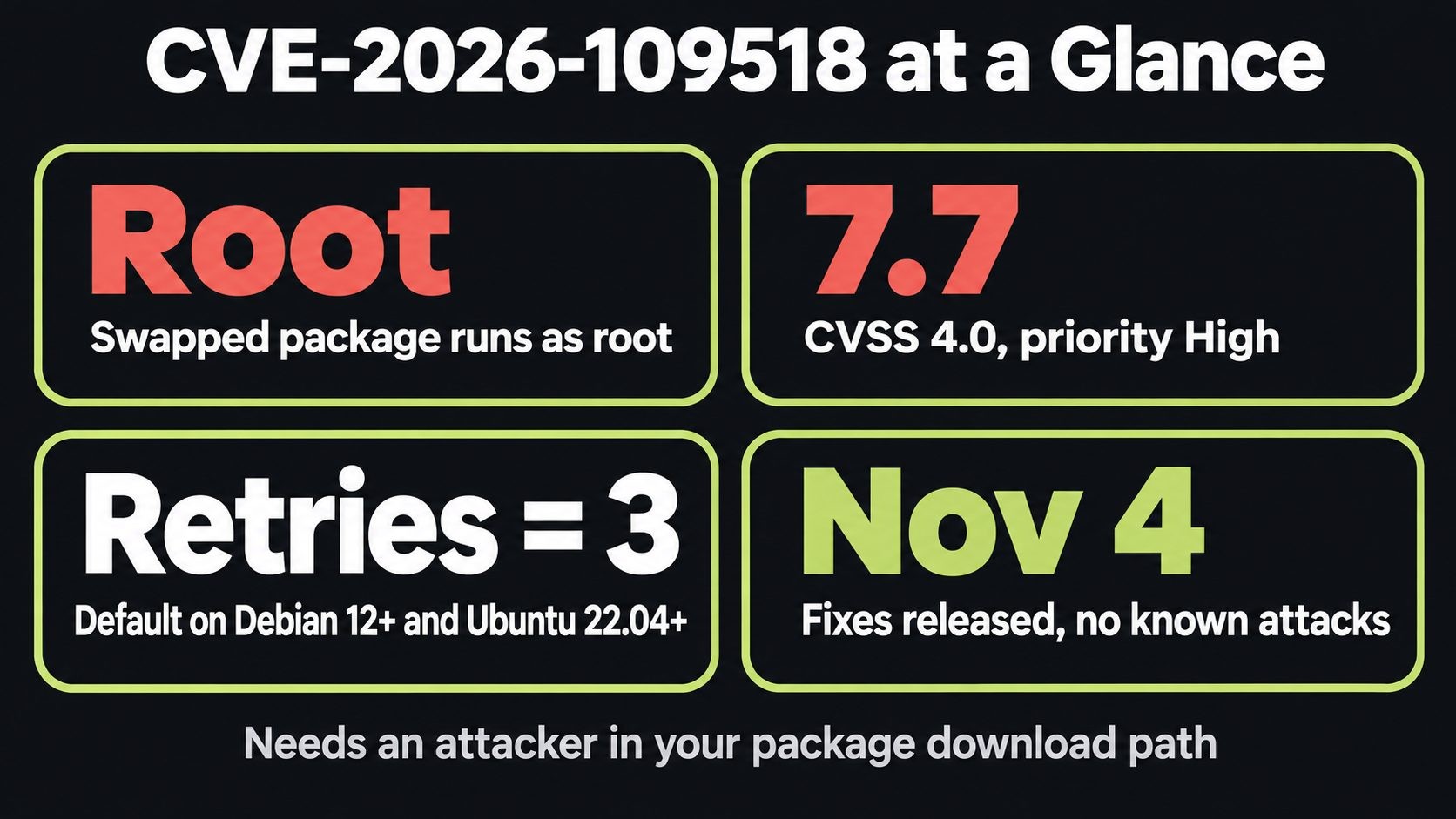
APT CVE-2026-109518 is a bug in the tool that installs every other security fix on Debian and Ubuntu. Under the right conditions, an attacker who can tamper with your server's package downloads can slip in their own package after APT has already checked it. That package then installs and runs as root.
Debian and Ubuntu shipped fixes on November 4, 2026, and nobody has reported attacks so far. There's one twist, though: the vulnerable APT has to download its own fix. So patch it like this:
sudo apt update && sudo apt install -o Acquire::Retries=0 --only-upgrade '?source-package(^apt$)'
This guide explains what the bug is, who can realistically exploit it, how to check and patch your servers (including Docker images and CI runners), and how to harden APT for the next one.
CVE-2026-109518 at a glance
| Item | Detail |
|---|---|
| CVE | CVE-2026-109518 ("APT RCE via hard link reuse") |
| Severity | CVSS 4.0 7.7, Ubuntu priority High |
| Impact | A swapped package installs and runs as root |
| Who can attack | Someone who can tamper with your HTTP package traffic: an on-path attacker, a malicious mirror or a hostile proxy |
| Condition | APT retries above zero, which is the default (3) on Debian 12+ and Ubuntu 22.04+ |
| Fixed in | Debian DSA-6607-1 and DLA-4880-1, Ubuntu USN-8996-1 (November 4, 2026) |
| Exploited | No active exploitation reported. Not in CISA KEV |
| Found by | Max Justicz |
What is CVE-2026-109518?
How APT normally keeps packages safe
When you run apt install or apt upgrade, APT downloads each package from an archive or mirror, checks it against signed metadata, and only then hands it to dpkg. dpkg installs it and runs its maintainer scripts as root. That signature check is what makes it safe to download packages over plain HTTP. Even if someone tampers with the download, the check should catch it.
Where it breaks
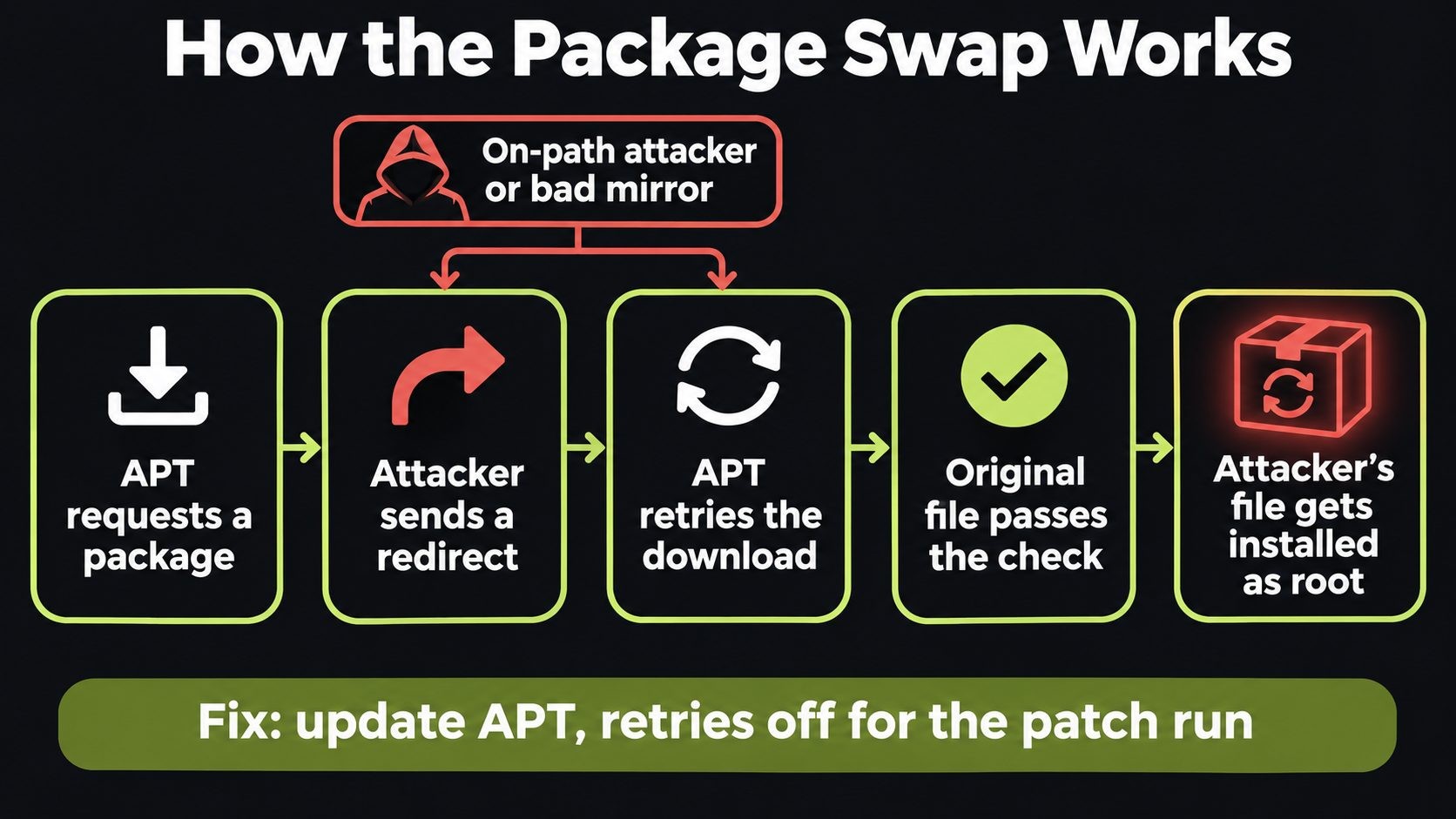
CVE-2026-109518 breaks the link between "checked" and "installed." According to Debian's advisory, APT can merge two different package downloads when an HTTP redirect gives them the same address. Ubuntu traces it to the way APT reuses hard links, which are two file names pointing at the same file on disk.
In plain terms: an attacker controls a redirect, waits for APT to retry a download, and uses that retry to swap the verified file for their own. APT thinks it's installing what it checked. It's actually installing what the attacker sent, as root.
The attack needs a retried download, which only happens when APT's retry setting is above zero. On Debian 12 and later and Ubuntu 22.04 and later, the default is 3. That default is built into APT, so it won't show up in your config files.
Who can actually exploit it
This is not a bug a random attacker on the internet can fire at your server. They have to be able to tamper with the HTTP traffic between your server and its package source. Realistic cases:
- A malicious or compromised mirror, including a third-party or regional mirror you added years ago
- A hostile or compromised proxy or caching server in your network path
- Shared or untrusted networks, such as a laptop or dev box running Debian or Ubuntu on public Wi-Fi
- A compromised upstream network in a hosting or cloud environment, which is rare but high impact
That makes it less urgent than a remotely exploitable bug. But when it does land, the attacker gets root, on a machine you trust to install your security updates. That's why it's rated High.
Is your server affected?
Your server needs attention if:
- It runs Debian 12 or 13, or Ubuntu 22.04, 24.04, 26.04 or 26.10, and APT hasn't been updated since November 4
- It runs an older release where a script or config file sets
Acquire::Retriesabove zero - It pulls packages over plain HTTP, or through a proxy or mirror you don't control
- It's a Docker image or CI runner built before the fix
Check your installed version:
apt --version
apt policy apt
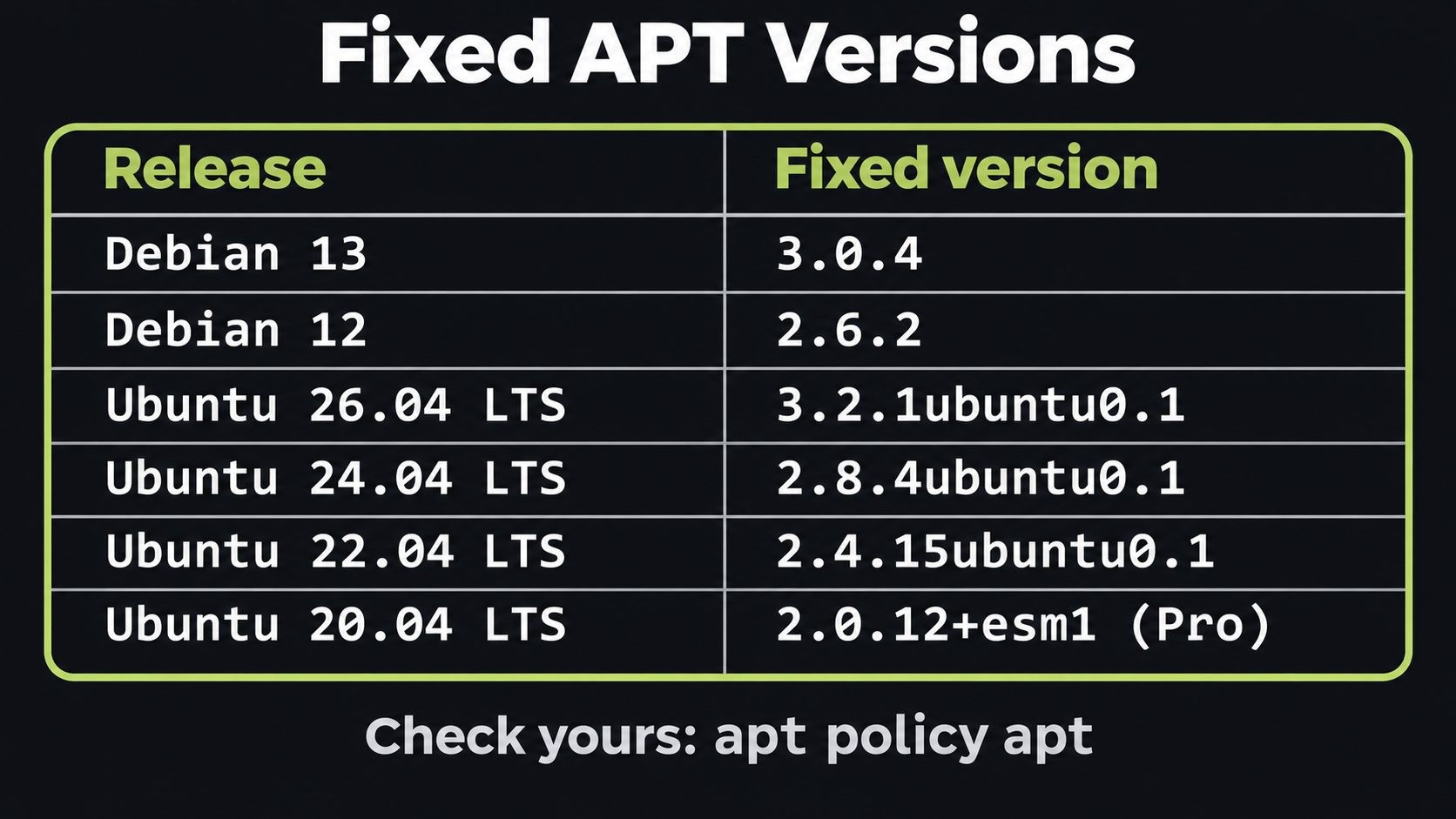
Compare it with the fixed versions:
| Release | Fixed APT version | Advisory |
|---|---|---|
| Debian 13 (trixie) | 3.0.4 | DSA-6607-1 |
| Debian 12 (bookworm) | 2.6.2 | DLA-4880-1 |
| Ubuntu 26.10 | 3.3.3ubuntu0.1 | USN-8996-1 |
| Ubuntu 26.04 LTS | 3.2.1ubuntu0.1 | USN-8996-1 |
| Ubuntu 24.04 LTS | 2.8.4ubuntu0.1 | USN-8996-1 |
| Ubuntu 22.04 LTS | 2.4.15ubuntu0.1 | USN-8996-1 |
| Ubuntu 20.04 LTS | 2.0.12+esm1 | Ubuntu Pro |
| Ubuntu 18.04 LTS | 1.6.19+esm1 | Ubuntu Pro |
One common mistake: version 3.3.6 is the fix in Debian unstable only. On stable Debian, compare against 3.0.4 or 2.6.2, not 3.3.6.
The catch: vulnerable APT downloads its own fix
The only real fix is a new APT version, and the only normal way to get it is through APT. So the patch download itself goes through the vulnerable code.
Canonical's answer is simple: turn retries off for that one run. Without retries, the swap trick can't work, so the fix arrives clean. That's what -o Acquire::Retries=0 does in the command above. It only applies to that command and doesn't change your config.
What about servers with unattended-upgrades? It's on by default on Ubuntu and installs security updates daily, so many Ubuntu servers have probably already pulled the fix, with retries on. For most machines that's a reasonable trade-off, because the attack needs someone in the network path at that exact moment. But "probably" isn't a patch status. Check each server.
How to patch CVE-2026-109518 safely (step by step)
Step 1: Update APT with retries turned off
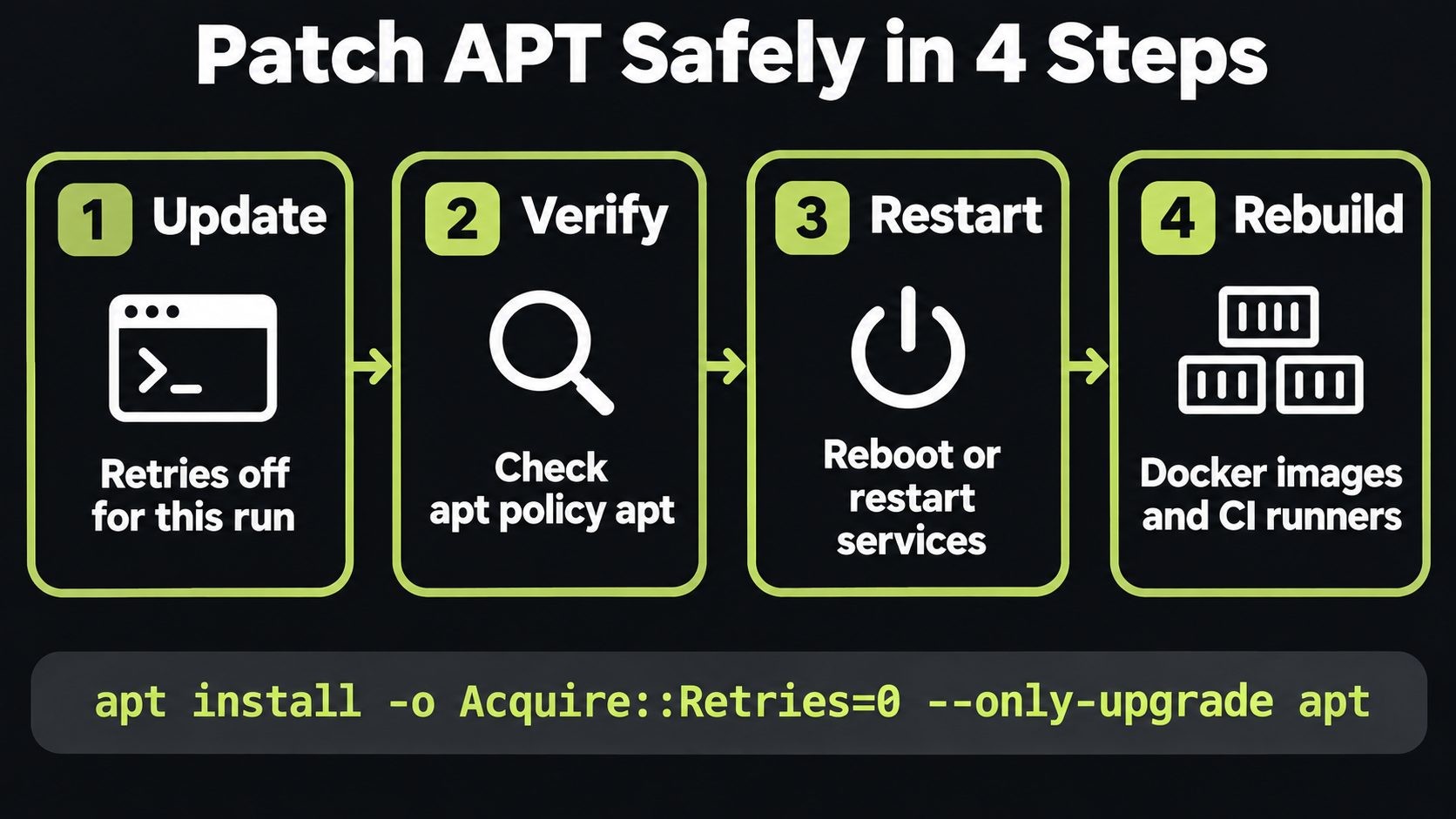
sudo apt update && sudo apt install -o Acquire::Retries=0 --only-upgrade '?source-package(^apt$)'
The ?source-package(^apt$) pattern updates APT and the libraries built from the same source package together, so you don't end up with a mismatched libapt-pkg.
Step 2: Confirm the version
apt policy apt
apt list --installed '?source-package(^apt$)'
The installed version should match the fixed version for your release in the table above.
Step 3: Check when the fix landed
If unattended-upgrades handled it, this shows you when:
grep " upgrade apt:" /var/log/dpkg.log
On Debian, you can also confirm the CVE is listed in the package changelog:
zgrep -m1 CVE-2026-109518 /usr/share/doc/apt/changelog.gz
Step 4: Restart services or reboot
Long-running services that use APT's libraries, such as packagekitd, keep the old code in memory until they restart. On servers, the simplest clean option is a reboot in your next maintenance window. If you can't reboot, restart the affected services.
Step 5: Rebuild Docker images and fix CI runners
Container images built before November 4 carry the old APT, and a cached build layer can keep it there. Rebuild without the cache and add retries-off as the first package step:
RUN apt-get -o Acquire::Retries=0 update && \
    apt-get -o Acquire::Retries=0 install -y --only-upgrade apt
Then confirm the version inside the built image. Self-hosted CI runners that install packages over plain HTTP need the same treatment. If you deploy apps in containers, my Laravel Docker VPS guide shows where this fits in a production build.
Step 6: Proxmox and other Debian-based hosts
Proxmox VE runs on Debian, so it's in scope. Run the targeted command from Step 1 first, then continue with your usual apt full-upgrade.
Harden APT so the next bug hurts less
Patching fixes this bug. These habits shrink the damage from the next one:
- Use HTTPS package sources where your mirror supports them. HTTPS makes on-path tampering much harder. It isn't listed as an official fix for this CVE, so it doesn't replace patching, but it removes the easiest way in. Check your mirror supports HTTPS before switching, then run
apt updateto test. - Know every source you trust. Review
/etc/apt/sources.listand/etc/apt/sources.list.d/. Remove old third-party repositories and regional mirrors you no longer need. - Avoid untrusted proxies. If you use a caching proxy such as apt-cacher-ng, make sure it's yours and locked down.
- Keep unattended-upgrades on for security updates. Fast patching beats perfect patching for most servers.
- Watch your logs.
/var/log/dpkg.logand/var/log/apt/history.logshow exactly what was installed and when. They're your first stop after any APT advisory.
Patching a fleet: check every server in one go
If you look after more than a handful of servers, check versions in a script instead of logging into each box. A simple version check:
FIXED="2.8.4ubuntu0.1"   # set to the fixed version for this release
CUR=$(dpkg-query -W -f='${Version}' apt)
if dpkg --compare-versions "$CUR" ge "$FIXED"; then
  echo "$(hostname): OK ($CUR)"
else
  echo "$(hostname): VULNERABLE ($CUR)"
fi
Run it through SSH, Ansible or whatever you already use, then patch the hosts that report VULNERABLE with the Step 1 command.
A practical note from running mixed server fleets: not every server uses APT. cPanel and WHM servers usually run AlmaLinux or CloudLinux, which use dnf instead, so they're out of scope for this bug. But the Ubuntu boxes around them are not: app servers, control panels like CyberPanel, Docker hosts, CI runners and monitoring machines. Those are the ones to list first.
The bigger pattern: updates are part of your attack surface
This is the second bug this month where the update process itself was the weak point. WordPress CVE-2026-119977 could be raced while WordPress installed its own fix, and CVE-2026-109518 needs the vulnerable APT to download its own patch. Add the sshole OpenSSH bug from earlier in the month, and core Linux infrastructure has had a busy November.
The lessons are the same each time:
- Patch the patcher first, and do it the safe way the vendor recommends
- Verify, don't assume, that automatic updates did their job
- Keep logs so you can answer "when did we patch?" in seconds
- Reduce trust paths: fewer mirrors, fewer proxies, more HTTPS
If you're deciding between shared hosting and running your own server, my shared vs VPS hosting guide covers the trade-off. A VPS gives you control, which means patching like this is your job.
CVE-2026-109518 FAQs
Conclusion
CVE-2026-109518 isn't the kind of bug that gets every server on the internet hacked overnight. It needs someone in your package download path. But when that happens, the attacker gets root through the tool you trust to install your security updates. That makes it worth ten minutes today.
The plan is short: update APT with retries off, verify the version, restart or reboot, rebuild your images, then harden your package sources so the next updater bug has less to work with.
If you run Debian or Ubuntu servers for your business or clients and want a second pair of hands on patching and hardening, see my website security services. For the bigger picture, start with my website security guide for small businesses.
Sources: Ubuntu CVE-2026-109518 · Debian Security Tracker · APT security announcement
Get new posts by email
New guides and alerts, sent when they are published. No spam. Unsubscribe anytime.

Comments (0)