
Updated November 15, 2026 · Status: Meta plans to appeal · 60-day deadline to change the feature in Italy
One tap on a vague "enable other features" prompt was enough to give Facebook access to your entire photo gallery. On November 14, 2026, Italy's data protection authority put a price on that: a €805 million fine against Meta over Facebook gallery access on Android.
The ruling only applies in Italy. If you're in the US, the same feature is still sitting in your Facebook app, and nothing will change unless you change it yourself.
The 2-minute fix:
- In Facebook, open Settings and search for camera roll
- Turn off both camera roll toggles
- In your phone settings, set Facebook's photo access to None or Limited
Below is what happened, what the ruling did and didn't find, step-by-step instructions for Android and iPhone, and the lesson for anyone who builds apps.
Meta's €805M fine at a glance
| Item | Detail |
|---|---|
| Regulator | Garante, Italy's data protection authority |
| Company | Meta Platforms Ireland Limited |
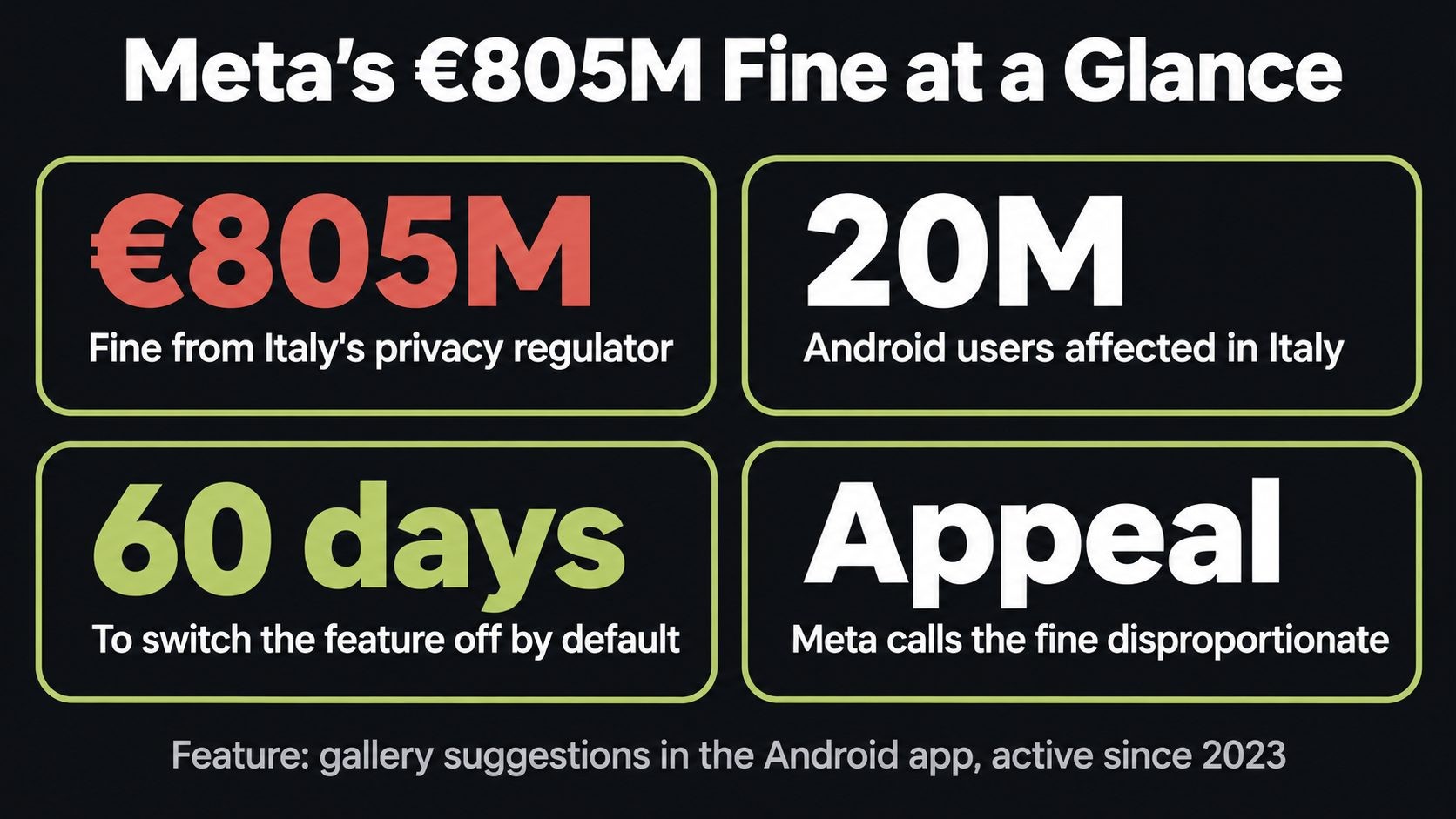
| Fine | €805 million (about $887 million, roughly 0.47% of Meta's global revenue) |
| Announced | November 14, 2026 |
| Feature | "Get tips from your gallery while browsing Facebook" in Facebook for Android, available since 2023 |
| Users affected | About 20 million Android users in Italy |
| Finding | Gallery access without specific, informed consent |
| Order | Feature off by default and a separate consent prompt, within 60 days |
| Meta's response | Plans to appeal, calls the fine "disproportionate" |
What did Facebook do with your photo gallery?
The "gallery suggestions" feature
Since 2023, Facebook for Android has offered a feature that, while you scroll, shows you photos and videos from your phone's gallery as suggestions to post. Meta calls it "Get tips from your gallery while browsing Facebook."
To do that, the app needs to read your gallery. Once you grant full access, it can read the whole archive: photos, videos and the metadata attached to them, such as when and often where each one was taken.
The three consent problems the Garante found
The Garante's issue was not that the feature exists. It was how Facebook got permission to run it:
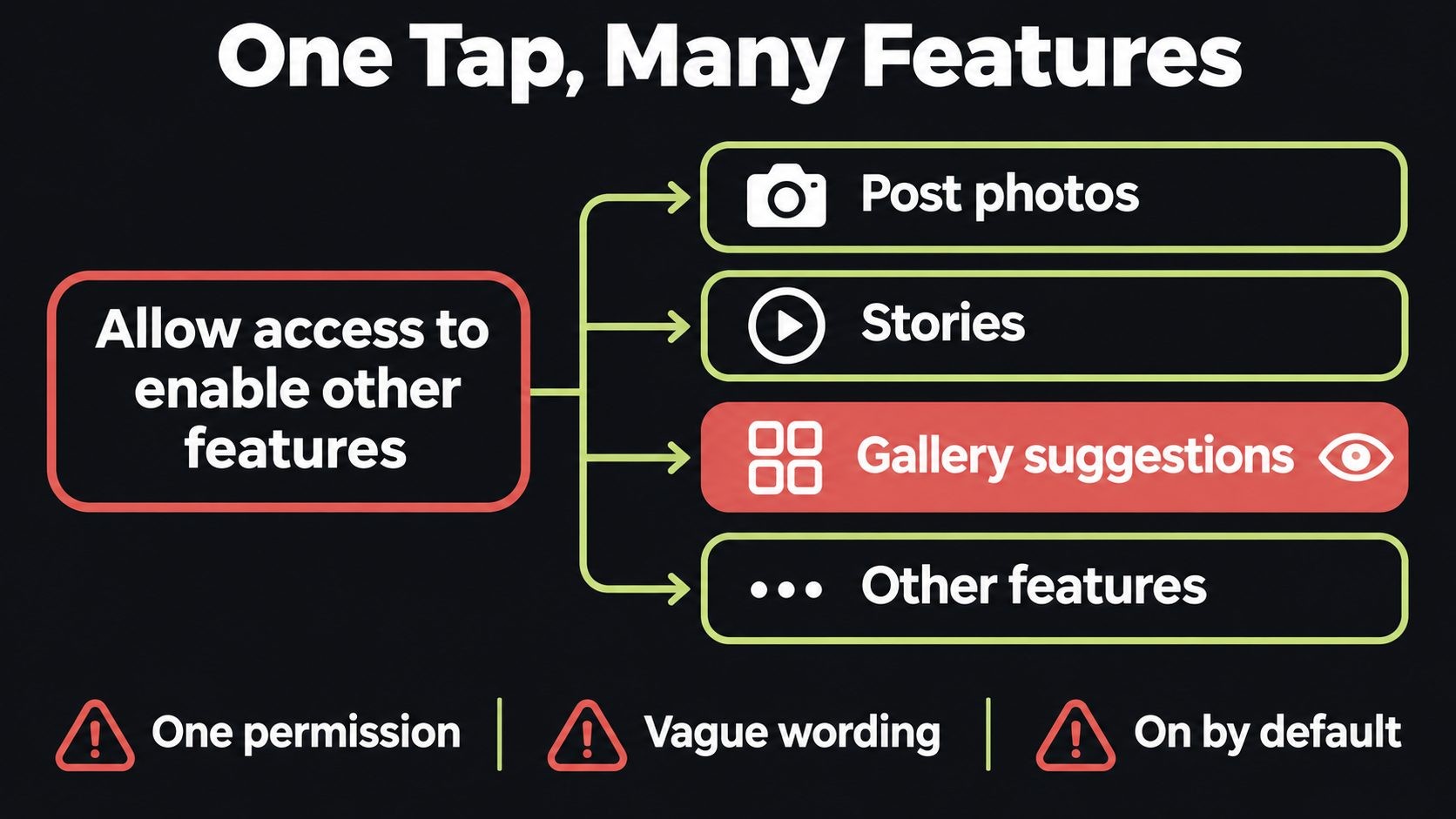
- One permission for many purposes. Gallery access was requested through a single permission that covered the whole app and several features with different purposes. Saying yes to one meant saying yes to all of them.
- A vague notice. The prompt talked about letting you "enable other features." According to the Garante, it didn't make clear that you were also switching on gallery suggestions.
- On by default. The feature was active unless you went looking for the setting and turned it off.
The Garante treats your smartphone as part of your private sphere. Under that view, any access to what's stored on it needs free and informed consent, whether or not data leaves the phone and whether or not anyone is harmed. The Garante decided that a broad permission, a vague prompt and a default-on setting don't add up to that.
What the ruling did not find
It's worth being precise here, because headlines tend to run ahead of the facts:
- No finding on AI training. The investigation did not examine whether gallery content was used to train AI models.
- No finding that photos were sold or used for ads. The case was about access and consent.
- Cloud processing is a separate question. The Garante said it may separately assess a newer feature, launched in 2026, that allows cloud processing of gallery content.
So the accurate takeaway is this: Facebook could read your gallery without asking you properly. That's serious enough on its own.
What Meta has to change in 60 days
In Italy, Meta must:
- Turn the feature off by default, including for people who already granted gallery access
- Ask for consent with a separate, specific prompt for this feature
- Explain clearly what the feature does, that it accesses the gallery, and how to turn it off
- Report back to the Garante on what it changed
If Meta misses the deadline, the feature can't be switched on for anyone in Italy without valid consent. Meta told Reuters it plans to appeal and called the fine "disproportionate." An appeal could take a long time, so the 60-day order is the part to watch.
Does this affect you in the US?
Not directly. The order covers Facebook users in Italy only. In the US, Meta has no regulator telling it to switch the feature off by default or to ask again.
That means your settings are whatever they were the day you installed or updated the app. If you tapped through a permission prompt without reading it, which most of us do, the gallery features may be on right now. The US has no single federal privacy law with a rule like the one Italy applied, so in practice the control sits with you.
The good news: it takes about two minutes to check and fix.
How to turn off Facebook gallery access (step by step)
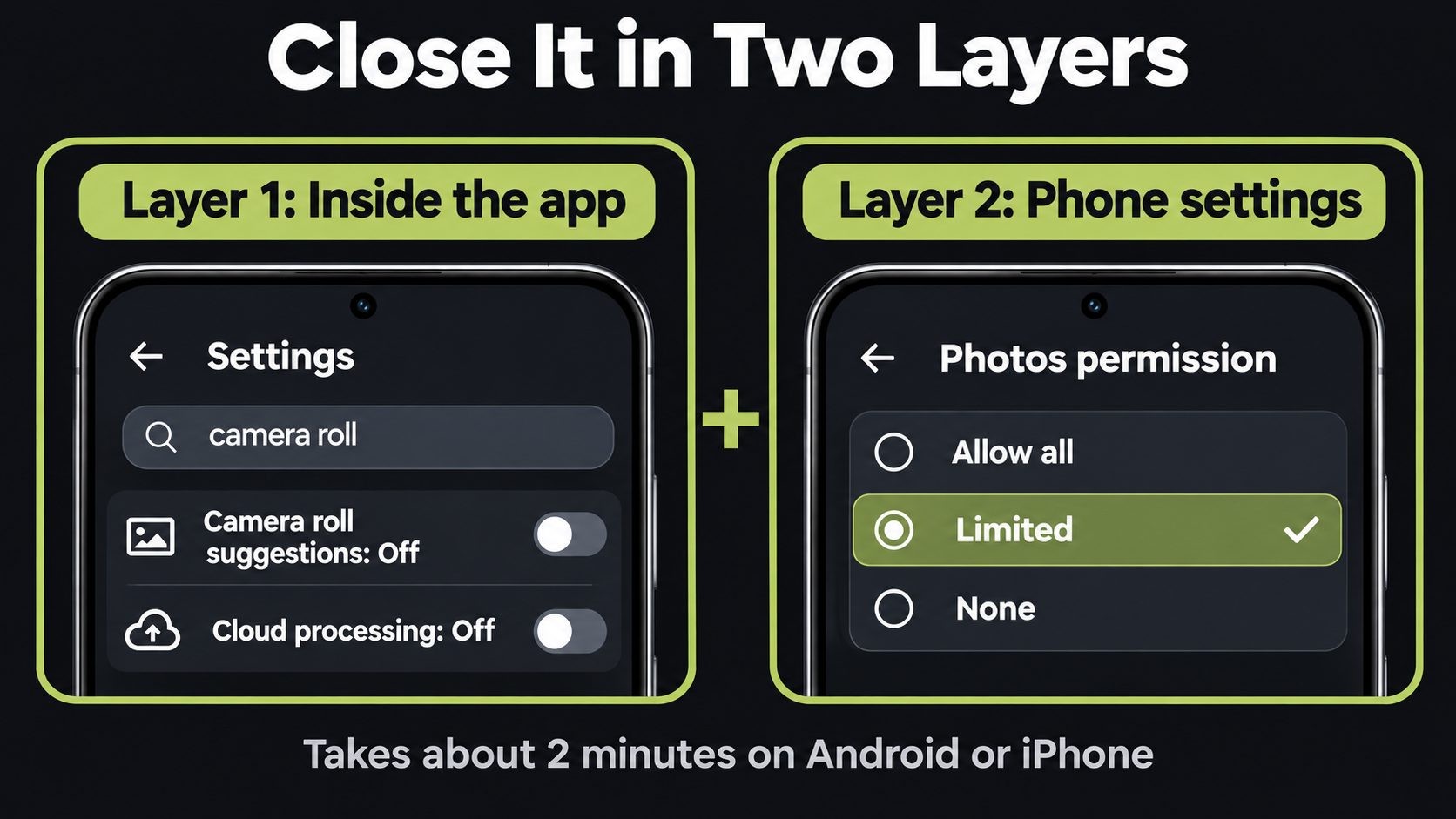
There are two layers: the settings inside the Facebook app, and the photo permission in your phone. Do both. The app settings control what Facebook does, and the phone permission controls what it can reach at all.
Step 1: Turn off camera roll suggestions in the Facebook app
- Open the Facebook app and tap the menu (three lines, or your profile picture).
- Go to Settings & privacy → Settings.
- Tap the search box at the top of Settings and type camera roll. Menu labels change between app versions, so searching is the fastest route.
- Open Camera roll sharing suggestions.
- Turn off both toggles (they turn gray when off):
- Get camera roll suggestions when you're browsing Facebook
- Get creative ideas made for you by allowing camera roll cloud processing
If you only see one toggle, turn that one off. Some accounts don't have the cloud processing option yet.
Step 2: Limit photo access on Android
The exact wording varies a little between Samsung, Pixel and other phones, but the path is similar:
- Open Settings → Apps → Facebook → Permissions.
- Tap Photos and videos.
- Choose Don't allow, or Allow limited access if you still want to post photos from your phone.
With limited access, Facebook only sees the photos you pick. You can add more any time you post.
Step 3: Limit photo access on iPhone
- Open Settings → Privacy & Security → Photos.
- Tap Facebook.
- Choose None or Limited Access, then pick only the photos you want to share.
Step 4: Spend 5 minutes on your other apps
Facebook is not the only app with full photo access. While you're in your phone's privacy settings:
- Open the photo permission list and look at every app with full access
- Switch anything you rarely use to Limited or None
- Do the same for Contacts, Location and Microphone
- Set a calendar reminder to repeat this every three months
Most apps work fine with limited photo access. The ones that truly need full access, like a backup app, are usually obvious.
The lesson for anyone building apps and SaaS
This is the part I care about most as a developer. Meta isn't the only company that bundles permissions or ships data-hungry features switched on. Most teams do it because it's easier and it lifts adoption numbers. Italy has now shown what that shortcut can cost.
If you build mobile apps, SaaS products or browser extensions, here's what this ruling says about consent design:
- One feature, one permission request. Don't use a single "allow access" prompt to cover several features with different purposes. Ask for each one separately.
- Ask at the moment of use. Request gallery access when someone taps "add photo," not on first launch when they'll tap yes to anything.
- Default new data features to off. If a feature reads personal data in the background, let people opt in.
- Say exactly what you access and why. "Enable other features" is the kind of wording the Garante rejected. "Let us read your photo gallery to suggest pictures to post" is honest.
- Make turning it off as easy as turning it on. One toggle, easy to find, explained in plain words.
- Log consent. Record what someone agreed to, when, and which prompt text they saw. If a regulator or client asks, you can prove it.
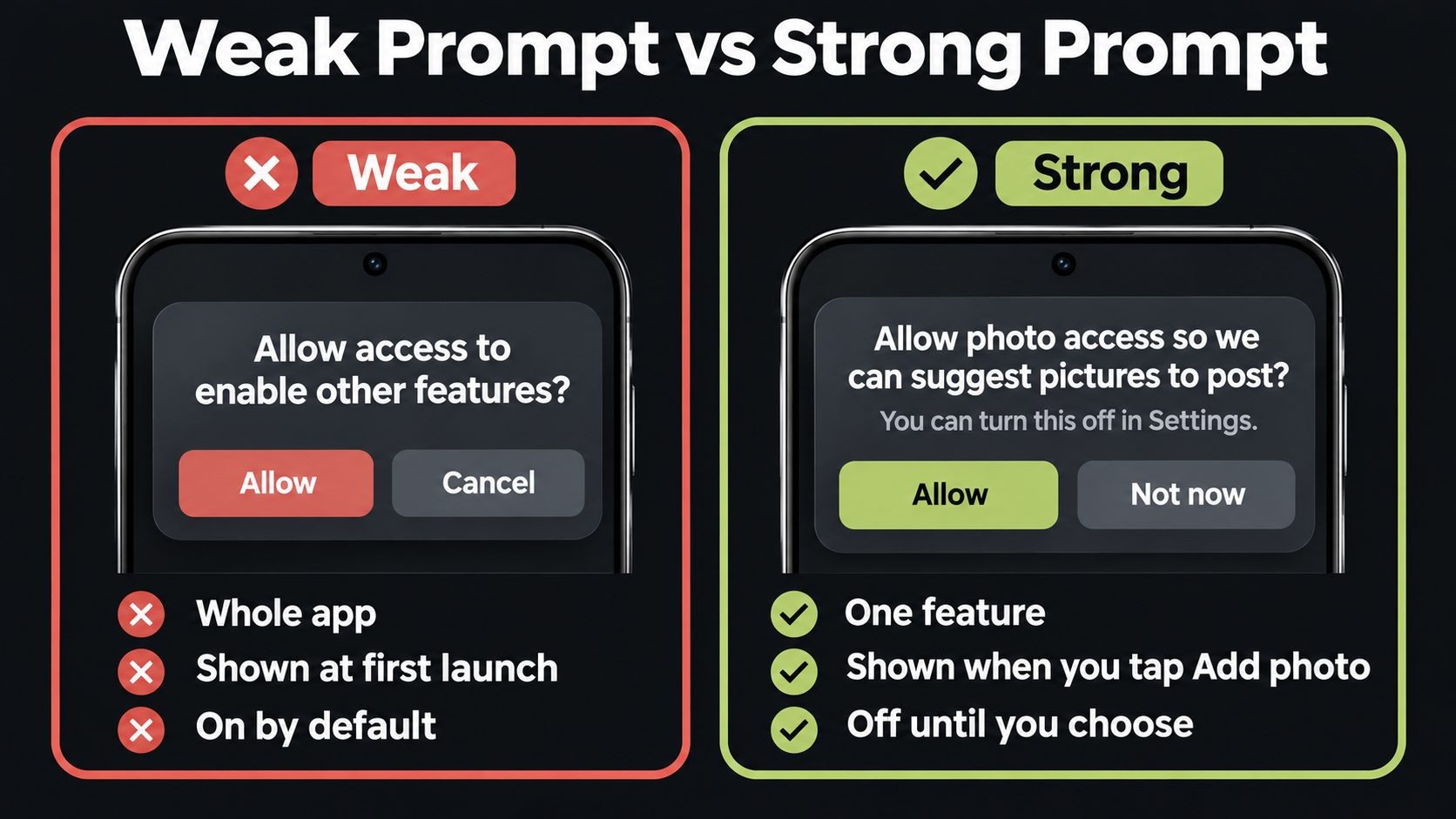
Here's the difference in practice:
| Weak prompt | Strong prompt |
|---|---|
| "Allow access to enable other features" | "Allow access to your photos so we can suggest pictures to post? You can turn this off in Settings." |
| Shown at first launch | Shown when you tap "Add photo" |
| Covers the whole app | Covers one feature |
| On by default | Off until you choose it |
The same pattern, convenience quietly turning into exposure, shows up in other places too. A "Don't ask again" setting in Claude Code ended up leaking secrets on GitHub, and third-party apps with broad store permissions led to checkout hijacking on Shopify. Every broad permission you grant or request should have a clear reason behind it.
What businesses should tell their staff
If your team uses personal or work phones that hold client photos, receipts, ID scans or documents, a social app with full gallery access is a real exposure. A simple policy covers most of the risk:
- Social and messaging apps get limited photo access on any phone that holds work files
- Camera roll suggestion and cloud processing features stay off
- Staff review app permissions every quarter
- Sensitive files live in a work app or managed folder, not the main camera roll
For the wider picture, my developer laptop security checklist and website security guide for small businesses cover the other devices and systems attackers target.
Not sure your app's permissions or your team's devices would pass this test? I've recovered 50+ attacked websites. Request a security review.
Meta Fine and Facebook Gallery Access FAQs
Conclusion
The €805 million fine isn't about a hack or a leak. It's about a feature that read people's photo galleries behind a prompt that didn't clearly say so. Italy has drawn a line: access to what's on your phone needs specific, informed consent.
If you're in the US, that line doesn't protect you automatically, so draw it yourself: turn off both camera roll toggles, set Facebook's photo access to Limited or None, and spend five minutes checking your other apps. If you build apps, treat this as a free lesson in consent design. Ask for each permission separately, explain it in plain words, and leave data-hungry features off until people choose them.
If you want a second pair of eyes on your app's permissions, your website's security or your team's devices, see my website security services.
Sources: The Hacker News · Financial News · Which?
Get new posts by email
New guides and alerts, sent when they are published. No spam. Unsubscribe anytime.

Comments (0)