- Khurram Shahzad
- WordPress
- 314
- 0
A small business owner asks two people how to build an online store. The first says, "Just use Shopify, it's easy." The second says, "Go with WordPress, it's cheaper." Both are partly right, and that's exactly why the WordPress vs Shopify question keeps coming up.
The real question isn't which platform is better. It's which one fits how your business sells, who will look after the site once it's live, and what it will cost over three years instead of the first month.
I build and maintain WordPress and ecommerce sites for clients, so I see both platforms from the developer's side: the setup, the monthly bills, the plugin updates at midnight and the migrations when a business outgrows its first choice. This guide gives you a quick verdict, a real three-year cost comparison, the fees most comparisons skip, and a clear recommendation for six common types of small business.
Quick verdict
Choose Shopify if products are your business, you want the store live fast, and nobody on your team wants to manage hosting, updates or security.
Choose WordPress with WooCommerce if content and SEO drive your sales, you want full control and ownership, you sell services alongside products, or you need custom features.
In short: Shopify costs more but asks less of you. WordPress costs less but needs someone to look after it.
WordPress vs Shopify at a Glance
Here's how the two platforms compare on the points small businesses ask about most.
| Shopify | WordPress + WooCommerce | |
|---|---|---|
| Platform type | Hosted, all-in-one ecommerce platform | Self-hosted, open-source software plus a free store plugin |
| Best for | Product-focused stores that want simplicity | Content-led businesses, service businesses and custom builds |
| Setup time | Hours to a few days | A few days to a few weeks |
| Starting cost | From $29/mo billed yearly (Basic) | Hosting from a few dollars a month |
| Platform transaction fees | None with Shopify Payments, extra fee with other gateways | None |
| Design flexibility | Good within themes, deeper changes need Liquid code | Unlimited with full code access |
| SEO control | Solid basics, some fixed limits | Full control |
| Blogging | Basic | Best in class |
| Maintenance | Handled by Shopify | Your job or your developer's |
| Ownership | You rent the platform | You own the site and data |
| Scaling | Upgrade your plan | Upgrade your hosting and tune the setup |
The table gives you the shape of it. The sections below explain where each difference actually matters for a small business.
The Real Difference: Hosted Platform vs Self-Hosted Software
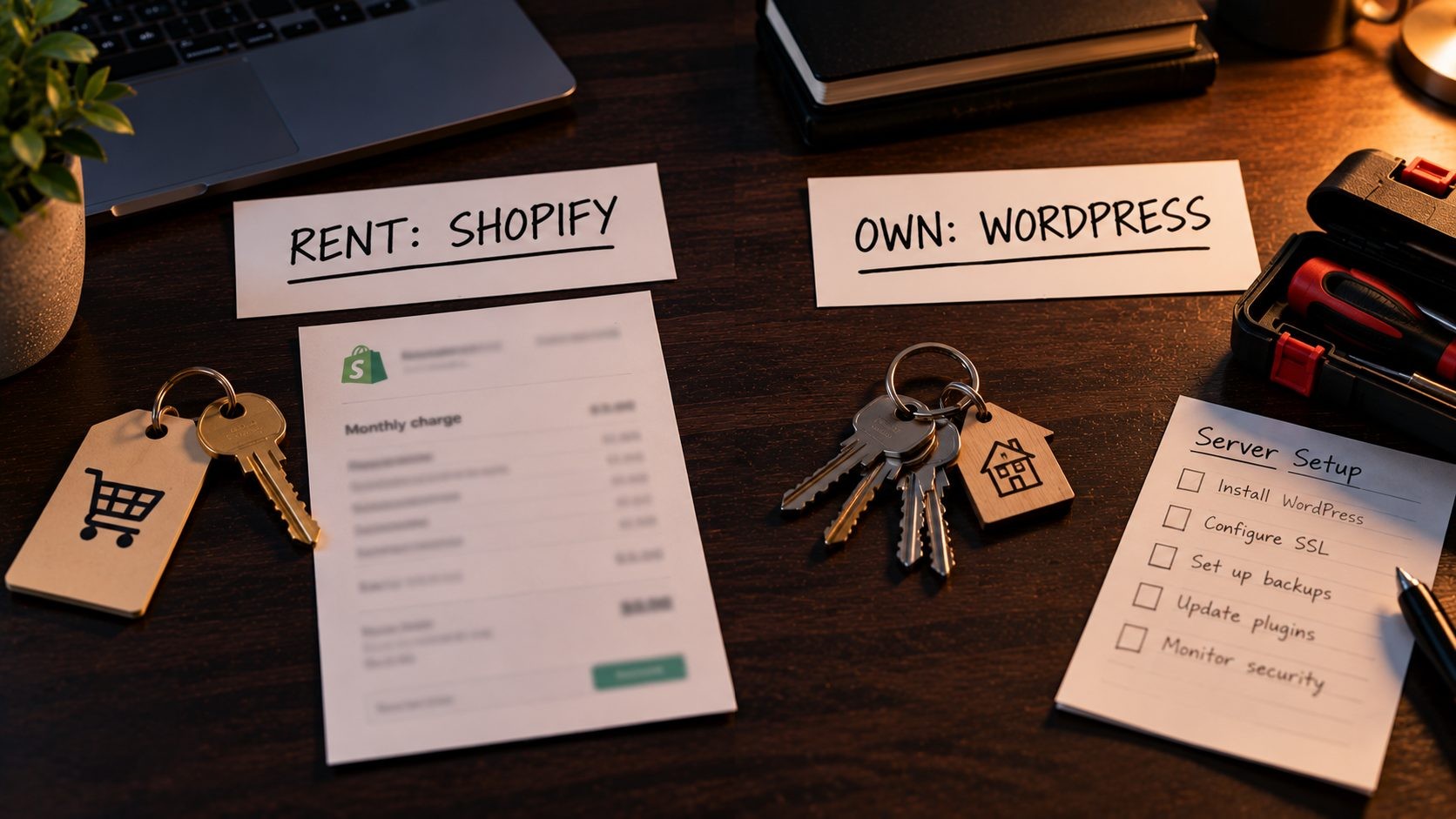
Shopify is a hosted software platform. You pay a monthly subscription, and Shopify runs the servers, security, checkout and updates. You build your store inside its system, using its themes and its app store.
WordPress works differently. The version most businesses use, WordPress.org, is free, open-source software that you install on hosting you choose. On its own, it's a content management system for pages and blog posts. Add WooCommerce, a free plugin from Automattic, and it becomes a full online store.
People often mix up WordPress.org and WordPress.com. WordPress.com is a hosted service that runs WordPress for you, with its own plans and limits. This article compares self-hosted WordPress.org with WooCommerce, because that's what most small business stores are built on.
The simplest way to think about it is renting versus owning. With Shopify, you rent a well-run store in someone else's building. It's convenient, but you follow their rules, pay their fees and move out if you stop paying. With WordPress, you own the building. You can change anything and take your files and data wherever you like, but the repairs are your responsibility.
In practice, this shows up in small ways. On Shopify, you can export products, customers and orders, but your theme and apps stay behind if you leave. On WordPress, you can download a full copy of your site, database included, and move it to a new host in an afternoon. Neither approach is wrong. It's a question of whether you value convenience or independence more.
Ease of Use and Setup
Shopify
Shopify is easier to start with, and that's its biggest selling point. You sign up, pick a theme, add products, connect payments and you can be live in a day or two. Everything sits in one dashboard: orders, products, customers, discounts and reports. There are no servers to think about and no updates to run.
For an owner who wants to spend their time on products and customers rather than software, that simplicity is worth a lot. Staff accounts are easy to set up, the mobile app lets you manage orders on the go, and the admin looks and works the same way from one year to the next.
The friction shows up later. When you want something your theme or apps can't do, you either find another app, which usually means another monthly fee, or you hire a developer who knows Shopify's Liquid templating language.
WordPress
WordPress takes more steps at the start. You need hosting, a domain, a WordPress install, a theme and a WooCommerce setup wizard to walk through. Good managed WordPress hosting removes most of that friction with one-click installs and a pre-configured setup, so you can have a working store in an afternoon.
Once it's running, day-to-day tasks feel familiar. Products, orders and customers live under the WooCommerce menu, pages and posts sit in the main dashboard, and most hosting panels give you backups and staging with a click.
In my experience, most small business owners don't struggle with the WordPress editor itself. Adding a page or a product is straightforward. What catches people out is everything around it: which plugins to trust, how to update them safely, and what to do when two plugins conflict. A WordPress site that someone looks after is easy to live with. A WordPress site nobody maintains after launch slowly becomes a problem.
Design and Customization
Shopify gives you a polished store quickly. Its theme store has free themes built by Shopify and paid themes that are a one-time purchase, generally in the $100 to $420 range. The theme editor lets you change layouts, colors, fonts and sections without code. For deeper changes, like a custom product page layout or unusual filtering, you'll need someone who can edit Liquid templates. Checkout customization is more restricted than the rest of the store, especially on the lower plans.
WordPress has no real ceiling. There are thousands of themes, the block editor for building layouts, page builders if you prefer drag and drop, and full access to the code. That means you can build almost anything: custom product types, booking systems, member areas, quote request flows, multi-language sites or a store that sits alongside a large resource library.
That flexibility cuts both ways. Heavy page builders and multipurpose themes can load a lot of code on every page, which slows the site down. I lean toward lightweight themes and a small, trusted set of plugins, and I've written up the WordPress tools I use on client builds if you want a starting point. If you're planning the look of a new store, these current website design trends are worth a read before you choose a theme.
The short version: Shopify gets you to a good-looking store faster. WordPress lets you build exactly the site you want, as long as someone builds it carefully.
Ecommerce Features Compared
Both platforms can run a serious online store. The difference is what comes built in and what you add.
Products and inventory. Both handle products, variants like size and color, stock levels and categories well. Shopify builds these into a single, consistent dashboard. WooCommerce covers the core in the free plugin and relies on extensions for more advanced needs.
Checkout. Shopify's hosted checkout is fast, familiar to shoppers and trusted, and Shopify maintains it for you. WooCommerce checkout is fully customizable, but how well it performs depends on your hosting, theme and payment setup.
Abandoned cart recovery. It's built into Shopify. On WooCommerce, you'll add it through an extension or your email marketing tool.
Shipping and taxes. Shopify includes shipping settings, discounted label printing in supported regions and tax calculation tools in its admin. WooCommerce handles shipping zones and tax rates in the core plugin, and most stores add a shipping or tax extension for live carrier rates and automated sales tax. For US sellers dealing with sales tax in several states, check what each platform's tax tools cover before you choose.
Selling in person. Shopify POS connects your physical and online sales in one system. The POS Pro add-on costs $89 per month per location. WooCommerce can do in-person sales through third-party POS extensions, but it's less of a single, joined-up system.
Selling on other channels. Shopify connects to marketplaces and social channels natively. It now also offers an Agentic plan, a free tier for selling through AI shopping channels, with 2.9% + 30¢ charged when a sale happens. It's a sign of where ecommerce is heading, and worth watching if you sell physical products.
Services, bookings and subscriptions. This is where WordPress pulls ahead for many small businesses. If you sell appointments, courses, memberships or a mix of services and products, WordPress handles it more naturally. Subscriptions add a cost on both platforms: WooCommerce Subscriptions is $279 a year, and Shopify stores typically use a subscription app.
Whichever platform you choose, the product pages still have to sell. These landing page optimization tips apply just as much to a product page as to a campaign page.
Pricing: The Real 3-Year Cost for a Small Business
Comparing Shopify's monthly fee with a cheap hosting plan is misleading. The real cost includes themes, apps or plugins, payment processing and, for WordPress, the time it takes to maintain the site. Looking at three years gives you a fairer picture, because that's roughly how long most small businesses keep a store before a major change.
Here's a three-year comparison for a typical small store with 50 to 100 products, using current published prices and yearly billing.
| Cost item | Shopify Basic | Shopify Grow | WordPress + WooCommerce |
|---|---|---|---|
| Platform or hosting | $1,044 ($29 × 36 months) | $2,844 ($79 × 36 months) | $210 (Nexi Bloom WP Pro, $69.99 × 3 years) |
| Store software | Included | Included | $0 (WooCommerce is free) |
| Theme | $0 to $420 one-time | $0 to $420 one-time | $0 to $177 (GeneratePress Premium, $59 × 3 years) |
| Subscriptions feature (if you need it) | App fees vary | App fees vary | $837 (WooCommerce Subscriptions, $279 × 3 years) |
| Card processing | 2.9% + 30¢ | 2.7% + 30¢ | 2.9% + $0.30 (WooPayments) |
| Maintenance | Handled by Shopify | Handled by Shopify | Your time, or a paid maintenance plan |
| Core 3-year total | $1,044 to $1,464 | $2,844 to $3,264 | $210 to $387 |
The core total leaves out card processing, which scales with your sales on every platform, and optional extras like subscriptions. It also leaves out the domain, which costs about the same wherever you register it.
Two things stand out.
First, the Shopify bill grows through apps. Reviews, upsells, subscriptions, advanced filters and bundles are often separate monthly subscriptions. A store with five or six paid apps can end up paying more for apps than for the plan itself, so add up the apps you'll actually need before you commit.
Second, the WordPress bill grows through time. The hosting is cheap, but someone has to update plugins, check backups and fix things when they break. If that's you, it costs a few hours a month. If it's a developer, it's a monthly maintenance fee. Either way, count it.
Good hosting narrows that gap. Nexi Bloom's WordPress hosting includes LiteSpeed caching, free SSL and daily backups on every plan, which covers much of the routine maintenance a store owner would otherwise handle alone. Plans start at $3.99 a month, and the WP Pro plan used in the table runs up to three websites.
Card processing is the cost that grows with you on every platform, so it helps to put numbers on it. Say your store does $50,000 a year in online sales from 1,000 orders. At 2.9% + 30¢, which applies to both Shopify Basic and WooPayments, processing costs about $1,750 a year. On Shopify Grow, at 2.7% + 30¢, it drops to about $1,650. That $100 saving doesn't cover the $600 a year difference between the Basic and Grow plans, so at this size, upgrading only makes sense for the features, not the card rates.
The honest conclusion is that WordPress usually costs less in cash and more in attention. Shopify costs more in cash and less in attention. Which one is cheaper for you depends on what your time is worth.
WooCommerce vs Shopify: Transaction and Payment Fees
Payment fees are where many owners get an unwelcome surprise, so they're worth a closer look.
With Shopify Payments, online card rates depend on your plan: 2.9% + 30¢ on Basic, 2.7% + 30¢ on Grow and 2.5% + 30¢ on Advanced. You can check Shopify's current pricing for the latest figures.
The fee most people miss is the third-party gateway fee. If you use a payment provider other than Shopify Payments, Shopify adds its own fee on top of that provider's charges: 2% on Basic, 1% on Grow and 0.6% on Advanced. On $100,000 of annual sales through a third-party gateway on the Basic plan, that's an extra $2,000 a year going to Shopify, before the gateway takes its own cut.
WooCommerce doesn't charge a platform fee on sales. You can choose any gateway you like, including Stripe, PayPal or WooPayments. WooPayments has no monthly fee and charges 2.9% + $0.30 for US cards, plus 1% for cards from outside the US, according to the WooPayments fee schedule.
Why would anyone use a third-party gateway on Shopify? Sometimes a business already has a merchant account with good negotiated rates, sells in a category Shopify Payments doesn't support, or needs a specific provider for accounting or financing reasons. If any of those apply to you, factor the extra fee into your cost comparison from day one.
So if you use each platform's own payment system, the per-sale fees are similar at the entry level. The gap opens up when you need a specific gateway on Shopify, or when your sales grow to the point where plan upgrades start to make sense purely for lower card rates.
WordPress vs Shopify for SEO
Both platforms can rank well on Google. I've seen strong stores on each. The difference is how much control you have, and how easy it is to build the content that earns rankings.
Shopify handles the SEO basics well out of the box. You get SSL, an automatic XML sitemap, canonical tags and editable page titles and meta descriptions. For many small stores, that's a solid foundation.
The limits appear as you get more serious:
- Shopify uses fixed URL prefixes, so products live under /products/ and categories under /collections/. You can't restructure them.
- You can customize robots.txt through a robots.txt.liquid template, but Shopify treats this as an unsupported customization.
- The built-in blog is basic compared with WordPress, which matters if content is part of your marketing.
WordPress gives you full control. You decide the URL structure, edit robots.txt, manage redirects, add any schema markup you need and build internal links exactly how you want. Plugins like Rank Math or Yoast make on-page SEO manageable for non-developers. Above all, WordPress is the stronger content platform, and helpful content is what earns rankings, backlinks and citations in AI search answers.
Collection and category pages deserve a special mention. On most stores they target the broad, high-value searches, like "women's running shoes", while product pages target specific models. WordPress lets you add as much helpful content and internal linking to those category pages as you like. On Shopify, you can add a description to a collection, but building rich, content-heavy category pages usually takes theme work or an app.
On both platforms, product structured data matters. Product schema with price, availability and reviews helps Google understand your pages and show richer results. Google's SEO best practices for ecommerce sites are worth reading whichever platform you choose, especially the sections on URL structure and site architecture.
My view: if organic search and content are central to how you get customers, WordPress gives you more room to win. If most of your traffic comes from ads, social media or marketplaces, Shopify's SEO is more than enough. Whichever you pick, run a full SEO audit on your store after launch to catch problems early.
Speed and Performance
Shopify manages the infrastructure, including a global content delivery network, so performance is consistent and you don't have to tune servers. When Shopify stores are slow, the cause is almost always the store itself: a heavy theme, large images and too many apps, each adding its own scripts to every page.
WordPress performance depends on the choices you make. On good hosting with server-level caching and a CDN, a WooCommerce store can be very fast. On cheap, overcrowded shared hosting with a bloated theme and dozens of plugins, it won't be, and no caching plugin will fully rescue it.
From the developer's side, the interesting part is that both platforms fail Core Web Vitals for the same reasons: too many third-party scripts, unoptimized images and themes that load far more than a page needs. The platform matters less than the discipline behind the build.
A few habits keep either platform fast: compress and resize images before uploading them, remove apps or plugins you no longer use, limit tracking scripts and chat widgets to the ones you actually need, and test your key pages in PageSpeed Insights after every major change. On WordPress, choosing hosting with server-level caching does more for speed than any plugin you can install afterward. If your current store is slow, it's worth knowing the signs a slow site needs more than a fix before you blame the platform.
Security, Maintenance and Support
Shopify
Security is largely Shopify's responsibility. It handles PCI compliance for card payments, security patches, server maintenance, backups of the platform and uptime. You still need strong passwords and staff permissions, and you should review the apps you install, but there's no server for you to secure. Support comes through Shopify's help center and support team, so there's one place to go when something goes wrong with the platform.
WordPress
With WordPress, maintenance is your job or your developer's. That includes WordPress core updates, theme and plugin updates, backups, PHP version upgrades and basic security hardening. In my experience, most WordPress security problems trace back to plugins and themes that weren't updated, or ones that were abandoned by their developers. The software itself is well maintained. Neglect is the real risk.
There's also no single support desk. You rely on your hosting provider, the developers of your theme and plugins, and the WordPress community. A good host with daily backups and responsive support makes a big difference here.
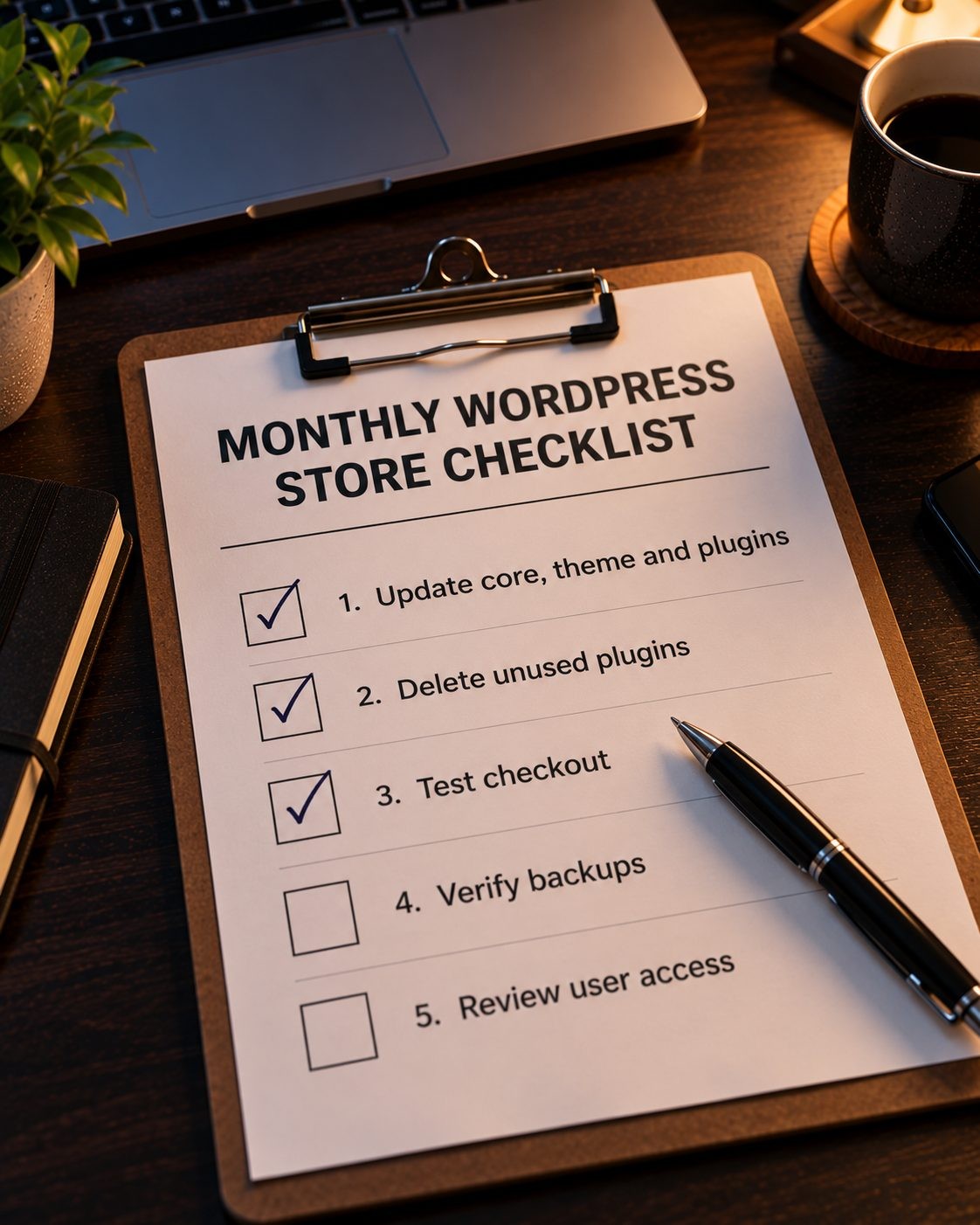
If you run a WordPress store, a simple monthly routine covers most of the risk:
- Update WordPress core, your theme and plugins, after checking that a recent backup exists.
- Delete plugins and themes you no longer use.
- Test checkout with a real order on a low-value product.
- Check that backups are running and that you can restore one.
- Review user accounts and remove anyone who no longer needs access.
If updates regularly break your store, that's a warning sign. It's one of the signals I cover in my guide to when a website needs a redesign.
Scalability: What Happens When You Grow
Shopify scales by plan. As sales grow, you move from Basic to Grow, Advanced and eventually Shopify Plus, which starts at $2,300 a month. The infrastructure scales with you, so a traffic spike on Black Friday is Shopify's problem, not yours. The cost of growth is predictable, but it rises with your plan and your app stack.
WooCommerce scales through hosting and setup. A growing store moves from shared hosting to more powerful hosting or a VPS, adds object caching and a CDN, and tunes the database as the order history grows. There's no hard ceiling, but it takes technical work to keep a large WooCommerce store fast. WooCommerce's newer high-performance order storage, which keeps orders in dedicated database tables, helps a lot here, and it's worth making sure a growing store has it enabled.
For most small businesses, though, scale isn't the deciding factor. Both platforms comfortably handle the traffic and order volumes a typical small store will see for years.
Sometimes neither platform is the right answer. Complex B2B pricing, custom quoting workflows, integrations with internal systems or a product that's closer to a SaaS app than a store can outgrow both. In those cases it's worth knowing when a custom Laravel build makes more sense.
Can You Use Both, or Switch Later?
You can use both. Some businesses keep WordPress for their main website and blog, where content and SEO do the heavy lifting, and use Shopify for the store. Shopify's Buy Button lets you embed products and a checkout on a WordPress page. Check Shopify's current plans to confirm Buy Button access before you build around it.
You can also switch later, in either direction. Products, customers and orders can be moved with migration tools or a developer's help. The part that causes damage is URLs. Shopify's /products/ structure won't match your WooCommerce URLs, and vice versa, so every old URL needs a 301 redirect to its new address. Skip that step and you can lose rankings you spent years building. The checklist in my guide on how to protect rankings during a platform move walks through the steps.
My Developer's Take: Which One Should Your Business Use?
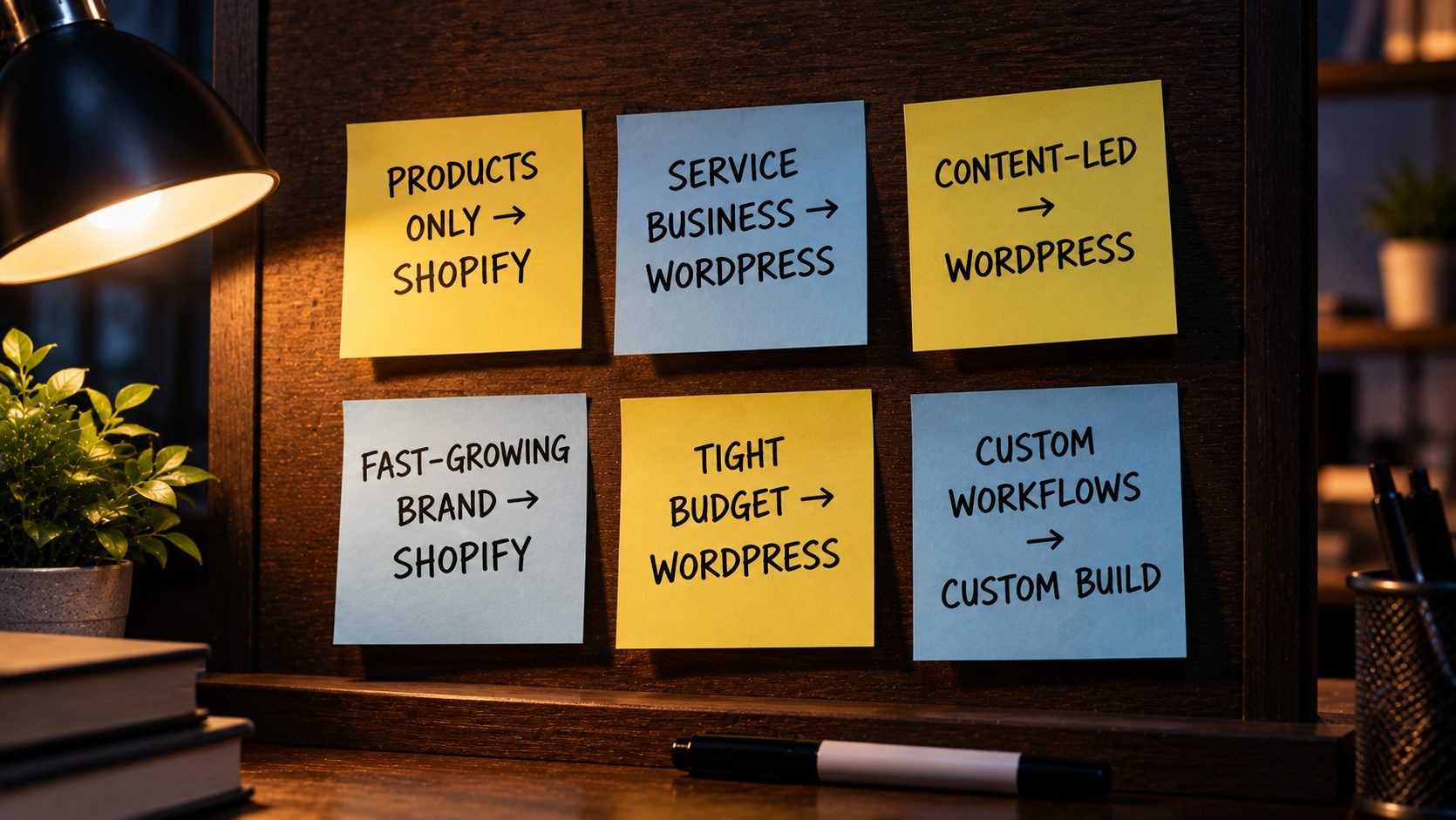
After building and supporting stores on both, here's how I'd advise six common types of small business.
1. A product-only store run by the owner, with no developer. Choose Shopify. You'll pay more each month, but you won't lose weekends to plugin updates, and your checkout will just work.
2. A service business that sells a few products or takes bookings. Choose WordPress. Your website's main job is to explain your services and win trust. WordPress does that better, and WooCommerce or a booking plugin covers the selling part.
3. A content-led brand where blog traffic drives sales. Choose WordPress with WooCommerce. When guides, reviews and articles bring in your customers, you want the strongest content platform and full SEO control.
4. A fast-growing product brand with a small team. Choose Shopify, likely on the Grow or Advanced plan. Your team's time is better spent on products and marketing than on server tuning, and Shopify scales without drama.
5. A tight budget, with someone technical available to help. Choose WordPress on good managed hosting. The three-year cost is a fraction of Shopify's, as long as someone keeps it updated.
6. Custom workflows, B2B pricing or integrations with internal systems. Consider a heavily customized WooCommerce build or a custom application. Both Shopify and standard WooCommerce will feel restrictive, and forcing them usually costs more than building the right thing.
If you're still unsure, answer three questions honestly. Who will maintain the site in a year's time? Where will most of your customers come from: search, ads, social media or marketplaces? And do you sell anything that isn't a simple physical product? The answers usually point clearly to one platform.
One honest note to finish: the wrong choice is usually the one made on price alone. The cheapest platform is the one your business can actually run well.
Frequently Asked Questions(FAQs)
Conclusion: Choose the Platform You Can Actually Maintain
The WordPress vs Shopify decision comes down to a simple trade. Shopify buys you convenience, with hosting, security and checkout handled for a higher monthly price. WordPress buys you control and a lower bill, in exchange for someone keeping it maintained.
So pick the platform that matches who will look after your site next year, not just who builds it this month. If that's you and you'd rather focus on products, Shopify is the safer choice. If you want ownership, stronger SEO and room to grow in any direction, WordPress is hard to beat.
Going with WordPress? Start your store on Nexi Bloom's WordPress hosting, with LiteSpeed caching, free SSL and daily backups included on every plan.
No Tags

Comments (0)