For years, the goal of SEO was simple to describe: get onto page one. Today, many searches are answered before anyone sees a list of links. Google shows an AI Overview at the top of the results, AI Mode turns search into a conversation, and millions of people skip search engines entirely and ask ChatGPT or Gemini instead. In all of these, a handful of websites get cited as sources. Those citations are the new page one.
Not surprisingly, an industry has grown up around them. You will see GEO, AEO and LLMO packages, "AI ranking" audits, special files you supposedly need to add, and tools that claim to know Google's internal AI metrics. Most of it is noise, and some of it contradicts what the search companies themselves have published. Business owners end up paying for files nobody reads, rewriting good pages into awkward "AI-friendly" fragments, or blocking the very crawlers they need, all while the basics that actually decide citations go untouched.
This guide sticks to what Google, OpenAI and Microsoft actually say, plus the practical work that follows from it. You will learn how each platform picks its sources, how to make sure their crawlers can reach you, what kind of content gets quoted, how to write passages that are easy to cite, why llms.txt is not the shortcut it is sold as, and how to measure your AI visibility with the free reports now available.
Quick answer: how to get cited in AI Overviews, ChatGPT and Gemini
- Let the right crawlers in: Googlebot, Bingbot and OAI-SearchBot.
- Rank well in normal search first, because AI answers draw on the same systems.
- Publish original, first-hand content that adds something the top results do not.
- Answer questions directly, in clear passages under descriptive headings.
- Keep your brand facts consistent across your site, listings and profiles.
- Measure with Search Console's Generative AI performance report and Bing's AI Performance report.
How AI Answers Pick Their Sources
Each platform works a little differently, but the basic mechanics are similar. Understanding them makes the rest of this guide obvious.
Google AI Overviews and AI Mode
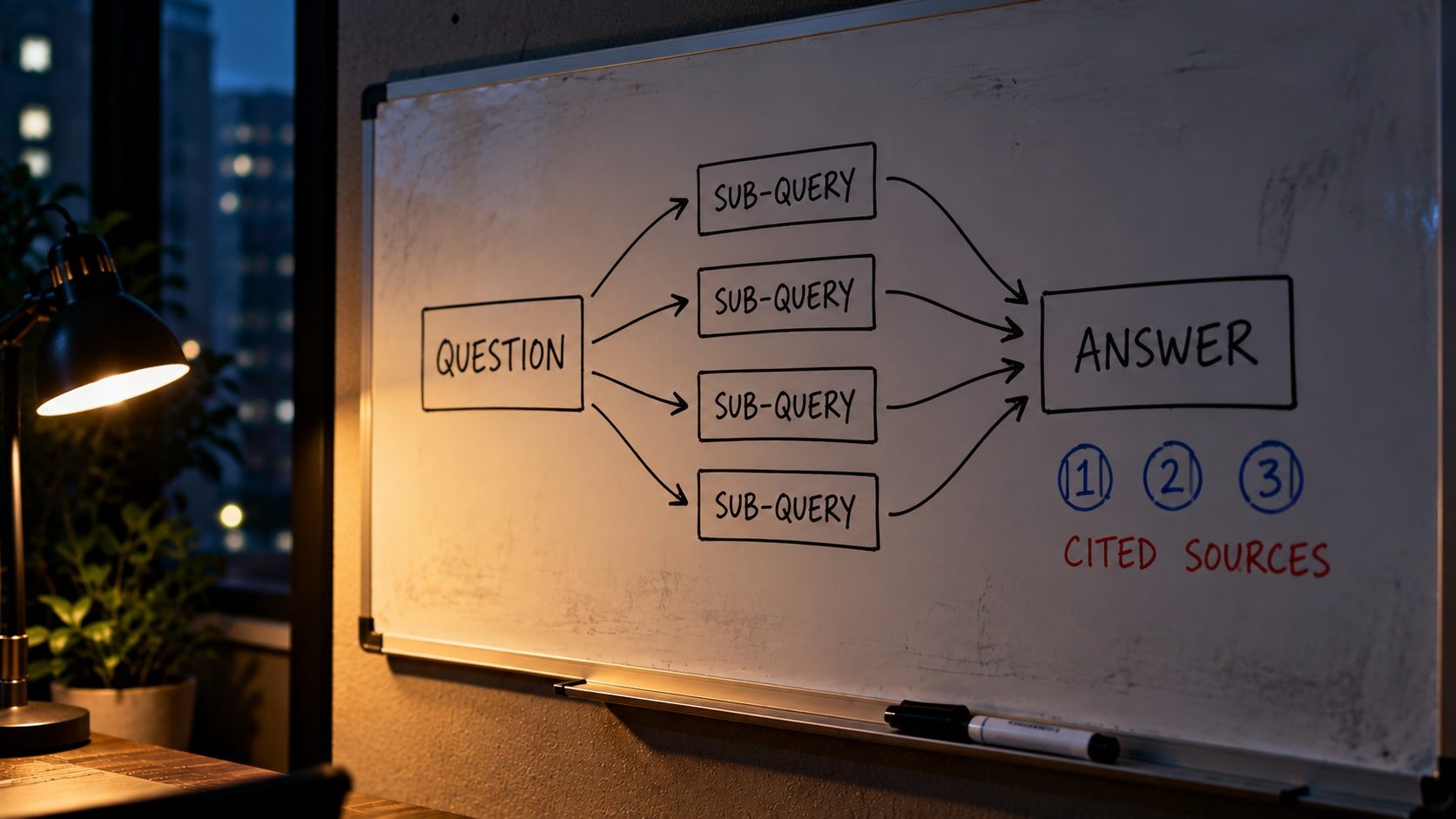
Google's AI features are not a separate search engine. In its official guide to optimizing for generative AI features, Google says they are "rooted in our core Search ranking and quality systems." When someone searches, the model uses a technique Google calls query fan-out, which it describes as "a set of concurrent, related queries generated by the model to request more information." In other words, a question like "best CRM for a small law firm" might trigger related searches about pricing, integrations, security and reviews behind the scenes. The model then pulls relevant passages from pages in Google's index, a process known as retrieval-augmented generation (RAG), and writes an answer that cites some of those pages.
AI Mode takes this further. It handles longer, multi-part questions and follow-ups in a conversation, so fan-out tends to be broader and a single answer can draw on more sources. AI Overviews, by contrast, appear on a normal results page for queries where Google decides a summary is helpful, and many searches still show no AI Overview at all.
Two consequences follow. First, a page has to be in Google's index and eligible to appear with a snippet before it can be cited at all. Second, selection happens at the level of passages, not whole pages. A long article that buries its best answer in paragraph 14 competes poorly against a page that states the answer clearly under a matching heading.
ChatGPT search
When ChatGPT searches the web, it relies on OpenAI's crawler, OAI-SearchBot. OpenAI's documentation is direct about it: sites that opt out of OAI-SearchBot will not appear in ChatGPT search answers, though they can still show up as navigational links. This is separate from GPTBot, which collects content for model training. Blocking GPTBot keeps your content out of training data without removing you from ChatGPT search, but blocking OAI-SearchBot does remove you.
ChatGPT shows its sources as links and citations next to the answer, and users often click through when they want detail, prices or to take action. That makes clear, specific pages especially valuable here: an answer built from your page about "how long a kitchen remodel takes" is far more likely to send a visitor than a generic mention of your brand.
Gemini
Gemini can ground its answers in content from the Google Search index. That use is controlled by a robots.txt token called Google-Extended, which covers both training future Gemini models and grounding in Gemini Apps and Grounding with Google Search on Vertex AI. Google states that Google-Extended "does not impact a site's inclusion in Google Search nor is it used as a ranking signal in Google Search." So blocking it affects Gemini's use of your content without touching your normal search rankings.
For most businesses that want visibility, the practical choice is to leave Google-Extended allowed. Publishers with strong reasons to keep content out of model training may decide otherwise, but they should know the trade-off: the same token also covers grounding, so blocking it can reduce how often Gemini draws on their pages when answering questions.
What all three have in common
Every one of these systems needs pages it can crawl, trust and understand quickly. None of them rewards tricks. They reward the same things good SEO always has, applied with more attention to clarity and originality.
GEO, AEO and LLMO: Do You Need a New Kind of SEO?
A few acronyms get used almost interchangeably:
- GEO (generative engine optimization): Optimizing to be cited in AI-generated answers.
- AEO (answer engine optimization): Optimizing to be the direct answer, originally for featured snippets and voice search, now for AI answers too.
- LLMO (large language model optimization): Optimizing to be mentioned by AI chatbots.
Google's view is that you do not need a separate discipline. Its own guide says SEO remains relevant precisely because these features are built on core Search systems, and it recommends the same foundations: helpful, non-commodity content, a clean technical setup and accurate business information. Gary Illyes of Google made the same point at a Search Central event, as reported by Search Engine Land: to appear in AI Overviews, "simply use normal SEO practices. You don't need GEO, LLMO or anything else."
That does not mean nothing has changed. Passage-level selection rewards clear, self-contained answers more than before. Mentions of your brand on other trusted sites matter because AI systems check across sources. And you now have more than one crawler to think about. So call it GEO if you like, but treat it as SEO done carefully, not as a replacement for it.
Google's guide also includes a warning worth repeating: "Be wary of third-party tools that promise ranking success or claim to use 'internal' Google metrics." Many AI visibility tools are useful for tracking mentions across assistants, but none of them can see inside Google's systems. If a vendor's advice contradicts Google's published guidance, trust the guidance.
Step 1: Make Sure AI Systems Can Reach Your Content
None of the content work matters if the crawlers cannot get in. This is the step most sites skip, and it is the easiest to fix.
Be indexed and snippet-eligible
Google's documentation on AI features says a page must be indexed and eligible to be shown in Google Search with a snippet to appear in AI Overviews or AI Mode. That makes a few settings important:
- A noindex tag removes the page from search, and with it, from AI features.
- A nosnippet directive prevents Google from showing text from the page, which also blocks it from AI answers.
- A low max-snippet value limits how much text Google can use.
Check your important pages in Search Console's URL Inspection tool, and make sure none of these were added by a plugin, a theme or a developer who wanted to "protect" content. Also check canonical tags. If a page's canonical points to a different URL, Google will usually index and cite that other URL instead, which can send AI visibility to an old or less useful version of the page.
Check robots.txt bot by bot

Each AI platform uses its own crawler or token, and they do different jobs:
| Bot or token | Owner | What it controls | Allow if you want citations? |
|---|---|---|---|
| Googlebot | Google Search, including AI Overviews and AI Mode | Yes | |
| Google-Extended | Gemini training and grounding in Gemini Apps and Vertex AI | Yes, if you want Gemini to use your content | |
| Bingbot | Microsoft | Bing Search and Copilot answers | Yes |
| OAI-SearchBot | OpenAI | Appearing in ChatGPT search answers | Yes |
| GPTBot | OpenAI | Content used to train OpenAI models | Your choice, it does not affect ChatGPT search |
| ChatGPT-User | OpenAI | Visits triggered by a user's request in ChatGPT | Usually yes |
Many sites added blanket "block all AI bots" rules in the last two years. If you want to be cited, review those rules and keep the search-related crawlers allowed. OpenAI's crawler documentation notes that robots.txt changes can take about 24 hours to affect ChatGPT search results. For Google's side, read how Google-Extended works before deciding whether to block it.
Check your CDN and firewall
Robots.txt is not the only gatekeeper. CDNs and security tools can block bots before they ever reach your server. In July 2025, Cloudflare changed its default so that AI bots are blocked on the sites it protects, with options for owners to allow specific crawlers or separate training from search. Bot protection features and firewall rules can also challenge crawlers that should be welcome. If your site sits behind Cloudflare, review its AI crawler and bot settings alongside the rest of your setup. This guide to Cloudflare settings for WordPress covers the security rules that most often catch good bots by mistake.
Confirm the crawlers actually visit
Settings are only half the story, so check that the bots are really reaching you. Your server or hosting logs show requests by user agent, and searching them for Googlebot, Bingbot, OAI-SearchBot and GPTBot shows which crawlers are visiting and whether they are getting normal 200 responses or being blocked with 403 errors. Be aware that some scrapers fake these user agents, so if you write allow rules in a firewall, use the verification methods or published IP ranges each company provides rather than trusting the name alone.
Keep important content as real text
AI systems cite text they can read. Content that only exists inside images, inside tabs that require a click to load, or in JavaScript that never renders for crawlers is easy to miss. Key answers, prices, specifications and definitions should be in the page's HTML as normal text.
A quick technical scan with the free Website SEO Score Checker is a fast way to catch missing titles, broken links and other basic issues on the pages you most want cited.
Step 2: Win the Organic Foundation First
Because AI Overviews and AI Mode draw on Google's core ranking systems, strong organic visibility is still the most reliable route to being cited. Pages that rank for the main query and its related sub-queries are the pages the model has to choose from. Weak technical SEO, thin pages and poor internal linking hurt you twice: once in the normal results and again in the AI answer built on top of them.
So the classic work still comes first. Fix crawl and indexing problems with a technical SEO audit checklist. Make sure every important page has a clear title, heading structure and internal links using an on-page SEO checklist. And organize your content into clear topics and hubs, as covered in this guide to site architecture for SEO, so search engines can see where your depth lies.
Ranking first is not strictly required to be cited. AI answers sometimes cite pages that sit lower in the results, because query fan-out pulls in pages that rank well for related sub-questions. But a site with weak fundamentals rarely shows up consistently in either place.
Speed and page experience belong in this foundation too. Google's guide mentions providing a good page experience as part of the basics, and a page that loads slowly or shifts around as it renders is less useful to the visitors who click through from an AI answer. Treat AI visibility as one more reason to keep the whole site healthy, not as a separate project.
Step 3: Create Non-Commodity Content
Google's guide uses a useful phrase: create "non-commodity" content. Commodity content is the kind anyone could produce by reading the top ten results and rewriting them. It includes common knowledge, generic definitions and AI-generated summaries of what is already out there. If an AI system can write the answer itself from many interchangeable sources, there is little reason to cite yours.
Content that earns citations adds something the others do not:
- Original data: Your own survey results, pricing data, benchmarks or analysis of real numbers.
- First-hand experience: What happened when you actually did the thing, including problems and trade-offs.
- Expert judgment: A clear recommendation with the reasoning behind it, not just a list of options.
- Specifics: Exact steps, real figures, named tools, dates and versions.
- Clear authorship: A named author with relevant experience, and an about page that explains who is behind the site.
You do not need to rewrite everything. Start with your most important pages and add proof of experience: screenshots of your process, a short "what we found" section, examples from real projects (without confidential details), or the reasons you recommend one approach over another. A page that says "most guides recommend X, but in practice Y works better for small sites, because..." gives an AI system a distinct, citable point of view.
What this looks like depends on the business:
- A local service business can publish real price ranges for its area, typical timelines from recent jobs, and photos of actual work, none of which a generic article can offer.
- A SaaS company can share setup walkthroughs with real screenshots, honest comparisons with alternatives, and data from its own product usage (anonymized and aggregated).
- A consultant or agency can explain how it approaches a problem, what it checks first, and what usually goes wrong, drawing on client work without revealing confidential details.
- An online store can add sizing notes from returns data, detailed product comparisons and answers to the questions customers actually email about.
In every case, the test is the same: does this page contain something a reader could not get from the next five results?
Step 4: Write Answer-First, Extractable Passages
Lead with the answer

Under each heading, answer the question in the first one or two sentences, then explain. This helps readers who skim, and it gives AI systems a clean passage that stands on its own. Compare these two openings for a section titled "How long does a website redesign take?":
Before: "Website redesigns are complex projects that involve many stakeholders, and every business is different, so there are many factors to consider when thinking about timelines, including scope, content and approvals."
After: "Most small business website redesigns take 8 to 12 weeks. Larger sites with custom features or many pages often take 3 to 6 months. The biggest factors are the number of pages, how quickly content is ready, and how many rounds of feedback are needed."
The second version can be quoted as is. The first gives an AI system nothing to cite.
Answer-first does not mean answer-only. After the direct answer, explain the reasons, the exceptions and the details that help someone decide. That depth is what makes a reader click through from the AI answer, and it is what separates your page from a one-line definition anyone could write. Think of the opening sentence as the summary and the rest of the section as the proof.
Cover the sub-questions in one strong page
Because of query fan-out, the model looks for answers to related questions as well as the main one. A page that answers "how much does a website redesign cost" well will also cover what affects the price, cost by business size, hidden costs and how to budget. Cover those sub-questions inside one comprehensive page, each under its own heading.
What you should not do is create a separate thin page for every variation. Google's guide warns that creating pages for every fan-out variation mainly to manipulate AI responses "violates Google's scaled content abuse spam policy."
Use exact names, numbers and definitions
Vague language is hard to cite. "Our software integrates with many popular tools" says almost nothing. "Integrates with QuickBooks, Xero and Stripe" can be quoted directly in an answer about accounting integrations. Use the exact names of products, places, standards and versions, give real numbers where you can, and define terms the first time you use them. When you compare options, a simple table with consistent columns (price, best for, limits) gives AI systems and readers a clean set of facts to work with.
Use structure that helps people
Descriptive headings, short paragraphs, numbered steps, comparison tables and clear definitions make passages easy to find and easy to quote. But Google is explicit that there is no need to "chunk" content into tiny pieces for AI, and that there is no ideal page length. Write for your readers. Structure is there to make answers easy to find, not to feed a machine.
Step 5: Build Entity and Brand Signals
AI systems cross-check information across sources. If your business is described the same way on your website, your Google Business Profile, your social profiles, industry directories and in articles that mention you, the systems can be more confident about who you are and what you do.
Practical steps:
- Keep core facts consistent: Business name, description, services, location, founding details and key people should match everywhere.
- Keep Business Profile and Merchant Center current: Google's guide specifically recommends this, because AI features use that information directly.
- Strengthen about and author pages: Explain who you are, your experience and why readers should trust you.
- Earn real mentions: Industry publications, podcasts, local news, partner sites, reviews and genuine participation in forums where your customers ask questions.
The word "earn" matters. Google's guide lists "seeking inauthentic mentions" among the things you do not need to do, and its spam systems are built to ignore manufactured ones. Paying for mass mentions or posting promotional comments in forums is more likely to hurt than help.
On your own site, Organization markup with sameAs links to your official profiles (LinkedIn, social accounts, industry listings) helps connect the different places your brand appears. It will not create authority you do not have, but it removes guesswork about which profiles belong to you. You do not need a Wikipedia page or a knowledge panel to be cited. Plenty of small, specialist sites are cited regularly because their content is the clearest answer available on a narrow topic. For local businesses, listings and reviews are where most of these signals start, and the small business SEO checklist walks through them in order.
Step 6: Keep Content Fresh and Accurate
AI answers often deal with current facts: prices, versions, rules and recommendations. Outdated information makes a page less useful to cite and can lead to your brand being quoted with wrong details.
Review your most important pages at least a few times a year. Update figures, dates, screenshots and product details, and show an honest "last updated" date when you make real changes, not cosmetic ones. Merge or remove old pages that contradict your current advice, because two pages on your own site saying different things send a mixed signal about which one to trust.
Your prompt log (covered in the measurement section below) is a good trigger for updates. If an AI assistant quotes an old price, an outdated feature list or a discontinued service from your site, that page needs attention first, because it is already being used as a source and is spreading the wrong information.
Structured Data: Useful, but Not a Shortcut
Many guides claim that schema markup is the key to AI Overviews. Google says otherwise: "Structured data isn't required for generative AI search, and there's no special schema.org markup you need to add."
Structured data is still worth using for what it does well. Organization, LocalBusiness, Product, Article and Breadcrumb markup help search engines understand your pages, and they make you eligible for rich results where Google still supports them. Keep it accurate and consistent with what is visible on the page.
What it will not do is get you cited on its own. And FAQ markup in particular no longer produces special results, because Google removed FAQ rich results from search in 2026. If a guide tells you to add FAQ or HowTo schema "for AI Overviews", it is working from outdated advice.
The one rule that matters most is consistency. Google's documentation on AI features asks site owners to keep structured data consistent with the page's visible text. Markup that claims a price, rating or author the page does not show is worse than no markup at all, because it creates conflicting signals about your facts.
llms.txt: An Honest Verdict
What it is
llms.txt is a proposed standard for a Markdown file placed at the root of a website (/llms.txt) that summarizes the site and points language models to its most important content. A typical file starts with the site name as a heading, a one-paragraph summary, and then grouped lists of links to key pages, such as documentation, pricing and guides, each with a short description. Some sites also publish a longer companion file with the full text of their docs. It has been promoted heavily as a way to "get into AI answers", and some agencies now sell llms.txt setup as a service.
What Google says
Google's guide addresses it directly in its mythbusting section: "You don't need to create new machine readable files, AI text files, markup, or Markdown to appear in Google Search." It adds that Google Search ignores these files, so creating one neither helps nor hurts your visibility. Gary Illyes has also said that Google does not support llms.txt and is not planning to.
The Lighthouse twist
There is one complication. Lighthouse 13.3, released in May 2026, moved its Agentic Browsing category into the default configuration, and one of its checks looks at whether a site provides an llms.txt file. The check is about AI agents that browse websites on a user's behalf, not about search rankings. It does not produce a score, and if the file does not exist, the check is marked Not Applicable rather than failed, because the file is optional. If you have never looked at a Lighthouse report in detail, this guide on how to read a PageSpeed Insights report explains where these categories appear.
The verdict

llms.txt is a cheap, harmless extra. For documentation-heavy sites, developer tools or sites expecting AI agents to navigate them, a well-maintained file may be worth an hour of work. But it is not a lever for getting cited in Google's AI features, which ignore it. Other AI companies have not made clear commitments to use it either. So add one if you like, keep it accurate if you do, and never pay for "llms.txt optimization" as if it were a ranking strategy.
If you do publish one, treat it like a sitemap for humans and machines: link only to pages you actually want people to read, keep descriptions factual, and update it whenever your main pages change. An outdated llms.txt that points to retired pages or old prices does more harm than not having one. And spend the time you save on the steps above, because those are what the platforms' own documentation points to.
How to Measure AI Citations and Traffic
Search Console's Generative AI performance report
Google introduced Generative AI performance reports in Search Console in June 2026, and the report had rolled out to sites worldwide by the end of August 2026. It shows impressions from AI Overviews and AI Mode, combined, and lets you filter by page, country, device and date. Clicks from these features still appear in the regular Performance report. If you do not see the report yet, your site may not have enough impressions in AI features. This is the most direct signal you have of how often Google's AI features are showing your pages.
Bing Webmaster Tools AI Performance report
Bing's AI Performance report, released as a public preview in February 2026, goes a step further. It shows how often your pages are cited in Copilot and Bing's AI answers, which URLs are cited, and the grounding queries the AI used to find them. Data exports as CSV. It is one of the few free sources of real citation data, which is why it appears in this list of the best free SEO tools.
AI referrals in GA4
In Google Analytics 4, look at referral traffic from domains such as chatgpt.com, gemini.google.com, copilot.microsoft.com and perplexity.ai. Treat these numbers as a floor, not a full count. In October 2026, analysts reported that links opened from ChatGPT had started arriving without a referrer or the utm_source=chatgpt.com tag ChatGPT previously added, which means some of that traffic now shows up as Direct. OpenAI had not confirmed whether the change was intentional. Gemini, meanwhile, was reported to have started adding UTM parameters to some outgoing links in the same period. Tracking here is moving quickly, so recheck how each source appears in your reports every few months.
A manual prompt log
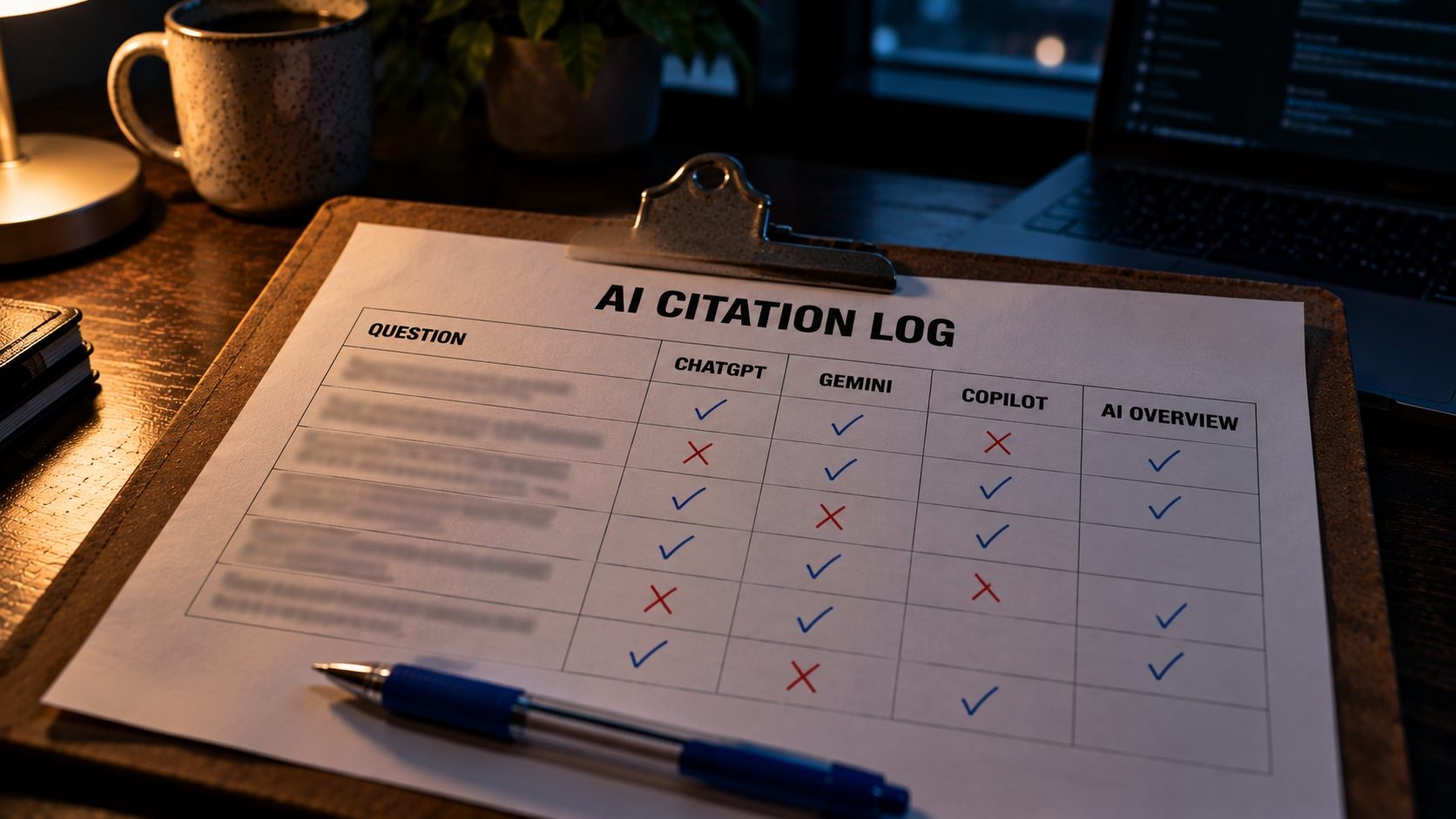
Finally, keep a simple log. Write down 10 to 20 real questions your customers ask, the kind that should lead to your site. Once a month, ask each one in ChatGPT, Gemini, Copilot and Google (checking for AI Overviews), and record whether your site is cited, which page, and which competitors appear instead. AI answers vary between runs and between users, so do not overreact to a single result. Look for trends over several months, and use the gaps to decide which pages to improve next.
Putting the signals together
No single report gives the full picture, so read them side by side. Search Console tells you how often Google shows your pages in AI features. Bing tells you which pages Copilot actually cites. GA4 shows the visits that still carry a referrer, and your prompt log shows what real answers look like. When a page gains AI impressions in Search Console, starts appearing in your prompt log and brings more conversions, you know the work on it is paying off. When a page you care about never shows up anywhere, it goes to the top of the improvement list.
A 30-Day Plan to Get Cited
Week 1: Access and indexing
- Check robots.txt rules for Googlebot, Bingbot, OAI-SearchBot and Google-Extended.
- Review CDN and firewall bot settings.
- Confirm your top 10 pages are indexed with no nosnippet or noindex directives.
Week 2: Answer-first rewrites
- Pick your five most important pages.
- Rewrite the opening of each section to lead with a direct answer.
- Add headings for the main sub-questions people ask.
Week 3: Proof and freshness
- Add first-hand examples, data or expert reasoning to those five pages.
- Update outdated facts, dates and screenshots.
- Make sure each page has a named author and links to an about page.
Week 4: Entities and measurement
- Align your business description across your site, Business Profile and main profiles.
- Check Search Console's Generative AI report and Bing's AI Performance report.
- Start your monthly prompt log.
Then repeat the cycle with the next set of pages. After three or four rounds, most of your important content will be accessible, answer-first and backed by real proof, and your monthly measurement will show where to focus next. Expect results to build gradually. Google's own SEO guidance notes that changes can take anywhere from hours to months to show, and AI features are no different.
FAQs
Conclusion
Getting cited in ChatGPT, Gemini and Google AI Overviews is not about secret files or special markup. It comes down to a few things done well. Let the right crawlers reach your site. Build a strong organic foundation. Publish content that adds something original. Write answers that can stand on their own. Keep your brand facts consistent wherever you appear. Then measure with the free reports Google and Microsoft now provide, and improve the pages that are not being cited yet.
The platforms will keep changing, and the tracking will keep shifting with them. But the foundations described in Google's and OpenAI's own documentation have stayed remarkably consistent: be accessible, be trustworthy, be clear and be useful. Sites that focus on those will keep earning citations as the interfaces change. And if you are also thinking about building AI features into your own product, such as assistants that answer questions from your own data, SmartLink Services' AI solutions covers that side of the work.
Start with the basics AI systems depend on. Run your key pages through the free Website SEO Score Checker to catch missing titles, broken links and other technical issues before you work on content.
No Tags

Comments (0)