- Khurram Shahzad
- Web Strategy
- 287
- 0
A business owner asks for quotes on "a simple website" and gets three answers: $500, $6,000 and $28,000. It's tempting to assume someone is overcharging, or that the cheapest option is a trap. More often, all three quotes are honest. They just describe three very different websites.
That's why the question of how much does a website cost is so hard to answer with one number. Most price guides mix together DIY builders, freelancers and agencies, and most of them only talk about the launch price. The cost of running the site for the next three years rarely makes it into the conversation, even though that's where many budgets fall apart.
This guide fixes that. You'll find real US price ranges for five types of website project, from a free builder site to a custom web application, with a breakdown of what each dollar actually pays for. You'll also see what a website costs per month, which costs tend to be left out of quotes, and how to compare proposals without overpaying.
I scope and build projects across this whole range, from small business sites to custom SaaS platforms, so the numbers here come from how projects are actually priced, cross-checked against published market ranges.
Quick answer: how much does a website cost?
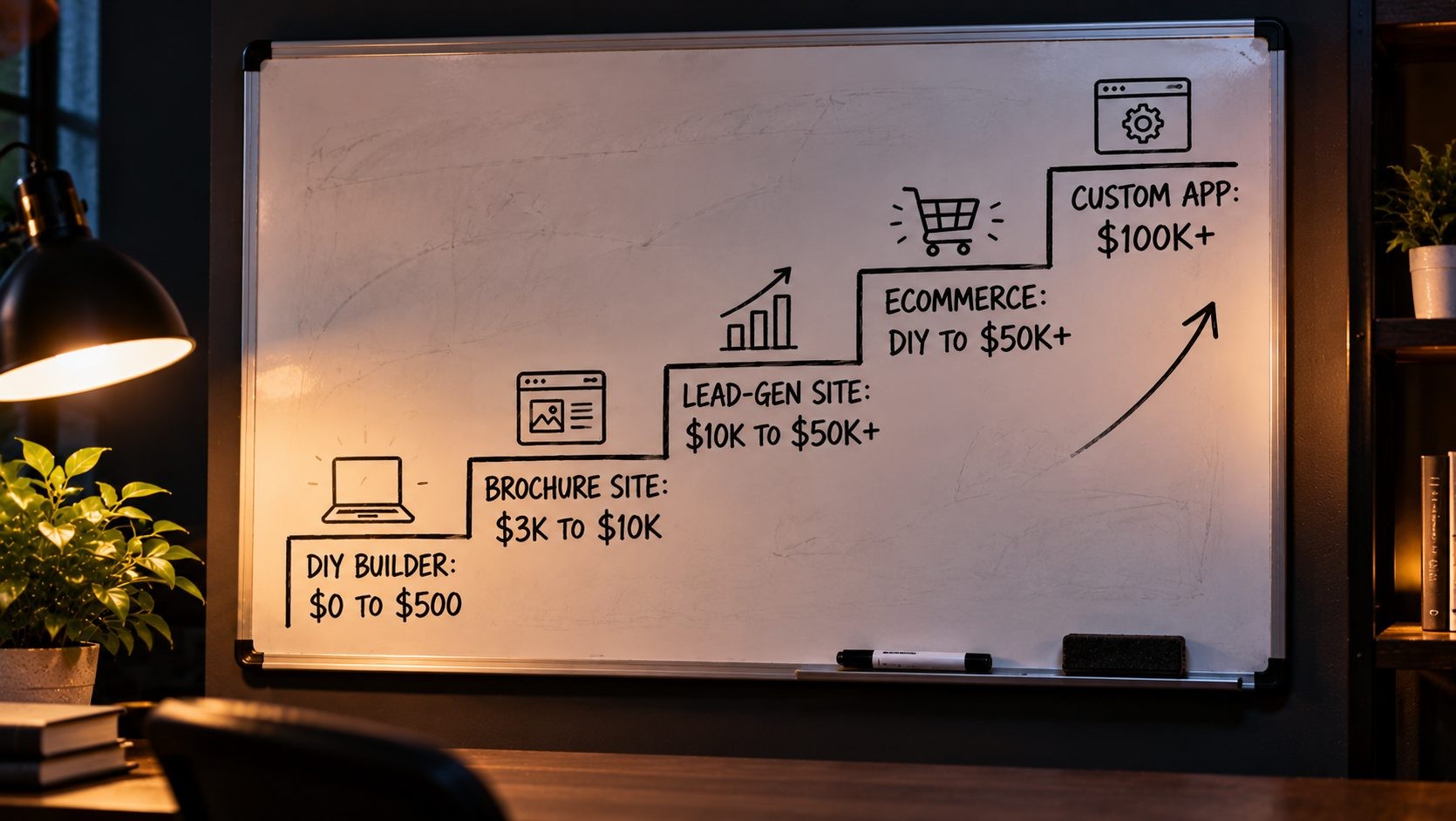
In the US, a website can cost anything from $0 to well over $100,000. The biggest factors are the type of project and who builds it.
| Project type | Typical upfront cost | Typical yearly running cost | Best for |
|---|---|---|---|
| Free or DIY builder site | $0 to $500 in year one | $0 to a few hundred dollars | New businesses, portfolios, testing an idea |
| Small business brochure site | $3,000 to $10,000 | A few hundred dollars, more with a care plan | Local and service businesses |
| Custom lead-generation site | $10,000 to $50,000+ | Care plan, SEO and content budget | Businesses where the site is the main sales channel |
| Ecommerce store | A few hundred dollars a year (DIY) to $10,000 to $50,000+ (professional) | Platform, apps and payment processing | Anyone selling products online |
| Custom web app or SaaS | $100,000+ for complex platforms | Hosting, support and ongoing development | Portals, platforms and software products |
These ranges line up with published market ranges from agencies like OuterBox and WebFX. The rest of this guide explains where each number comes from and what moves a project up or down the range.
What You're Actually Paying For: The 6 Core Website Costs
Every website, from a free portfolio to a large platform, is built from the same six cost components. The difference between a $500 site and a $50,000 site is how much each one costs and how much work goes into it.
Domain Name
Your domain is your address online, like yourbusiness.com. A standard domain usually costs between $10 and $35 a year, according to Forbes Advisor. Premium domains that someone already owns can cost far more.
A .com is still the safest choice for most US businesses, because it's the extension customers type by default. Keep the name short, easy to spell and easy to say out loud, and register it in your own name so you always control it.
Where people overpay: first-year discounts. Many registrars offer a cheap first year and a much higher renewal price. Always check what the domain costs in year two.
Web Hosting
Hosting is the server space where your website lives. Shared and WordPress hosting for a small site starts at a few dollars a month. Nexi Bloom's WordPress plans, for example, run from $3.99 to $9.99 a month. Website builders and Shopify bundle hosting into their subscription, so you don't pay for it separately.
Hosting quality matters more than most people expect. It affects how fast your pages load, how often your site goes down and how easy it is to recover when something goes wrong. For a small business site, look for server-level caching, free SSL, automatic daily backups and responsive support.
Where people overpay: buying far more hosting than a small site needs, or choosing the cheapest plan and paying later in slow pages and lost customers.
SSL Certificate
SSL is what puts the padlock in the browser and the "https" in your address. In 2026, it's usually free. Most good hosts include it, and you can get free SSL certificates from Let's Encrypt, a nonprofit certificate authority.
Where people overpay: paying for a basic SSL certificate as an add-on. Unless you have a specific business or compliance reason to buy one, you don't need to.
Design and Development
This is the biggest variable in any website budget. It covers planning, design, building the site, testing and launch. Depending on the project, it can be a few hours of your own time or several months of a team's work. The project tiers below break it down.
Three factors decide most of this cost: complexity (how custom the design and functionality are), functionality (what the site has to do beyond showing information) and size (how many pages and templates need to be designed and built). A ten-page site with standard features and a theme-based design sits at one end. A site with custom templates, integrations and a large page count sits at the other.
Where people overpay: paying for custom design and development on features they never use.
Content, Images and Copy
The words, photos and graphics on your site. You can write the copy yourself, hire a copywriter, use stock images or book a photographer.
Content is also what search engines and AI tools read to decide whether your business is worth showing to people. Clear service descriptions, useful answers to common questions and real photos of your work do more for your visibility than any design flourish.
Where people overpay, or underpay: content is the most commonly underestimated part of a website. It's also one of the most common reasons projects run late, because the site is ready and the words aren't.
Features and Integrations
Online booking, payments, a CRM connection, forms, memberships, multiple languages and live chat all sit here. Each feature adds build time, and many come with their own license or monthly fee.
Integrations are also where hidden running costs live. A booking tool, a CRM or an email marketing platform usually has its own monthly subscription on top of the cost of connecting it to your website, so price both parts before you commit.
Where people overpay: adding features "just in case." Every feature has to be built, tested and maintained, so start with what your customers actually need.
The first five costs are fairly predictable. Design and development is where prices split so widely, so the next section prices it by project type.
Website Cost by Project Type
Each tier below follows the same pattern: what the project is, who it suits, the typical cost, what pushes the price up, and a simple breakdown of where the money goes.
1. Free or DIY Website Builder Site ($0 to $500 in Year One)
What it is: a website you build yourself on a hosted website builder, using a template. You pick a design, add your pages and content, and publish.
Who it's for: new businesses, freelancers, side projects, portfolios and anyone who wants to test an idea before spending real money.
Typical cost: anywhere from $0 to about $500 in the first year. Some builders offer genuinely free plans. Sitelyx's free plan, for example, is permanently free rather than a trial. It includes up to five pages, a form builder, a blog and a free yourname.sitelyx.co subdomain, with no credit card needed. Moving to a custom domain and adding ecommerce costs $4 a month on its Growth plan. The blog you're reading right now runs on Sitelyx, so you're looking at a live example of what that tier can do.
What pushes the price up: paid plans for a custom domain, premium templates, ecommerce features, third-party apps and extra storage.
Line-item breakdown:
- Builder plan: $0 to a few hundred dollars a year, depending on the platform and plan
- Domain: $10 to $35 a year
- Premium template: optional, often free
- Your time: the real cost, usually several days to get the content and layout right
The honest trade-off: a builder site is the cheapest way to get online, but you work within the platform's limits. Designs are template-based, advanced features depend on what the platform offers, and moving to another platform later can mean rebuilding. For many small businesses, that's a perfectly sensible place to start.
When to move up from a builder site: watch for a few signs. You keep hitting a feature the platform can't provide. Your site is bringing in enough business that design and conversions now matter more than the monthly fee. Or you're spending more hours working around the builder's limits than it would cost to pay a professional. When two or more of those are true, it's usually time to look at the next tier.
2. Small Business Brochure Website ($3,000 to $10,000)
What it is: a professionally built site of around five to ten pages, usually a homepage, about page, service pages, contact page and often a blog. This is the most common website project for US small businesses, and it's what most people mean by "a simple website."
Who it's for: local businesses, service providers, consultants, trades and professional practices that need a credible site to win and convert customers.
Typical cost: $3,000 to $10,000 when built by a freelancer or small studio. OuterBox publishes a similar range, $3,000 to $10,000+, for a basic professional small business site. Most of these sites are built on WordPress, which keeps the software cost at zero and gives the owner a familiar editor.
What the money buys:
- A short discovery phase to understand your business, customers and goals
- Design based on a quality theme or a lightweight custom design
- A responsive build that works properly on phones
- On-page SEO basics: page titles, meta descriptions, headings and a sitemap
- Contact forms, analytics and Search Console setup
- Speed optimization and security setup
- Training so you can update the site yourself
What pushes the price up: professional copywriting, custom illustrations or photography, more pages, a booking system or other integrations, and multiple rounds of design revisions.
Line-item breakdown for a typical 7-page site:
| Item | Share of the budget |
|---|---|
| Discovery and planning | Small |
| Design | Large |
| Build and responsive testing | Largest |
| SEO setup, analytics and launch | Small |
| Training and handover | Small |
How long it takes: a site like this usually takes several weeks from kickoff to launch. The biggest variable is rarely the build itself. It's how quickly the content is ready and how fast feedback comes back on the design.
How to keep it in budget: agree on the page list before design starts, supply your content early, and group your feedback into one round per stage rather than a stream of small changes. Those three habits alone can keep a brochure site at the lower end of the range.
The design share is worth defending. A clean, well-structured design is what turns visitors into enquiries, and this piece on why good UI/UX pays for itself explains why.
3. Custom Lead-Generation or Business Website ($10,000 to $50,000+)
What it is: a larger, more strategic site where the website is a core part of how the business wins customers. It usually has a custom design, more pages, dedicated landing pages and integrations with sales tools.
Who it's for: established businesses where the website drives revenue: law firms, clinics, B2B companies, multi-location service businesses and firms running paid ad campaigns.
Typical cost: $10,000 to $50,000+. That matches OuterBox's published range for custom business and lead-generation websites.
What's different from a brochure site:
- A custom design system rather than a customized theme
- Conversion strategy built into page layouts, calls to action and forms
- Dedicated landing pages for campaigns and services
- CRM and marketing automation integration, so leads go straight into your sales process
- Deeper SEO work: site architecture, internal linking, schema markup and location pages
- Performance budgets so the site stays fast as content grows
- More testing across devices, browsers and user journeys
What pushes the price up: large page counts, multiple locations, complex integrations, custom functionality like calculators or quote builders, and extensive content creation.
Line-item breakdown:
- Strategy and discovery: user research, competitor review, sitemap and content plan
- UX and design: wireframes, a design system and page designs
- Development: the build, integrations and testing
- Content and SEO: copy, schema, redirects and on-page optimization
- Launch and optimization: tracking, QA and early conversion improvements
How to think about the budget: at this level, the useful question isn't "is $25,000 a lot for a website?" It's "what does one new customer mean to my business?" If a single new client is worth $5,000 in revenue to a law firm or a B2B company, a site that brings in just five extra clients a year has covered a $25,000 build within its first year. Run that simple math with your own numbers before deciding what you can justify spending.
If you're investing at this level, landing pages deserve special attention. These landing page optimization tips cover the changes that usually make the biggest difference.
4. Ecommerce Store (From a Few Hundred Dollars a Year to $50,000+)
What it is: a website that sells products online, with a catalog, cart, checkout, payments, shipping and order management.
Who it's for: any business selling physical or digital products online, from a small maker with 20 products to a brand with thousands.
Typical cost: ecommerce has the widest range of any project type, because there are three very different ways to build a store.
- DIY on a platform. You set up a store yourself on Shopify, WooCommerce or an ecommerce-enabled builder. Your costs are mainly the platform or hosting, a theme and apps. Shopify's Basic plan costs $29 a month on yearly billing, or $39 billed monthly, according to Shopify's current plan pricing. A WooCommerce store on good WordPress hosting can cost less in cash but needs more maintenance.
- Professionally built small or mid-size store. A developer or studio sets up the platform, customizes the design, configures products, shipping, taxes and payments, and launches the store. WebFX publishes a range of $10,000 to $50,000+ for ecommerce and large sites.
- Large custom store. Custom features, complex catalogs, B2B pricing, ERP or inventory integrations and headless setups. OuterBox publishes a range of $25,000 to $150,000+ for ecommerce builds.
Ongoing costs unique to stores:
- Payment processing: typically around 2.9% + 30 cents per online card transaction on entry-level plans
- Apps and extensions: reviews, subscriptions, upsells and filters, often billed monthly or yearly
- Product photography: usually the biggest content cost for a store
- Product data entry: titles, descriptions, variants and images for every product
A simple first-year example for a DIY store: a small Shopify store on the Basic plan with yearly billing costs $348 for the platform. Add a domain at $10 to $35 and an optional paid theme at $100 to $420 one-time, and a lean first year lands somewhere between roughly $360 and $800, before any paid apps and payment processing. The same store on WordPress with WooCommerce can cost less in cash, but you'll be the one handling updates and backups.
What pushes the price up: large catalogs, custom product configurators, subscriptions, multi-currency selling, marketplace integrations and custom checkout logic.
Choosing the platform is the first big cost decision for a store. The full WordPress vs Shopify cost comparison walks through a three-year budget for a small store on each. Over three years, the core cost ranged from roughly $210 to $387 for WordPress with WooCommerce to $1,044 to $1,464 on Shopify Basic, before payment processing.
5. Custom Web Application or SaaS Platform ($100,000+ for Complex Builds)
What it is: software that runs in the browser rather than a traditional website. Think customer portals, booking platforms, multi-tenant SaaS products, dashboards, internal business tools and applications with AI features built in.
Who it's for: businesses with workflows no off-the-shelf tool handles well, startups building a software product, and companies that want to automate internal processes.
Typical cost: OuterBox publishes a range of $100,000 to $500,000+ for enterprise sites, custom CMS builds and complex web platforms. That's a fair range for a full platform. A focused minimum viable product (MVP) with a tight scope can cost far less, which is why scoping comes before pricing on any serious software project.
What drives the cost:
- Architecture: how the system is structured so it stays reliable as it grows
- User roles and permissions: who can see and do what
- Database design: how data is stored, related and protected
- Integrations and APIs: payments, CRMs, accounting tools, email and third-party services
- Security: authentication, data protection and regular security reviews
- Testing: automated and manual testing across every workflow
- DevOps and deployment: servers, containers, backups, monitoring and release processes
- Ongoing development: new features, fixes and updates after launch
How to control the cost of a custom build: the most reliable approach is to build in phases.
- Discovery: map the workflows, users, data and integrations, and turn them into a written specification. This is a small, fixed-price piece of work, and it gives you a realistic estimate for everything that follows.
- MVP: build only the features needed to prove the product works for real users. Leave the "nice to haves" for later.
- Iterate: use real feedback and usage data to decide what to build next, instead of guessing up front.
Phasing the work spreads the cost over time, lowers the risk of building features nobody uses, and gives you something working in users' hands much sooner.
What pushes the price up: multi-tenancy, real-time features, complex permissions, heavy integrations, compliance requirements and AI features that need careful design and testing.
The platform decision matters a lot at this tier. It's worth understanding when a custom Laravel build makes sense compared with extending WordPress. If AI is part of your plans, this guide to adding AI features to a web application shows what's involved on the development side.
Who Builds It Changes the Price: DIY vs Freelancer vs Agency

Most of a website's cost is labor, so who does the work has a huge effect on the price.
For context, the US Bureau of Labor Statistics reports that the median pay for web developers and digital designers was $99,520 a year, or $47.85 an hour, in May 2025. That's what an employee earns. A freelancer or agency has to charge more than that per hour, because the rate also covers self-employment taxes, software, equipment, project management, sales and all the hours that can't be billed to a client. When a quote looks expensive, that's usually why.
Here's how the main options compare:
| Who builds it | Typical price range | Speed | Quality risk | Who manages the project |
|---|---|---|---|---|
| You (DIY) | $0 to $500 plus your time | Depends on you | Your own skill level | You |
| US freelancer | $500 to $10,000+ (WebFX) | Moderate | Varies widely by person | You and the freelancer |
| Small studio | Often between freelancer and agency rates | Moderate to fast | Lower, with more checks | The studio |
| Full-service agency | $3,000 to $30,000+ (WebFX) and higher for large projects | Structured | Lowest, with defined processes | The agency |
| Offshore developer | Lower hourly rates | Varies | Depends on communication and QA | Mostly you |
DIY makes sense when your budget is tight and your needs are simple. The real cost is your time, and time spent building a website is time not spent running your business.
Freelancers are a good fit for brochure sites and smaller projects. The quality range is wide, so look at their portfolio and ask for references.
Small studios sit in the middle. A team of a few people usually covers design and development together, with one point of contact. For many small businesses, that's the sweet spot: more structure and backup than a single freelancer, without the overhead that pushes agency prices up.
Agencies make sense for larger projects, where strategy, design, development and project management all matter. You pay more, but you also get more structure and accountability.
When you're comparing options, compare total cost rather than hourly rates. A developer who charges more per hour but works efficiently, communicates clearly and gets it right the first time can end up cheaper overall than one with a low rate and a long list of revisions.
Offshore developers can offer lower rates, and many do excellent work. Budget extra time for clear briefs, communication across time zones and quality checks, because those costs are real even if they don't show up on the invoice.
Whichever option you lean toward, check three things before you hire anyone: live examples of similar work, how they communicate during a project, and what happens after launch. A cheap build from someone who disappears after handover often ends up costing more than a fair quote from someone who supports the site properly.
One more thing that affects the final price: how the project is billed. A fixed price based on a clear scope protects small businesses from surprise bills. Hourly billing can make sense for open-ended or ongoing work, but you need a clear estimate and regular updates.
How Your Platform Affects the Cost
The platform you choose shapes both the upfront cost and what you'll pay every month after launch.
| Platform | Upfront cost | Monthly cost | Flexibility | Who maintains it |
|---|---|---|---|---|
| WordPress | Low to moderate | Hosting, plus premium plugins and maintenance | Very high | You or your developer |
| Shopify | Low to moderate | Plan, apps and payment fees | Moderate | Mostly Shopify |
| Hosted builders | Very low | Builder plan | Lower | The platform |
| Custom (Laravel or similar) | High | Hosting, support and development | Unlimited | Your developer or team |
WordPress is free software, which is why it's so popular for small business websites. You still pay for hosting, any premium themes or plugins, and someone's time to keep it updated.
Shopify has a higher monthly bill, but hosting, security and checkout are included. It's built for stores, so it's a strong choice when products are the business.
Hosted builders have the lowest start-up cost and the least technical work, with the most limits on design and features.
Custom builds cost the most upfront but give you complete control over features, performance and data. They also avoid the per-app and per-plugin subscriptions that can quietly add up on other platforms, although you'll pay for ongoing development instead. They make sense when your needs are too specific for a standard platform.
Don't forget the cost of switching later. Moving from a builder to WordPress, or from Shopify to WooCommerce, usually means rebuilding the design, migrating content and setting up redirects for every changed URL. Choosing a platform that can grow with you for the next few years is often cheaper than choosing the cheapest option today and migrating in 18 months.
The tools and hosting behind a site matter as much as the platform name. I've shared the stack I use for WordPress and Laravel projects if you want to see what a well-built setup looks like.
How Much Does a Website Cost Per Month?
Launch is only the start. Every website has running costs, and they're easy to underestimate. Here are the most common ones:
| Running cost | Typical cost | Billed |
|---|---|---|
| Hosting | A few dollars a month for small sites, more for busy stores and apps | Monthly or yearly |
| Domain | $10 to $35 a year | Yearly |
| Website builder plan | $0 to a few hundred dollars a year | Monthly or yearly |
| Premium plugins and apps | Varies by tool | Monthly or yearly |
| Business email | Free to $26.40 per user per month (Forbes Advisor) | Monthly |
| Maintenance or care plan | Roughly $30 to $500+ a month, based on published WordPress care plan pricing | Monthly |
| Backups and security | Often included with good hosting | Varies |
| SEO and content | From your own time to a monthly retainer | Monthly |
To make that more concrete, here are three typical monthly profiles:
A DIY builder site can cost almost nothing each month. On Sitelyx, the free plan is $0 and the Growth plan with a custom domain is $4 a month, plus the yearly domain cost. Many other builders charge more, so compare plans carefully.
A small business WordPress site typically costs a few dollars a month for hosting, plus any premium plugin renewals. Add a care plan if you want someone else to handle updates, backups and small changes. That care plan is usually the biggest monthly cost for this type of site.
An ecommerce store has the highest running costs of the three. On Shopify, you'll pay the plan fee, any app subscriptions and payment processing on every sale. On WooCommerce, you'll pay for hosting, extensions and processing, plus maintenance time.
What a Maintenance Plan Should Cover
If you're paying someone to maintain your website, the plan should include:
- Updates to the platform, theme and plugins, tested before they go live
- Regular backups, with a tested way to restore them
- Uptime monitoring, so problems are caught quickly
- Security monitoring and cleanup if something goes wrong
- A set amount of time each month for small content or design changes
- A simple monthly report of what was done
A Sample Year of Running Costs
To see how these add up, take a small business WordPress site on Nexi Bloom's WP Pro hosting at $69.99 a year, with a premium theme license at $59 a year and a domain renewal at around $20. That's roughly $150 a year before email and maintenance. Add one business email account and a basic care plan at $30 a month, and the yearly running cost moves to somewhere around $500 to $830, depending on the email plan you choose.
That's a manageable number for most small businesses, and it's worth knowing before launch rather than discovering it one renewal notice at a time.
Compare care plans by what's included, not just the monthly price. A $30 plan that only runs automatic updates is very different from a $300 plan that includes testing, fixes and development time.

The Hidden Costs Most Website Quotes Leave Out
The quote covers the build. These are the costs that often surface later.
- Renewal price jumps. Hosting and domains are often sold with a low introductory price that rises sharply at renewal. Always ask for the renewal price, not just the first-term price.
- Premium plugin and theme licenses. Many WordPress themes and plugins charge a yearly license for updates and support. A plugin that costs $59 or $279 in year one usually costs the same again every year after that.
- Copywriting and photography. If the quote assumes you'll supply the content, budget for writing it or paying someone else to. Good product and team photography is a separate cost.
- Stock image licenses. Free image sites are fine for some uses, but premium stock photos and illustrations add up, and using images without the right license can create legal problems.
- Accessibility fixes. Building an accessible site from the start costs far less than fixing one later. If the quote doesn't mention accessibility, ask how the site will meet WCAG 2.2 guidelines.
- Third-party tools. Booking systems, CRMs, email marketing platforms and live chat tools all have their own subscriptions, separate from the website.
- Content migration and redirects. Moving content from an old site takes time, and every changed URL needs a redirect to protect your search rankings.
- Your own time. Reviews, feedback rounds, content gathering and approvals take real hours. The faster you respond, the faster and cheaper the project tends to be.
- Ongoing SEO and content. A website doesn't rank just because it launched. If search traffic matters to your business, budget time or money for new content, updates to existing pages and regular technical checks.
- Post-launch changes. Once real customers start using the site, you'll almost always want a few changes: a new page, a clearer form, a better call to action. Ask whether the quote includes a period of post-launch tweaks, or how they'll be charged.
If you already have a website and you're pricing a replacement, it's worth checking whether you actually need one. Sometimes a targeted fix solves the problem for a fraction of the cost. This guide explains when a fix is cheaper than a redesign.
Website Cost by Industry
Industry doesn't set the price of a website on its own. The features each industry needs do. Here's how common industries tend to differ.
Restaurants and cafes need clear menus, opening hours, location details and often online ordering or reservation systems. Ordering and booking integrations are usually the biggest cost drivers, along with good food photography.
Law firms and professional services need a site that builds trust quickly. That means detailed practice area or service pages, attorney or team profiles, client intake forms and a strong local SEO structure. Content is often a large part of the budget, because each practice area needs its own well-written page.
Healthcare practices and clinics usually need appointment booking and patient forms. When a site collects health information, privacy rules such as HIPAA can apply, which affects how forms, hosting and third-party tools are chosen. That extra care adds cost, and it's worth getting right from the start.
Contractors and home services benefit from service area pages, project galleries, quote request forms and prominent reviews. Location pages and a gallery that's easy to update are the main cost drivers.
Nonprofits often need donation processing, event listings, volunteer sign-ups and newsletter integration. Some platforms and tools offer nonprofit discounts, which can lower the running costs.
Retail and ecommerce businesses follow the ecommerce tier above, where catalog size, integrations and payment setup drive the price.
Real estate, fitness studios and salons often depend on third-party systems, such as property listing feeds, class schedules or booking and payment tools. Integrating those systems neatly into the website is usually the main cost, along with the monthly fee for the tool itself.
The practical lesson: when you ask for quotes, list the features your business needs rather than just naming your industry. Two dental practices can need very different websites.
Has AI Made Websites Cheaper in 2026?
Partly. AI has changed some parts of building a website, but not all of them.
Where AI cuts costs: AI tools can draft first versions of page copy, generate images and layout ideas, and help website builders produce a starting design in minutes. Developers also use AI to write and review code faster, which can shorten some parts of a project.
Where it doesn't: AI doesn't understand your business, your customers or your competitors the way you do. It can't decide what your site needs to achieve, make judgment calls about brand and messaging, test every user journey or take responsibility when something breaks. Strategy, integrations, security, quality assurance and accountability still take skilled human time.
There's also a new cost to plan for. AI-generated content still needs to be checked for accuracy, edited to sound like your business and reviewed for anything that could mislead customers. That review time is small compared with writing everything from scratch, but it isn't zero, and skipping it is one of the fastest ways to end up with a generic website that nobody remembers.
The honest verdict: AI has lowered the floor for simple websites. A basic site is cheaper and faster to create than it used to be. For sites that need to win customers, handle payments or run business processes, AI speeds up parts of the work, but it doesn't remove the cost of getting the site right.
How to Keep Website Costs Down Without Cutting Corners
A lower budget doesn't have to mean a worse website. These are the savings that work, and the ones that tend to backfire.
Savings that work:
- Start with fewer pages. A focused five-page site that answers your customers' main questions often performs better than a sprawling 20-page one. You can add pages as your business grows.
- Prepare your content before the project starts. Having your copy, photos and logo ready saves time on every stage and shortens the timeline.
- Use a quality theme as a starting point. For a brochure site, a well-built theme customized to your brand gives you most of the benefit of a custom design at a fraction of the cost.
- Prioritize must-have features. List every feature you want, mark the ones customers actually need at launch, and schedule the rest for later.
- Choose good hosting once. Solid hosting with caching, SSL and backups included prevents many of the speed and security problems that cost money to fix later.
- Ask for a fixed-price quote based on a written scope. It protects you from surprise bills and makes quotes easier to compare.
Savings that backfire:
- Skipping mobile testing. Many of your visitors will arrive on a phone, and fixing a poor mobile experience later costs more than getting it right the first time.
- Ignoring SEO basics at launch. Page titles, headings, redirects and a sitemap are cheap to set up during the build and expensive to fix after rankings drop.
- Letting the developer own your accounts. If your domain or hosting is in someone else's name, getting it back can cost time and money.
- Choosing the lowest quote with no scope. A price that looks too good usually leaves out something you'll pay for later.
How to Compare Website Quotes Without Overpaying
Two quotes that look far apart often describe different projects. These eight questions help you compare them fairly.
- What exactly is included? Ask for the number of pages, rounds of revisions, whether content is included and what SEO setup comes with it.
- Who owns the site? You should own your domain, hosting account, content and, for custom work, the code. Get this in writing.
- What happens after launch? Ask about renewal costs, maintenance options and what support is included.
- Is it fixed price or hourly? If it's hourly, ask for an estimate and how often you'll get updates on hours used.
- What's the timeline, and what do you need from me? Many delays come from waiting on content and feedback, so understand your part.
- How are changes priced? Scope changes are normal. Know in advance how they'll be quoted.
- How will you make sure the site is fast, accessible and mobile-friendly? A good developer can explain how they test for this.
- Can I see live examples of similar projects? Look at real sites, not just screenshots, and try them on your phone.
A quick example. Say you receive two quotes for a small business site: $4,000 and $9,000. At first glance, the cheaper one wins. But when you ask the questions above, you find the $4,000 quote assumes you'll write all the copy, includes one round of revisions and has no SEO setup or training. The $9,000 quote includes copywriting for seven pages, two rounds of revisions, SEO setup, analytics and a month of post-launch support. Once you price the copywriting and the extra work yourself, the gap is much smaller than it looked, and the more expensive quote may be the better value.
A few red flags to watch for:
- A very low price with no written scope
- No contract or agreement
- A developer who registers your domain in their own name
- Vague answers about who owns the site after launch
- No mention of maintenance, backups or security
If you'd like to see what well-scoped projects look like, here are examples of recent website projects.
Example: A 3-Year Budget for a Small Business Website
Here's a worked example for a seven-page WordPress brochure site, built professionally and hosted on a mid-range WordPress plan.
| Cost item | Year 1 | Years 2 and 3 | 3-year total |
|---|---|---|---|
| Design and build | $3,000 to $10,000 | $0 | $3,000 to $10,000 |
| Hosting (Nexi Bloom WP Pro, $69.99/yr) | $69.99 | $139.98 | $209.97 |
| Domain | Free in year one with the hosting plan | $20 to $70 | $20 to $70 |
| Premium theme (GeneratePress Premium, $59/yr) | $59 | $118 | $177 |
| Optional care plan at $30/month | $360 | $720 | $1,080 |
| Total without care plan | $3,407 to $10,457 | ||
| Total with a basic care plan | $4,487 to $11,537 |
The domain renewal uses the $10 to $35 a year range from earlier.
For a simple brochure site like this, the build is the biggest share of the three-year cost. The running costs stay modest, which is one of the reasons WordPress is so popular with small businesses.
The picture changes as you move up the tiers. A more comprehensive care plan, an ongoing SEO and content budget, ecommerce apps and payment processing can make the running costs match or exceed the build cost over three years. That's why it's worth budgeting for the full three years, not just the launch invoice.
Frequently Asked Questions
Conclusion: Budget for the Website You Need, Not the Cheapest Quote
So, how much does a website cost? It depends on three decisions: the type of project, who builds it, and how you'll run it after launch. Pick the project type first, choose the right people to build it, then budget for three years rather than just the launch invoice.
Remember that a website is a business tool, not a one-off purchase. The right budget is the one that matches what the site needs to do for you. A new business testing an idea can start free and upgrade later. A company that wins most of its customers online should treat the website as an investment and judge it by the leads and sales it brings in, not by the size of the first invoice.
Before you ask for quotes, write down the pages and features your business actually needs. A clear list is the single best way to get accurate, comparable prices and avoid paying for things you'll never use.
Ready to get a website built for your US business? See Nexi Bloom's website development service for custom, responsive websites built for small businesses and growing brands across the US.
No Tags

Comments (0)