Most businesses have far more happy customers than reviews. The gap is rarely about quality. It is about asking. Customers are busy, they do not know where to leave a review, and most businesses either never ask or ask in a way that feels awkward for both sides. The result is a profile with a handful of old reviews, while a competitor with a simple routine collects new ones every week.
At the same time, the rules have become stricter. Since October 21, 2024, the US Federal Trade Commission's rule on consumer reviews and testimonials has made several common shortcuts risky, and platforms such as Google and Yelp have their own policies on top of that. Some tactics still recommended in older guides, like offering a discount for a five-star review or only sending happy customers to your Google profile, can now cause real trouble.
This guide gives you a simple system that works and stays on the right side of the rules: why reviews matter, exactly what you cannot do, when and how to ask, templates you can copy, where to collect reviews, and how to reply to every one of them.
Quick answer: how to get more customer reviews
- Ask every customer, not just the ones you think are happy.
- Ask at the moment they are most satisfied, right after the result.
- Send a direct link that opens the review form in one tap.
- Keep the request short and personal.
- Never pay for positive reviews, write fake ones or filter out unhappy customers.
- Reply to every review, good or bad, within a few days.
Why Reviews Matter More Than Ever
Reviews shape decisions long before a customer contacts you. When two businesses look similar in search results, the one with more recent, detailed reviews usually gets the call. Reviews also answer questions your own website cannot answer convincingly, because they come from other customers rather than from you.
They matter for search visibility too. Google says its local results are based mainly on relevance, distance and prominence, and that review count and ratings are part of prominence. A steady flow of genuine reviews is one of the few local ranking signals a small business can actively build.
Reviews now feed AI answers as well. Assistants like ChatGPT, Gemini and Copilot, and Google's AI Overviews, draw on business listings, review sites and other third-party mentions when they describe or recommend a business. Consistent, positive feedback across trusted platforms makes it more likely your business is described accurately, which is part of the wider work covered in this guide to getting cited in AI search.
Volume is not the only thing that counts. Customers notice when the latest review is two years old, and they trust a profile with a mix of mostly positive and occasionally critical reviews more than a wall of perfect scores. Recency, steady growth and honest replies all matter as much as the total.
Reviews also do something no marketing copy can: they describe your business in your customers' own words. Those words often match the way new customers search, such as "fixed our leak the same day" or "explained the pricing clearly", which makes reviews useful for both people and search engines reading your profile.
The Rules You Can't Break
The FTC rule in plain English
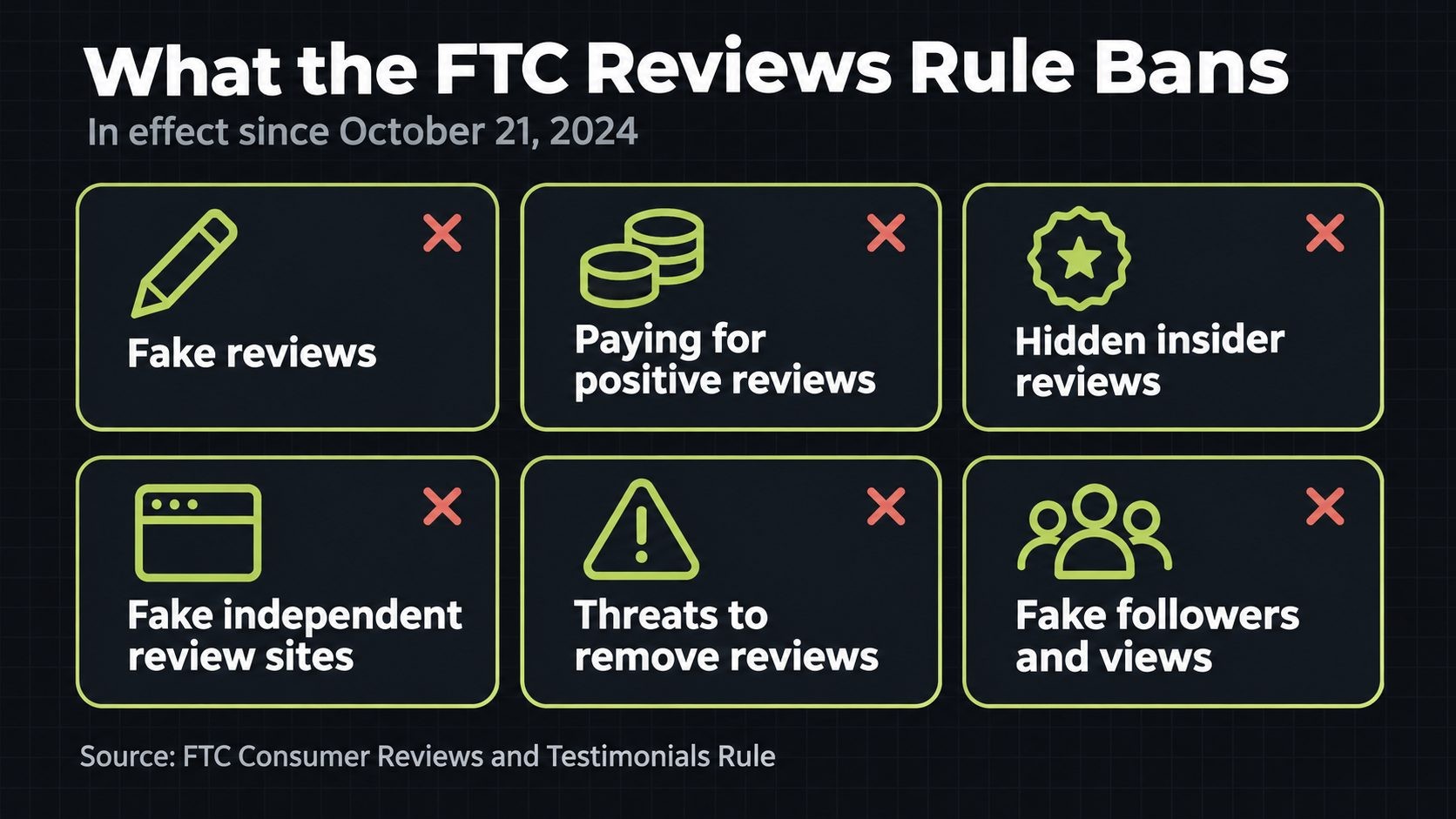
The FTC's Consumer Reviews and Testimonials Rule went into effect on October 21, 2024. According to the FTC's questions and answers on the reviews rule, it covers six main practices:
- Fake or false reviews and testimonials. Writing, creating or selling reviews that misrepresent someone's experience, or reviews from people who do not exist or never used the product.
- Conditional incentives. Paying for or rewarding reviews when there is an express or implied requirement that they be positive or negative.
- Undisclosed insider reviews. Reviews from employees, owners, relatives or others with a close connection to the business, without clear disclosure.
- Company-controlled review sites. Presenting a site you control as an independent source of reviews or opinions.
- Review suppression. Using intimidation, unfounded legal threats or knowingly false accusations to remove or prevent reviews.
- Fake social media indicators. Buying or using fake followers, views or other signs of influence that you know, or should know, are fake.
The rule lets courts impose civil penalties for knowing violations, on top of the FTC's other powers. This guide is not legal advice, and if your situation is complicated, such as a large incentive program or a regulated industry, talk to a lawyer. But for most businesses, the safe path is simple: ask real customers for honest reviews and treat every review the same.
Incentives: what is allowed and what is not
The FTC's position on incentives surprises many people. Its guidance says offering an incentive for a review is not automatically a violation, "as long as there isn't an express or implied requirement that the reviews have to express a particular sentiment." Paying for five-star reviews is clearly banned. Offering the same small reward for any honest review is not banned by the rule itself, although disclosure questions can still arise.
Here is the catch: many platforms are stricter than the FTC. Google's policy does not allow businesses to offer incentives such as payments, discounts or free goods or services in exchange for reviews, regardless of the sentiment. Yelp does not allow them either. Amazon has banned incentivized product reviews outside its own Vine program since 2016. So even if an incentive is legal, it can still get reviews removed or your profile penalized on the platform where you posted it. The simplest rule: do not offer anything in exchange for reviews on Google, Yelp or Amazon.
Review gating and suppression
Review gating means asking customers how they feel first, then sending only happy customers to a public review site while routing unhappy ones to a private form. It is popular because it seems to protect your rating. It is also risky.
The FTC's rule does not contain a specific ban on gating, but the FTC says the practice "could violate the FTC Act." Google's policy goes further and prohibits businesses from selectively soliciting positive reviews. And if you display reviews on your own website, hiding only the negative ones can fall under the rule's suppression provisions, because the FTC expects review policies to be applied equally.
Suppression also covers how you react to criticism. Threatening a customer with legal action over an honest negative review, or pressuring them to remove it, is exactly the behavior the rule targets. Reply calmly instead, as covered later in this guide.
Platform rules at a glance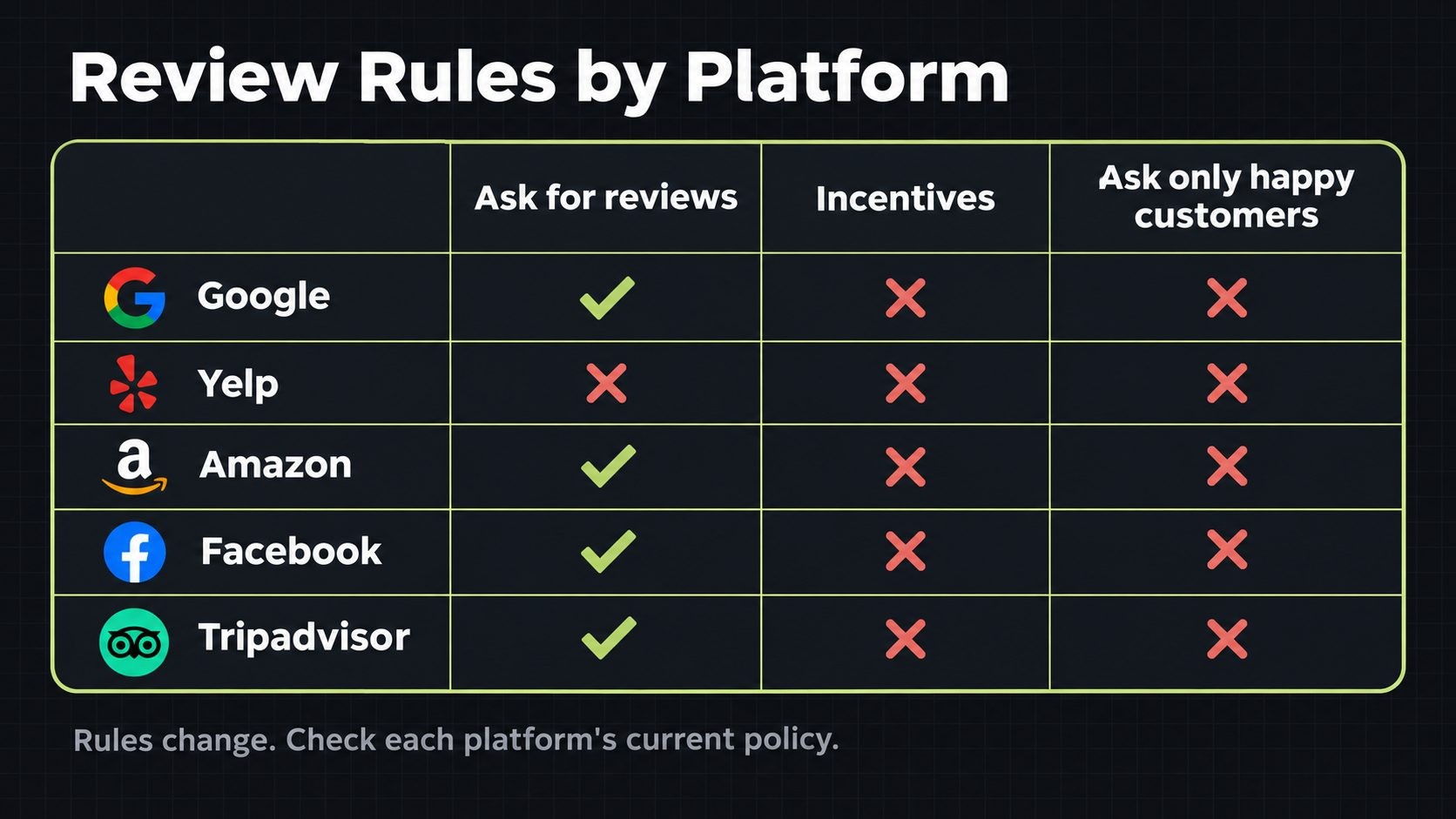
| Platform | Can you ask for reviews? | Incentives for reviews? | Asking only happy customers? |
|---|---|---|---|
| Yes | No | No | |
| Yelp | No, Yelp asks businesses not to solicit reviews | No | No |
| Amazon | Yes, through Amazon's own tools | No, except the Vine program | No |
| Yes | No | Avoid | |
| Tripadvisor | Yes, actively encouraged | No | Avoid |
| Industry directories | Usually yes | Check each platform | Avoid |
Yelp is the exception that trips up most businesses. Its guidelines say businesses shouldn't ask for reviews, and as BrightLocal's summary of review platform guidelines notes, solicited reviews may be moved to Yelp's "not recommended" section, where they do not count toward your rating. You can let customers know you are on Yelp, for example with a "Find us on Yelp" sign or link, but do not ask them to write a review there.
Step 1: Earn the Review Before You Ask
No request template can fix a poor experience. Before pushing for more reviews, look at what your existing reviews, complaints and support tickets say. If the same problem comes up again and again, such as late deliveries, unclear pricing or slow replies, fix it first. Asking more customers for reviews while the problem remains only produces more reviews about the problem.
Set clear expectations at the start of every job or order. Many negative reviews come from surprises: a price higher than expected, a delay nobody mentioned, or a result that did not match what the customer imagined. When customers know what to expect, they are far more likely to be satisfied, and satisfied customers are the ones who say yes when you ask.
It also helps to catch problems before they become public. A quick check-in at the end of a job ("Is everything working the way you expected?") gives customers a chance to raise issues while you can still fix them. That is not gating, because you are not deciding who gets asked for a review. You are simply making sure the experience is right before the job is marked as finished, and every customer still receives the same review request afterwards.
Finally, identify your "happy moments." Every business has points where customers are most pleased: the moment a repair is finished, a package arrives, a project goes live or a problem is solved. Those moments are where your review requests belong.
Step 2: Ask Every Customer, at the Right Moment
Timing by business type
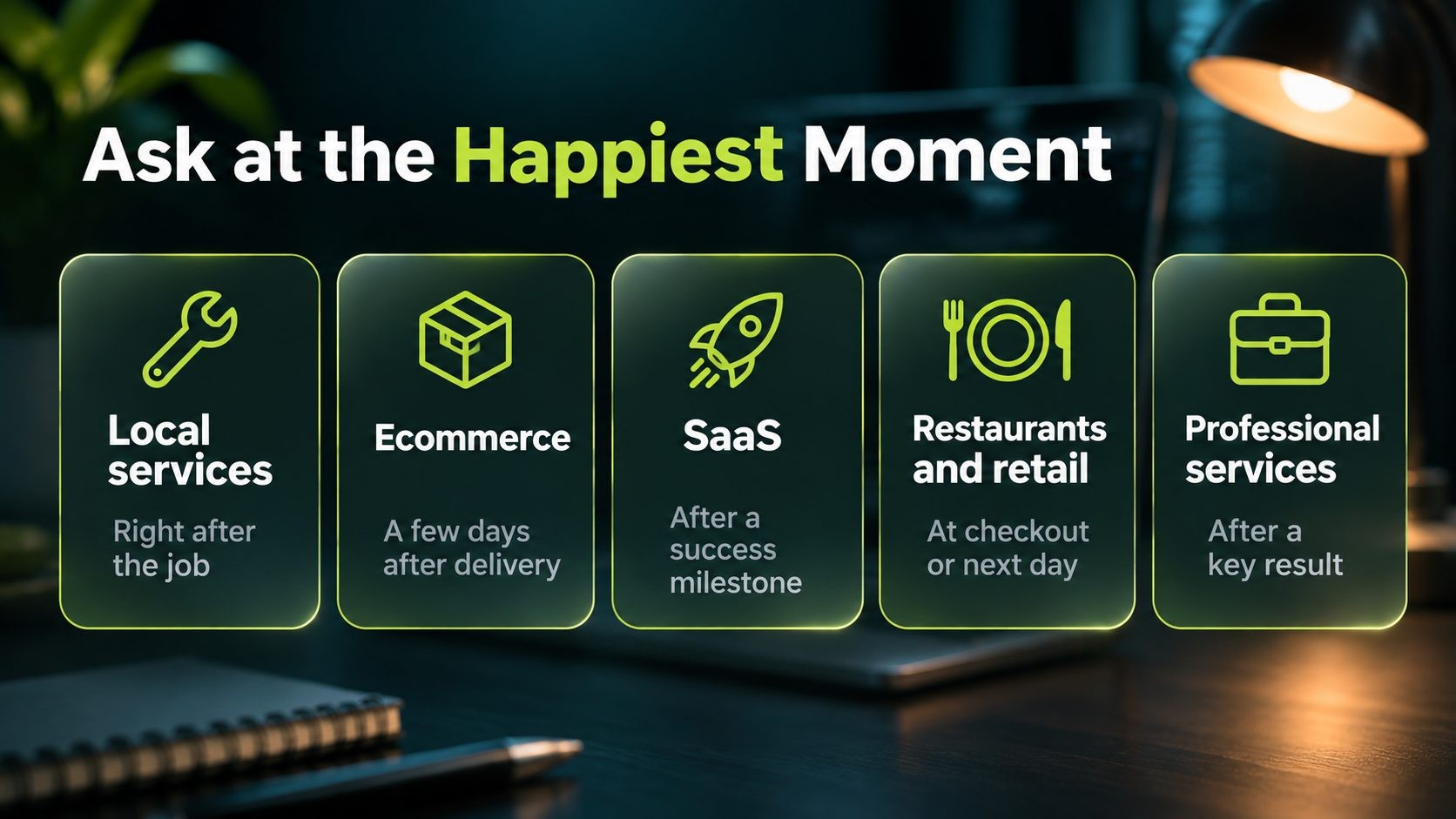
The best time to ask is shortly after the customer experiences the result, while the experience is fresh and positive:
- Home and local services: Right after the job is done, in person, followed by a text or email the same day.
- Ecommerce: A few days after delivery, once the customer has had a chance to use the product. Not at checkout, when they have not received anything yet.
- SaaS and software: After a clear success, such as completing setup, reaching a milestone or getting a support issue resolved.
- Restaurants and retail: At checkout with a QR code, or the next day by email or text for customers you can contact.
- Professional services: At the end of a project or after a significant result, such as a successful launch or a solved case.
For stores, review requests usually go in the post-purchase email sequence. If you run WooCommerce, the same emails that improve checkout and repeat sales, covered in this guide to WooCommerce checkout optimization, are the natural place to add a review request.
Ask everyone
Ask every customer, not just the ones who seem delighted. This keeps you on the right side of Google's policy and the FTC's concerns about gating, and it also produces more believable reviews. A few critical reviews among many positive ones make your profile more credible, and they show prospects how you handle problems.
Train your team, without quotas
Give your team one simple sentence to use, such as: "If you were happy with today, a quick Google review would really help us. I can text you the link." Make asking part of the routine at the end of every job or appointment. Do not set staff review quotas or reward employees for the number of five-star reviews, because Google's policy prohibits review quotas and they encourage pressure that customers can feel.
Step 3: Make It Effortless
The number one reason customers do not leave a review after saying they will is friction. Every extra click loses people.
- Use a direct review link. In your Google Business Profile, you can get a link that opens the review form for your business directly. Share that link, not your general Google listing or your homepage.
- Add a QR code to receipts, invoices, packaging, counter signs and business cards, pointing to the same direct link.
- Ask for one platform at a time. Giving customers a choice of five review sites often means they choose none. Pick the most important one for each customer, usually Google for local businesses.
- Make it work on mobile. Most people will leave a review on their phone, so test your link on one before sending it to customers.
- Keep your own review forms short. If you collect reviews on your website, do not require an account, a long form or a password.
- Tell customers what to write about, if they are unsure. A gentle prompt such as "What did you need help with, and how did it go?" helps customers write a useful review without telling them what to say or how to rate you.
Test the whole path yourself every few months. Click the link in your own email on your own phone, and make sure it still opens the right review form. Links break more often than you would expect after a business name change, a profile update or a switch in tools.
Step 4: Use Templates That Sound Human
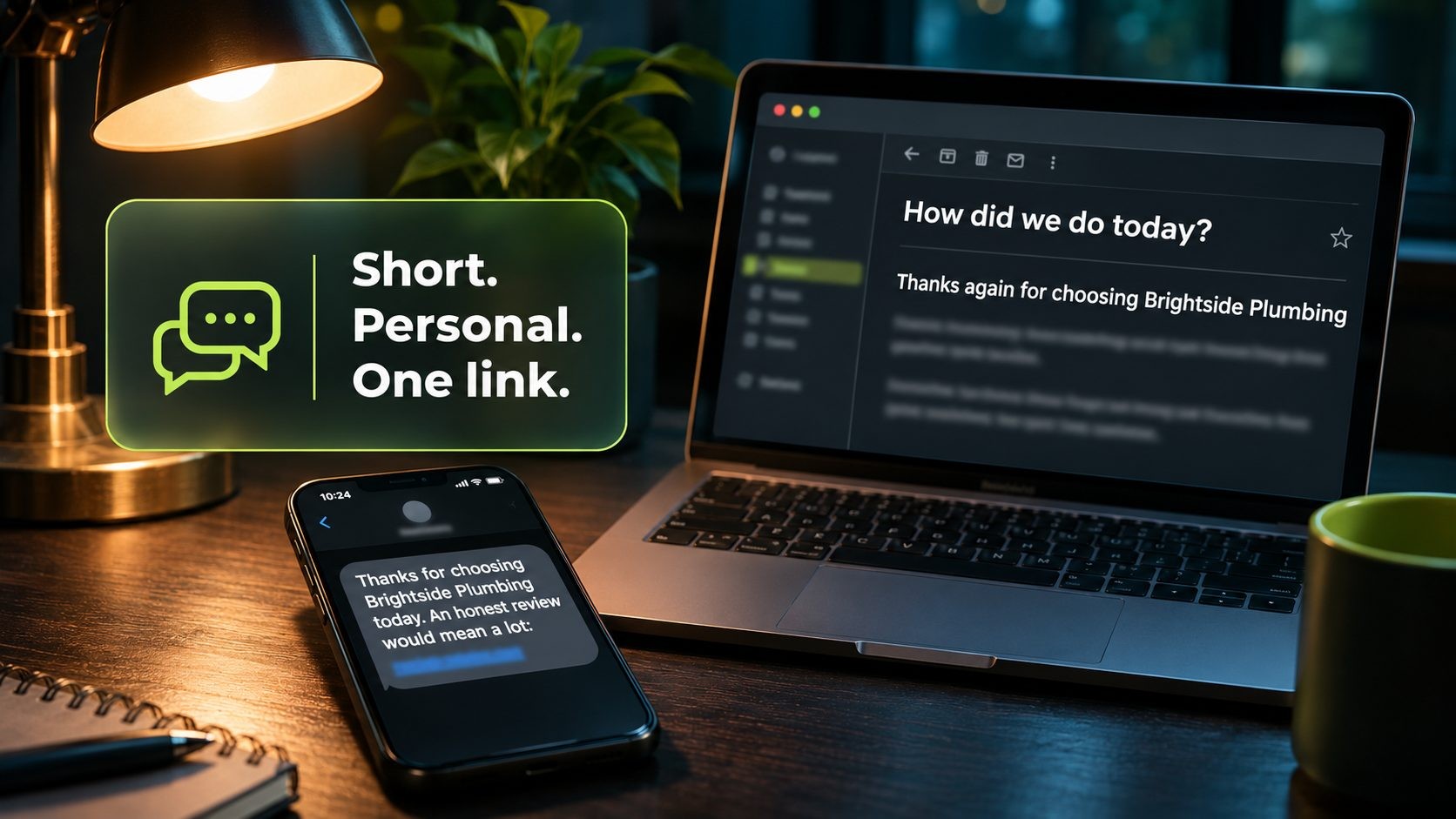
These templates use a sample business, Brightside Plumbing. Change the name, tone and details to fit your business, and keep them short.
Email request template
Subject: How did we do today?
Hi Sarah,
Thanks again for choosing Brightside Plumbing for your kitchen repair today. We hope everything is working perfectly.
If you have a minute, would you share a quick review of your experience? Honest feedback helps other homeowners decide, and it helps us keep improving.
Leave a review here: (your direct Google review link)
Thanks, Mike, Brightside Plumbing
SMS template
Hi Sarah, thanks for choosing Brightside Plumbing today. If you have a minute, an honest review would mean a lot: (short review link)
Keep text messages under 160 characters where possible, send them during normal hours, and only text customers who have agreed to receive messages from you.
In-person script
"Thanks for having us today. We're a small local team, and reviews really help people find us. If you were happy with the work, would you mind leaving a quick Google review? I'll text you the link so it only takes a minute."
Then send the link straight away, while you are still there.
One follow-up reminder
If someone does not respond, send one gentle reminder a few days later, and then stop:
"Hi Sarah, just a quick follow-up from Brightside Plumbing. If you have a moment, we'd really appreciate your honest feedback: (review link). Thanks either way!"
One reminder often brings in as many reviews as the first message. More than one starts to feel like pressure.
Step 5: Choose Where to Collect Reviews
Focus beats spreading yourself thin. For most local businesses, Google is the first priority, because it affects local rankings and is where most customers look first. Once your Google reviews are flowing, add the platform where your specific customers compare options.
For service businesses such as agencies, consultants, contractors and IT providers, that is often an industry directory. Clutchpilot, for example, is a business directory where buyers compare providers by service and location, and its free provider profile lets you collect verified client reviews in the same place prospects are researching. Verified reviews on a focused platform are particularly persuasive for higher-value services.
For ecommerce, product reviews on your own product pages matter most, because they answer buying questions right where the decision is made. If you sell on marketplaces, follow each marketplace's own rules and tools for review requests.
Reviews you collect can also work harder for you. With the customer's permission or within each platform's terms, you can quote short excerpts on your website, in proposals and on social media, linking to the original review so readers can check it. Keep the wording exactly as the customer wrote it. Editing a review to make it sound better turns a real testimonial into a misleading one.
Two more habits help. Spread reviews over time rather than collecting dozens in one week, because sudden spikes can look unnatural to customers and platforms. And keep your business name, address and phone number consistent everywhere you collect reviews, so every review connects to the same business. This small business SEO checklist covers listings and consistency in more detail.
Step 6: Reply to Every Review
Replying to reviews shows customers that you listen, and it shows future customers how you treat people. It also encourages more reviews, because customers see that their words reach a real person.
Replying to positive reviews
Keep it short, specific and personal. Mention something from the review so it does not sound automatic:
"Thanks so much, James! We're glad the new water heater is running well and that the team kept everything tidy. We appreciate you trusting Brightside Plumbing."
Replying to negative reviews
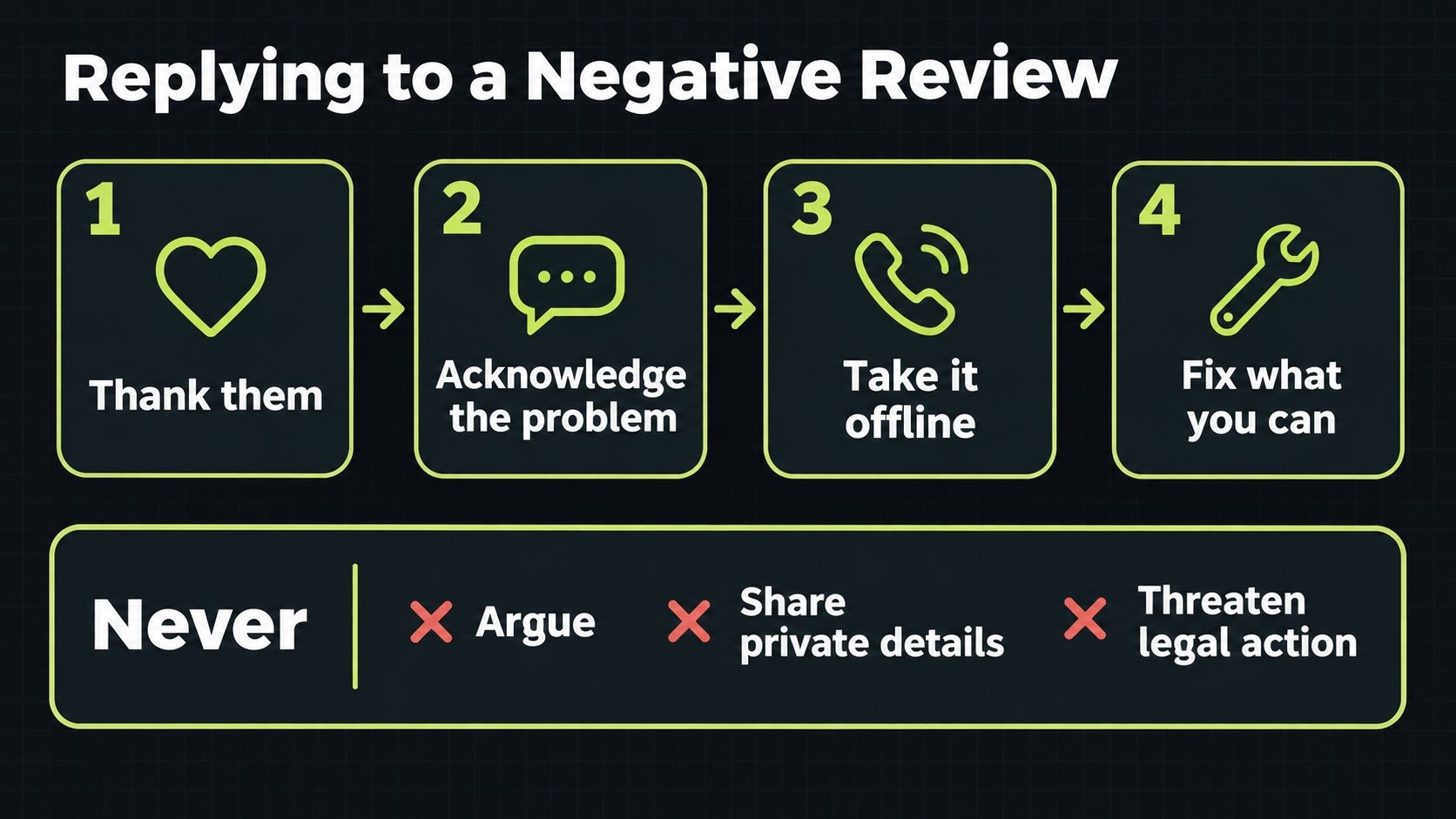
Negative reviews are where your reply matters most, because prospects read them closely. Use a calm, simple framework: thank them, acknowledge the problem, take the details offline, and fix what you can.
"Hi Lisa, thank you for the feedback, and I'm sorry the appointment started late. That's not the experience we want for anyone. I'd like to make this right. Please call me directly at our office so we can sort it out."
What never to do in a reply:
- Argue or blame the customer, even if you think they are wrong.
- Share private details about the job, the customer or their account.
- Threaten legal action or pressure them to remove the review. Beyond looking bad, intimidation and unfounded threats are the kind of review suppression the FTC rule prohibits.
Reply from a named person where you can, such as the owner or the manager who handled the job. A real name makes the response feel personal, and it shows prospects that someone senior takes complaints seriously. Keep replies short. Two or three sentences are enough, and long, defensive explanations rarely help.
If you resolve the issue, the customer may choose to update their review. Do not ask them to remove it in exchange for a refund or a discount, because that turns your fix into an incentive.
Handling fake or abusive reviews
If a review is clearly fake, comes from a competitor, contains hate speech or breaks the platform's policy in another way, report it through the platform's own reporting tools. Keep your public reply short and factual, or do not reply until the platform has reviewed it. Fighting fake reviews in public tends to draw more attention to them.
Build a Simple Review System
Good intentions fade without a system. The businesses that keep collecting reviews make the request automatic.
Automate the request. Most booking systems, CRMs, invoicing tools and ecommerce platforms can send an email or text after a job is completed or an order is delivered. Set it up once with your template and direct link, and every customer gets asked without anyone remembering to do it.
Run a 15-minute weekly routine. Once a week, reply to new reviews, check for any that need reporting, and look at whether requests went out to everyone. Google Business Profile's own performance insights are free and show how customers find and contact you, alongside the other tools in this list of free SEO tools.
Learn from what customers say. Reviews are free customer research. Every month, read through the latest ones and note the themes: what customers praise most, what they mention as problems, and what words they use to describe your service. Praise themes are good material for your website and ads, and recurring problems tell you what to fix next.
Track a few simple numbers:
- Request-to-review rate: How many customers who were asked actually left a review.
- Average rating trend: Whether your rating is rising, steady or falling over months.
- Recency: How many reviews you received in the last 30 and 90 days.
- Response time: How quickly you reply, with a target of a few days.
Seasonal peaks are a good moment to check the system. After a busy period such as the holiday rush, more customers than usual are ready to give feedback, which is one more reason to prepare your store ahead of time with a WooCommerce Black Friday checklist.
Common Mistakes That Cost You Reviews (or Get You in Trouble)
- Bulk-asking every past customer at once. A sudden flood of reviews can look unnatural and may be filtered. Ask recent customers first, and spread out any requests to older ones.
- Buying reviews or using AI-written reviews. Both fall under the FTC's ban on fake reviews, and platforms remove them.
- Offering discounts or gifts for Google or Yelp reviews. Even when the reward does not depend on a positive rating, both platforms prohibit it.
- Asking only happy customers. Google prohibits selective solicitation, and the FTC warns it could violate the FTC Act.
- Setting up an in-store review tablet. Many reviews posted from one device or network can look suspicious to review platforms and may be filtered. Let customers use their own phones instead.
- Posting reviews from staff or family without disclosure. Insider reviews must be clearly disclosed under the FTC rule, and most platforms do not allow them at all.
- Ignoring negative reviews. Silence looks like you do not care. A calm reply often does more for your reputation than the original review did harm.
FAQs
Conclusion
Getting more customer reviews comes down to a few simple habits. Earn the review with a good experience, ask every customer at the moment they are happiest, send a direct link that takes seconds to use, and reply to every review you receive. Make the request automatic so it happens every time, and track a few numbers so you know it is working.
Just as important, stay within the rules. Do not buy reviews, write fake ones, pay for positive ratings, hide negative reviews or ask only happy customers. The FTC's 2024 rule and platform policies have made those shortcuts expensive, and the honest approach works better over time anyway, because genuine reviews build the kind of trust that shortcuts never can.
Collecting reviews for a service business? Create a free Clutchpilot provider profile to collect verified client reviews where buyers compare providers by service and location.
Get new posts by email
New guides and alerts, sent when they are published. No spam. Unsubscribe anytime.


Comments (0)