- Khurram Shahzad
- Security Alerts
- 1975
- 0
Updated: November 11, 2026
Google has patched another Chrome flaw that attackers are already using. The bug, CVE-2026-125350, sits in the part of Chrome that handles XML, and it's the eighth exploited Chrome zero-day of 2026. Google released the fix on November 9 and says it is aware that an exploit exists in the wild.
Here's the catch most people miss: Chrome downloads the update on its own, but the fix doesn't protect you until Chrome restarts. If your browser has been open for days, you may still be exposed.
The good news: updating and relaunching takes about 60 seconds. This guide shows you how to check your version, which builds are safe, what to do about Edge, Brave and other Chromium browsers, and how to patch a whole team.
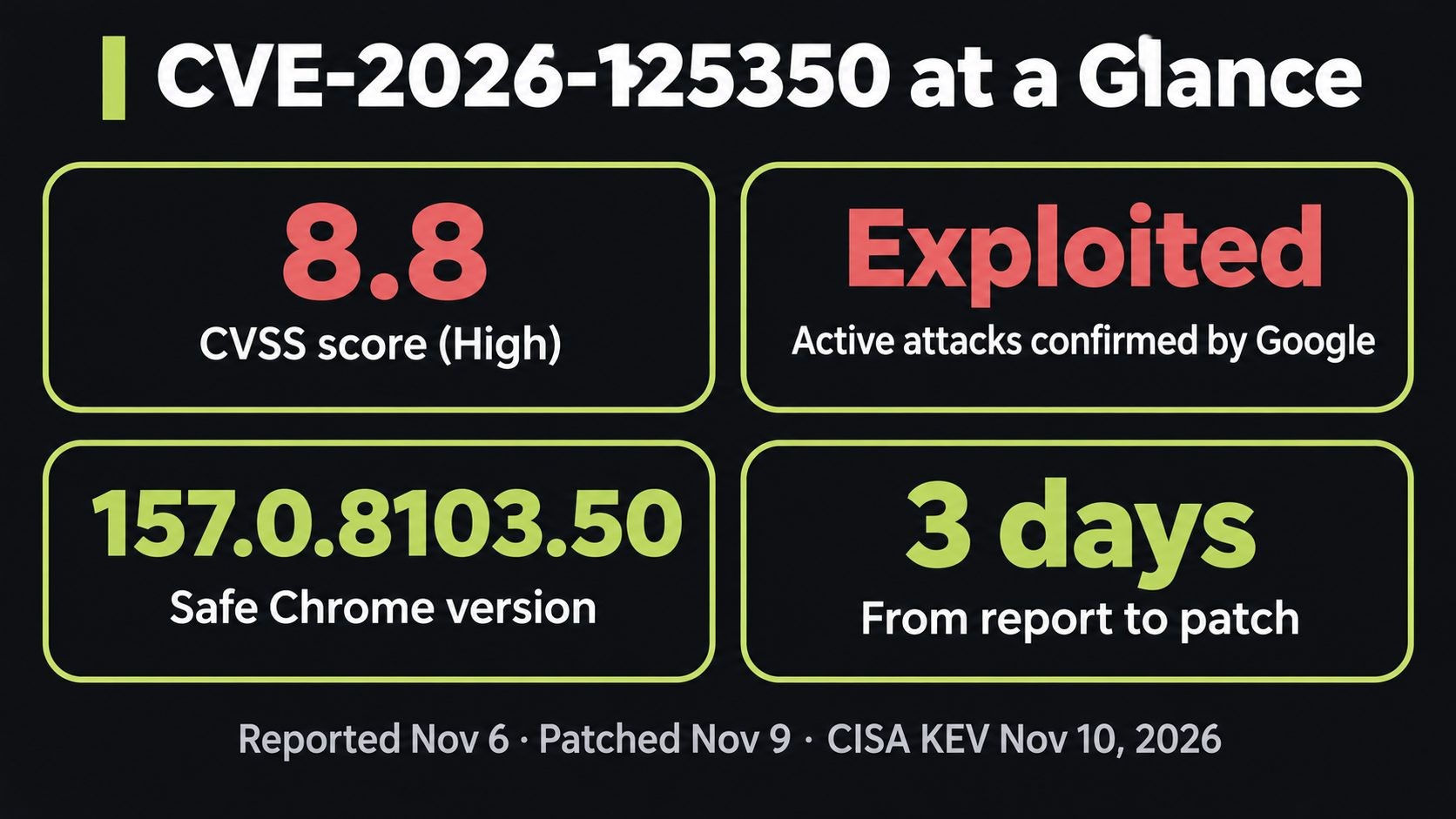
Quick answer: what is CVE-2026-125350? CVE-2026-125350 is a high-severity use-after-free vulnerability in Google Chrome's XML component, rated CVSS 8.8. A crafted web page can use it to run code inside Chrome's renderer sandbox. Google confirmed it's being exploited and fixed it in Chrome 157.0.8103.50 on November 9, 2026.
What Is CVE-2026-125350?
CVE-2026-125350 is a memory-safety bug in how Chrome processes XML. An anonymous researcher reported it to Google on November 6, 2026. Google shipped the fix just three days later, on November 9, which tells you how seriously it took the report.
Google's advisory gives very few details. It says only that this is a "use after free in XML" and that an exploit exists in the wild. Google hasn't said who is exploiting it, who is being targeted or how the attack is delivered. That's normal. Google keeps bug details restricted until most users have updated.
The U.S. Cybersecurity and Infrastructure Security Agency (CISA) added CVE-2026-125350 to its Known Exploited Vulnerabilities catalog on November 10. Federal civilian agencies must patch by November 24, 2026. For everyone else, that's a strong signal to patch now.
CVE-2026-125350 key facts at a glance
| Item | Detail |
|---|---|
| CVE | CVE-2026-125350 |
| Severity | High, CVSS 8.8 |
| Component | XML (XSLT processing) |
| Bug type | Use-after-free |
| Exploited | Yes, Google confirms an exploit exists in the wild |
| Reported | November 6, 2026 (anonymous researcher) |
| Patched | November 9, 2026 |
| Fixed in | Chrome 157.0.8103.50/.51 (Windows, Mac), 157.0.8103.50 (Linux, Android) |
| CISA KEV | Added November 10, 2026; federal deadline November 24 |
Use-after-free, in plain English
Programs borrow memory to do their work and give it back when they're done. A use-after-free bug happens when a program keeps using memory after giving it back. An attacker who controls what fills that memory next can trick the program into running their code. In this case, the attacker's tool is a crafted web page, which means simply visiting the wrong site could be enough.
How to Update Chrome and Confirm You're Protected
This takes about a minute on a desktop computer:
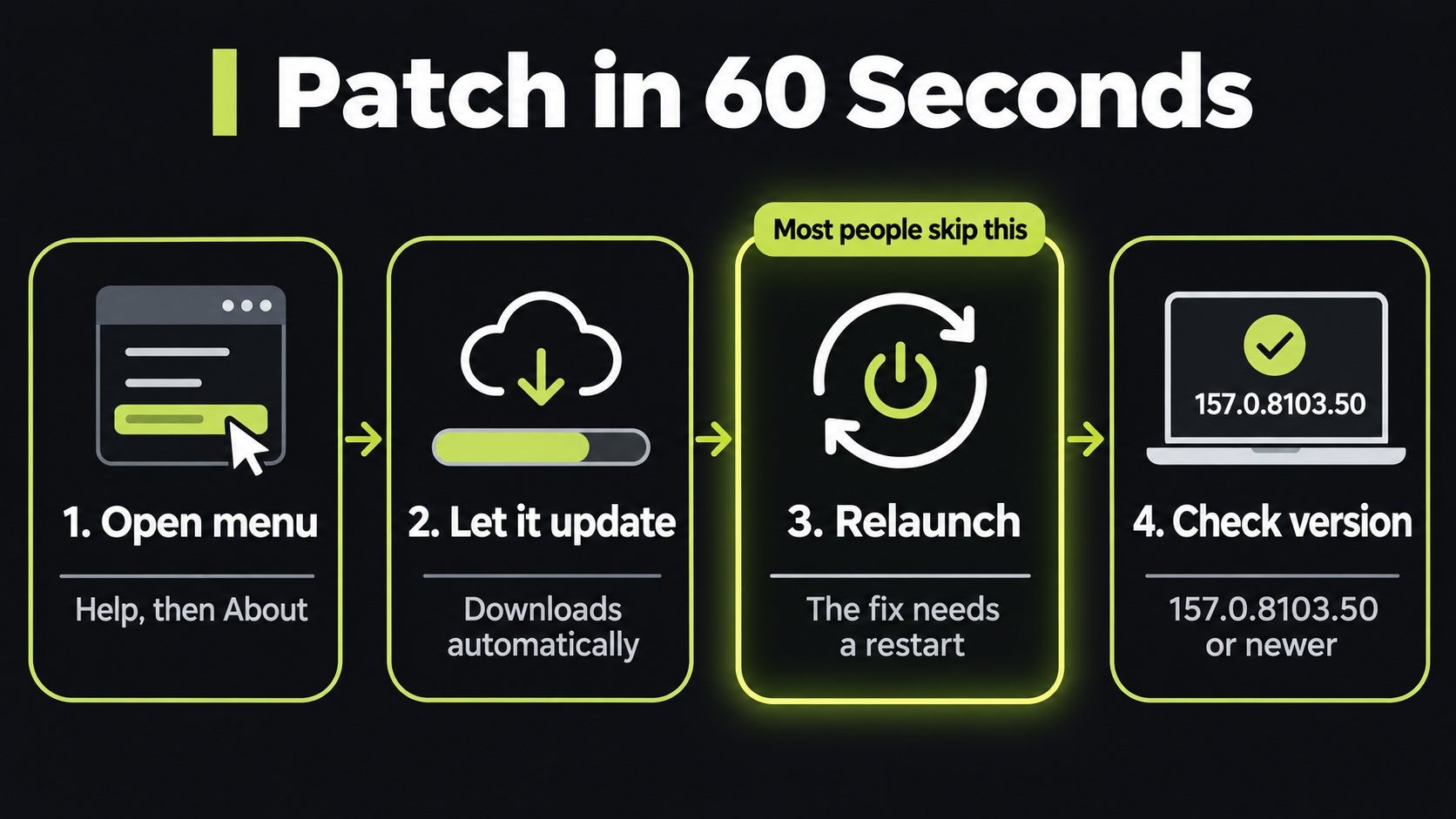
- Open Chrome's update page. Click the three-dot menu in the top right, then Help → About Google Chrome. Or type this in the address bar:
chrome://settings/help
- Let Chrome check for updates. It downloads the latest version automatically.
- Click Relaunch. Chrome reopens your tabs after the restart.
- Check the version number on the same page. It should be 157.0.8103.50 or higher.
On Android, open the Google Play Store, search for Chrome and tap Update if it appears. Then close and reopen the app.
Fixed Chrome versions for CVE-2026-125350
| Platform and channel | Safe version (or newer) |
|---|---|
| Windows and Mac (Stable) | 157.0.8103.50 or 157.0.8103.51 |
| Linux (Stable) | 157.0.8103.50 |
| Android | 157.0.8103.50 |
| Windows and Mac (Extended Stable) | 156.0.8078.96 |
| Early Stable (Chrome 158) | 158.0.8127.30 |
The update also fixes eight other security bugs, including a second XML use-after-free (CVE-2026-125346) and a type confusion bug in V8, Chrome's JavaScript engine. You can read the full list on the Chrome Releases blog.
Why the relaunch matters
Chrome is good at downloading updates quietly in the background. But the new code only runs after a restart. Until then, the old, vulnerable version keeps running every page you open. Many people leave Chrome open for weeks with dozens of tabs. If that's you, the restart is the step that actually protects you.
If you see a green, orange or red Update button in Chrome's top-right corner, an update is waiting. Click it.
Edge, Brave, Opera and Vivaldi: Are They Affected?
Microsoft Edge, Brave, Opera and Vivaldi are all built on Chromium, the open-source project behind Chrome. Each one ships Chromium fixes on its own schedule, so updating Chrome does nothing for Edge on the same computer.
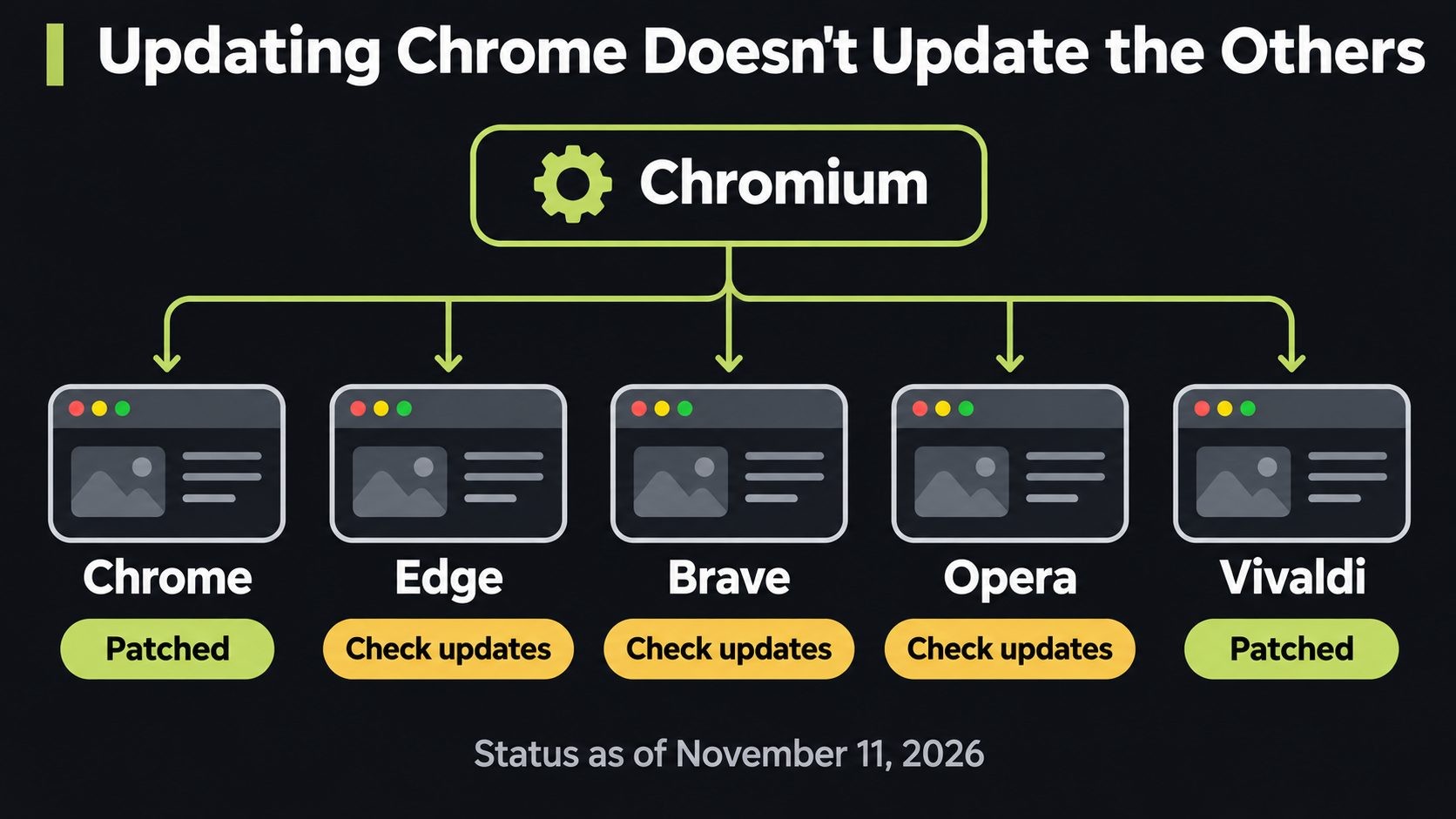
Status as of November 11, 2026:
| Browser | Status for CVE-2026-125350 |
|---|---|
| Google Chrome | Fixed in 157.0.8103.50/.51 |
| Vivaldi | Desktop and Android updates shipped November 10 |
| Microsoft Edge | Not yet listed against an Edge build |
| Brave | No release tied to the CVE yet |
| Opera | No release tied to the CVE yet |
| Chrome for iOS | Uses Apple's WebKit engine; Google lists no iOS fix |
Check each browser's "About" page and release notes over the next few days. Don't assume a recent update includes this fix unless the vendor says so. We'll update this table as vendors ship.
The XSLT Angle: What We Know (and Don't)
Security researchers who read the public Chromium patch say the bug sits in Chrome's bundled copy of libxslt, the library that applies XSLT stylesheets to XML documents. According to SOCRadar's analysis, a nested evaluation could free and replace a cached object while an earlier operation still held its old memory address.
Two important caveats:
- Google hasn't confirmed this reading. It's based on the public patch, not an official write-up.
- There's no upstream libxslt fix yet as of November 11, 2026, and it isn't confirmed whether other software that embeds libxslt is affected.
For web developers, this is worth watching. libxslt is used well beyond browsers, including in PHP's XSL extension and many server-side XML tools. If an upstream fix lands, plan to update your servers too.
All 8 Chrome Zero-Days of 2026
CVE-2026-125350 is the eighth Chrome vulnerability exploited in the wild this year. In 2025, Google fixed eight in total, so 2026 has already matched last year's count with weeks to spare.
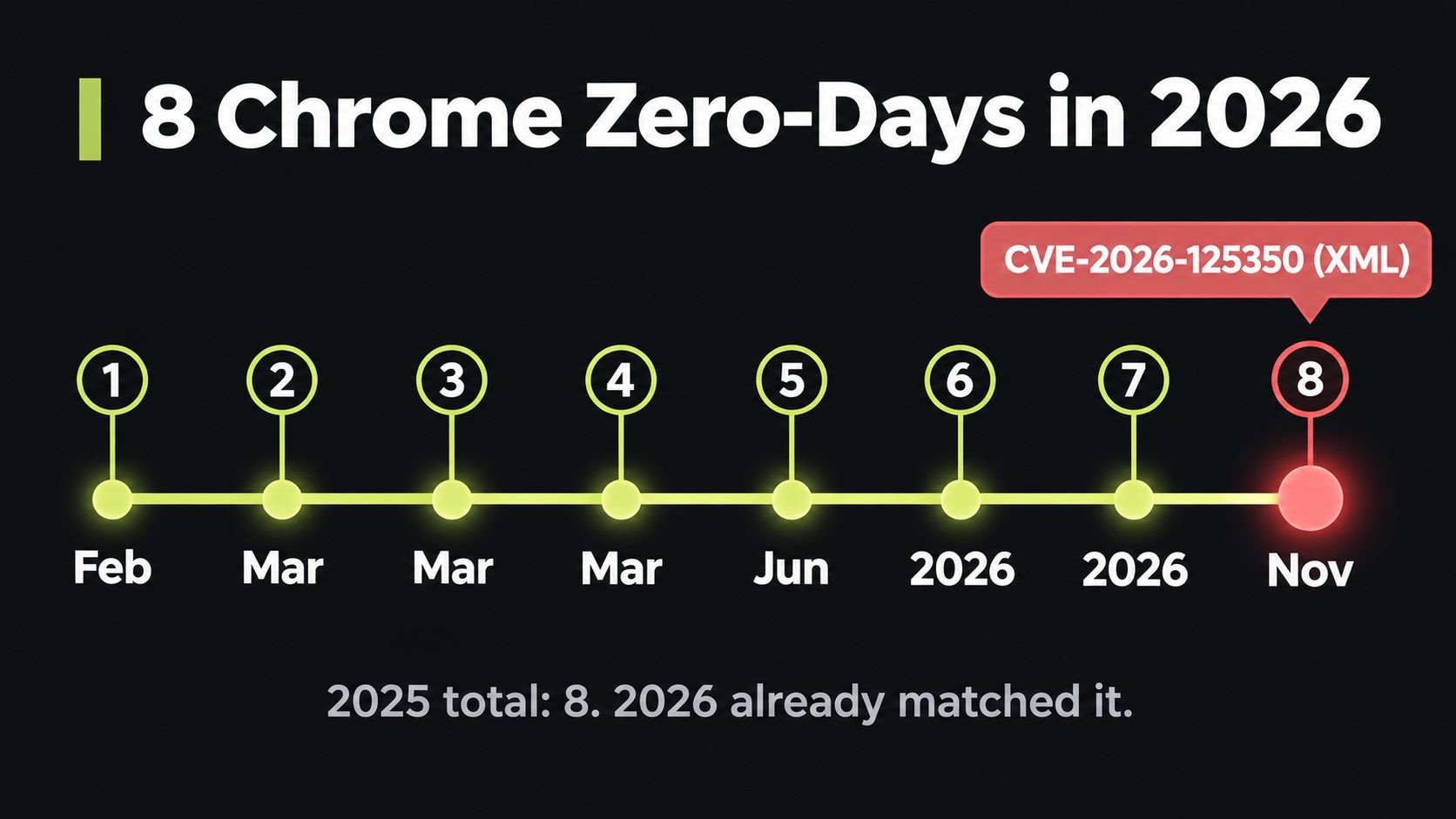
| # | CVE | Component | When |
|---|---|---|---|
| 1 | CVE-2026-2441 | CSS (use-after-free) | February |
| 2 | CVE-2026-3909 | Skia graphics (out-of-bounds write) | March |
| 3 | CVE-2026-3910 | V8 JavaScript engine | March |
| 4 | CVE-2026-5281 | Dawn / WebGPU (use-after-free) | March 31 |
| 5 | CVE-2026-11645 | V8 (out-of-bounds read and write) | June |
| 6 | CVE-2026-85046 | V8 (type confusion) | Early September |
| 7 | CVE-2026-87491 | V8 (out-of-bounds write) | September 9 |
| 8 | CVE-2026-125350 | XML / XSLT (use-after-free) | November 9 |
The pattern is clear. Attackers keep hunting Chrome's graphics, JavaScript and parsing code, and V8 alone accounts for four of this year's eight. Fixes now arrive every few weeks, so browser updates should be treated as urgent security patches, not routine maintenance.
How to Patch a Whole Team (for Business Owners and IT)
If you run a small team, "everyone please update Chrome" in Slack isn't enough. Here's a short checklist that works whether you have five people or fifty:
- Force the relaunch. In managed environments, use Chrome's
RelaunchNotificationandRelaunchNotificationPeriodpolicies so people can't postpone the restart that activates the fix. - Verify, don't assume. Check your device management (MDM) or endpoint tool for any Chrome build below 157.0.8103.50. For a tiny team, ask everyone to send a screenshot of
chrome://settings/help. - Cover every Chromium browser. Track Edge, Brave, Opera and Vivaldi separately, and confirm each vendor's fixed build before you mark the job done.
- Consider a temporary XSLT block, carefully. Some analysts suggest disabling XSLT with the
XSLTEnabledenterprise policy until patches land. This is not Google's guidance, and it may break internal tools that use XML, so test it first. - Watch for signs of trouble. Repeated tab or renderer crashes, unexpected programs launched by the browser, or new startup items after browsing are worth a closer look. A clean result doesn't prove nothing happened, but it's a good start.
- Turn on automatic updates everywhere, including on Android phones used for work.
This is the same discipline we covered in the AuthMask vulnerability alert: patch fast, verify, and don't trust "it updates itself." If you'd rather hand this off, I offer security help for small businesses.
Why Browser Zero-Days Matter for Small Businesses
For most small businesses, the browser is the office. Your WordPress admin, Shopify or WooCommerce dashboard, banking, email, payroll and every SaaS tool live in a browser tab. An attacker who gets code running in that browser is one step from your most valuable logins.
Timing matters too. We're heading into Black Friday and Cyber Monday, when store owners spend long hours logged in to admin panels and attackers ramp up. If you run an online store, pair this update with our WooCommerce Black Friday checklist, and read how attackers targeted checkouts in the Shopify checkout hijacking incident.
The browser is also only one layer. Our developer laptop security checklist covers the machine around it, and the WordPress security checklist covers the sites you log in to.
This alert is part of our website security for small business guide, which puts every 2026 incident into a layer-by-layer plan you can follow.
Not sure if this affects you? I've recovered 50+ attacked websites. Request a security review.
CVE-2026-125350 FAQs
Conclusion: Update, Relaunch, Then Check Your Other Browsers
CVE-2026-125350 is being exploited right now, and the fix is free and fast. Update Chrome to 157.0.8103.50 or newer, relaunch it, and confirm the version. Then check Edge, Brave and Opera, which patch on their own schedules. It's the second patch-now alert this month after the sshole vulnerability, so make quick updates a habit.
Need help keeping a team's devices and sites patched? Get in touch.
Sources
- Chrome Releases blog (Stable Channel Update for Desktop, November 9, 2026)
- CISA Known Exploited Vulnerabilities catalog
- SOCRadar: CVE-2026-125350, Google Fixes Exploited Chrome XML Zero-Day
- Qualys ThreatPROTECT: Chrome Patches Eighth Zero-Day of the Year
- Threat Defence: Chrome CVE-2026-125350 Zero-Day, Patching and Hunting
- Security Affairs: Google fixes the sixth actively exploited Chrome zero-day of 2026 (CVE-2026-85046)
- BleepingComputer: Google patches seventh Chrome zero-day exploited in attacks (CVE-2026-87491)
Get new posts by email
New guides and alerts, sent when they are published. No spam. Unsubscribe anytime.


Comments (0)