- Updated
- Khurram Shahzad
- Security Alerts
- 2120
- 0
Updated: November 11, 2026.
An Android app with zero permissions could convince Microsoft Authenticator that it was Microsoft Teams, and walk away with tokens for your work email, files and calendar. That is the AuthMask vulnerability in one sentence. Tracked as CVE-2026-80097, the AuthMask vulnerability was found by Ofek Levin of Enclave and carries a CVSS score of 8.6. It affects Microsoft Authenticator for Android before version 6.2606.4246.
The good news first: Microsoft fixed it on September 8, 2026, and says it has not been exploited in attacks. The research only became public on October 23, which is why it is in the news now.
Below, I explain how the attack worked in plain English, who is affected and who is not, how to check the Authenticator version on your phone, and what IT teams and small businesses should do this week.
AuthMask at a glance
If you only need the facts, here they are. The full record is in the CVE-2026-80097 entry in the National Vulnerability Database.
| Item | Detail |
|---|---|
| Name | AuthMask |
| CVE | CVE-2026-80097 |
| Product | Microsoft Authenticator for Android |
| Affected versions | 6.0.0 up to, but not including, 6.2606.4246 |
| Fixed version | 6.2606.4246 or later |
| Severity | CVSS 3.1 score 8.6 (High), Microsoft rating Important, elevation of privilege, CWE-287 Improper Authentication |
| Discovered by | Ofek Levin, Enclave Fellowship Program |
| Patch released | September 8, 2026 (Patch Tuesday) |
| Research published | October 23, 2026 |
| Exploited in the wild | No, according to Microsoft |
| iPhone affected | No, Android only |
What is the AuthMask vulnerability?
AuthMask is a flaw in how Microsoft Authenticator for Android decided which app should receive sign-in tokens. The name says it well: a malicious app put on the "mask" of a trusted Microsoft app, and Authenticator believed the mask.
The attacker did need a malicious app on the same phone. But that app needed no Android permissions at all. It did not ask for your contacts, your camera or your files, so nothing looked suspicious when it was installed. That is what makes this Microsoft Authenticator flaw worth taking seriously.
Why does a token matter so much? Because a token is what you get after you pass your password and MFA prompt. Whoever holds a valid token does not need your password, and does not need to beat MFA. They are already past the front door. So even though Microsoft rates CVE-2026-80097 as Important rather than Critical, the prize at the end of the attack is a working session for your Microsoft 365 account.
Microsoft fixed the bug quietly in its September security updates. The full technical story only came out on October 23, when the researcher published Enclave's original AuthMask research. Most of the coverage you are seeing now is reacting to that write-up, not to a new attack.
How Microsoft Authenticator works as a token broker
To follow the AuthMask attack, you need one piece of background. On Android, Microsoft Authenticator does more than show 6-digit codes. When a work or school account is signed in, it also acts as a broker for single sign-on (SSO).
Teams, Outlook, OneDrive and other Microsoft apps do not each ask you to sign in. Instead, they ask Authenticator for tokens, and Authenticator hands them out on your behalf. Three kinds matter here:
- Access token: a short-lived pass that lets an app call a service such as your mailbox.
- Refresh token: a longer-lived pass used to get new access tokens without signing in again.
- ID token: a statement of who you are, used by the app to show your account.
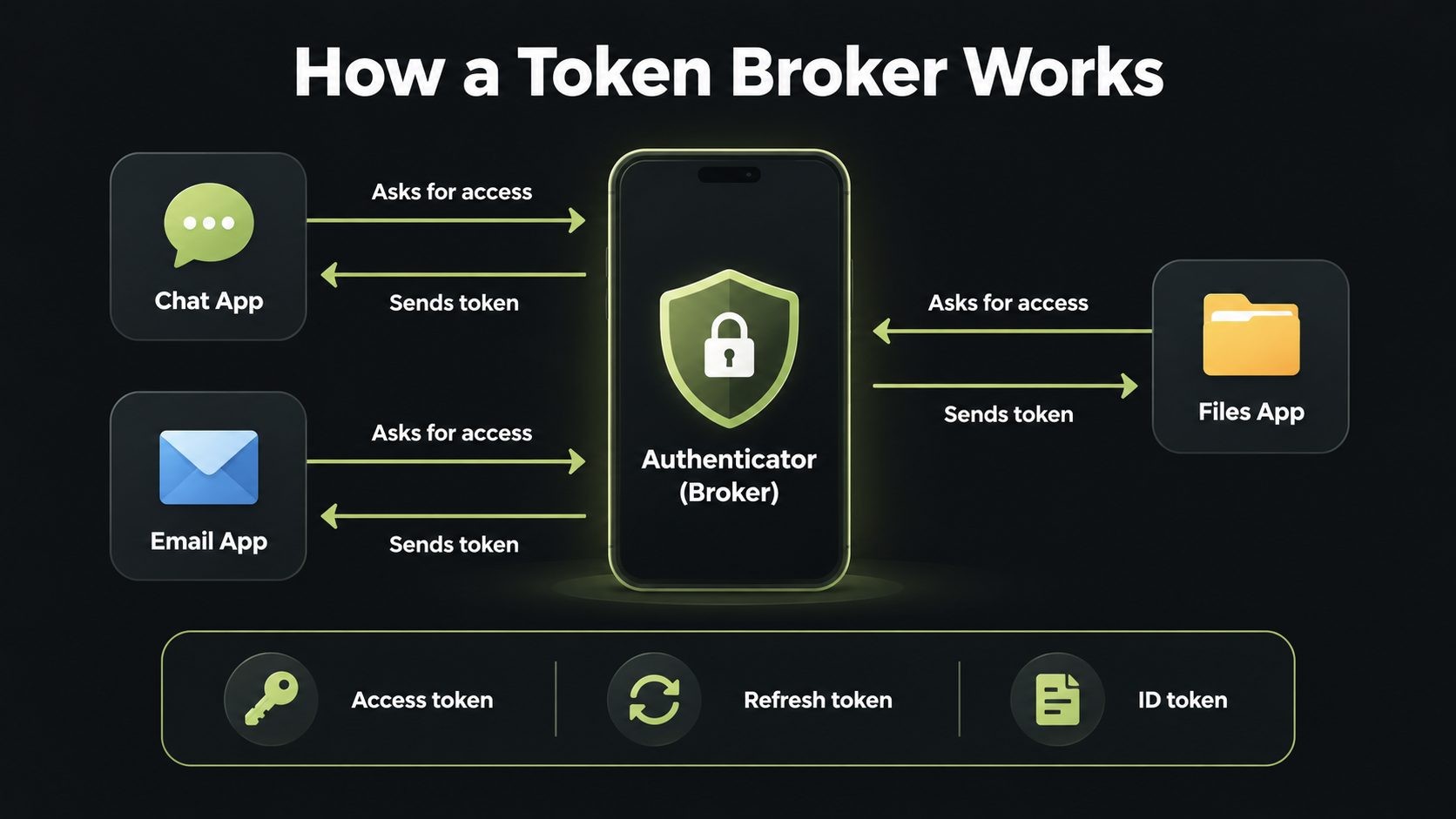
Because the broker controls access to the whole work account, it has to be strict. It should only give tokens to the real app that asked, never to an app that merely claims to be that app.
Think of a building receptionist who hands out keycards. A good receptionist checks the visitor's face against their ID. AuthMask was a receptionist who read the name on the visitor's badge, saw "Teams", and handed over the keycard without looking up.
How the AuthMask attack worked, step by step
This is the core of the AuthMask vulnerability. I am keeping it conceptual: no exploit code, just the logic, which is what defenders and developers need.
The open door: AccountChooserActivity
Authenticator exposed a component called AccountChooserActivity. On Android, an "exported" activity can be launched by any app on the device. This one sat at the start of the token flow, so any installed app could knock on it.
The fake ID
When an app launched that activity, it supplied its own details: an app name, a package name, a client ID, a redirect URI and the permissions (scopes) it wanted. The malicious app simply filled these in with Teams' details. In effect, it wrote "Teams" on its own badge.
The broken check
Authenticator did run a check. It confirmed that the redirect URI matched the signature of the app being claimed. The problem is that the real Teams signature is readable on any phone where Teams is installed. An attacker could copy it and pass the check, so the check proved nothing about who was really calling.
The ignored truth
Here is the frustrating part. Android tells the receiving app who the real caller is. Authenticator had that verified identity, but it only used it for bookkeeping, not for the trust decision. The truth was in hand and was not consulted.
The handover
With the checks passed, Authenticator returned access, refresh and ID tokens to the malicious app, in plain text.
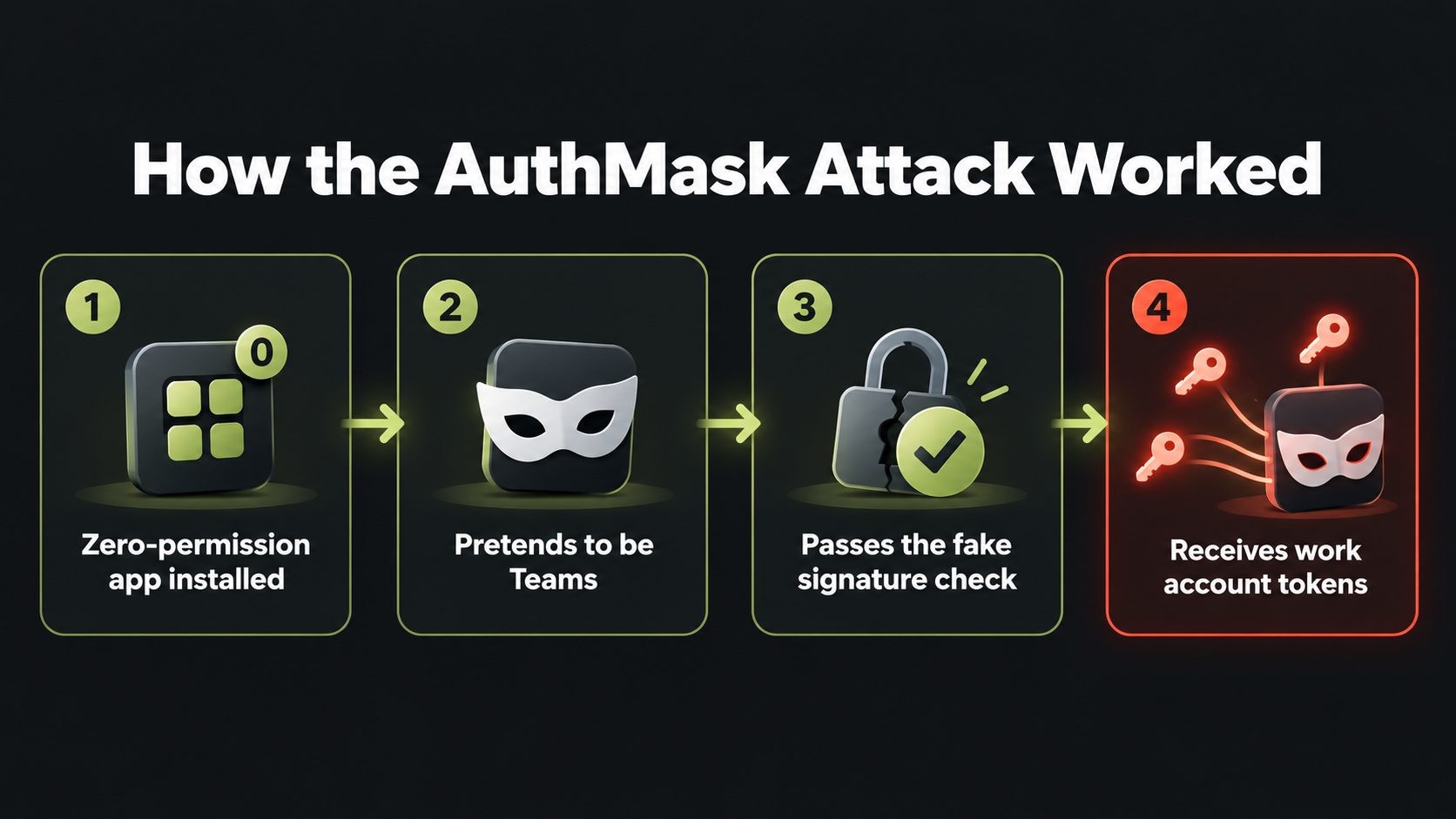
In short, the AuthMask attack had four steps:
- A malicious app with zero permissions is installed on the phone.
- It launches the exported activity while pretending to be Teams.
- It passes the signature check using values copied from the real Teams app.
- It receives the work account's tokens.
What attackers could access
Enclave tested three disguises. Each one returned tokens for a different service and a different set of permissions:
| Disguise | Resource | Example permissions returned |
|---|---|---|
| Microsoft Teams | Microsoft Graph | Mail.ReadWrite, Mail.Send, Files.ReadWrite.All, Calendars.ReadWrite, ChatMessage.Send, Sites.ReadWrite.All |
| Teams chat backend | api.spaces.skype.com | user_impersonation |
| Authenticator itself | Authentication methods | UserAuthenticationMethod.ReadWrite, Passkey.Create, Passkey.Delete |
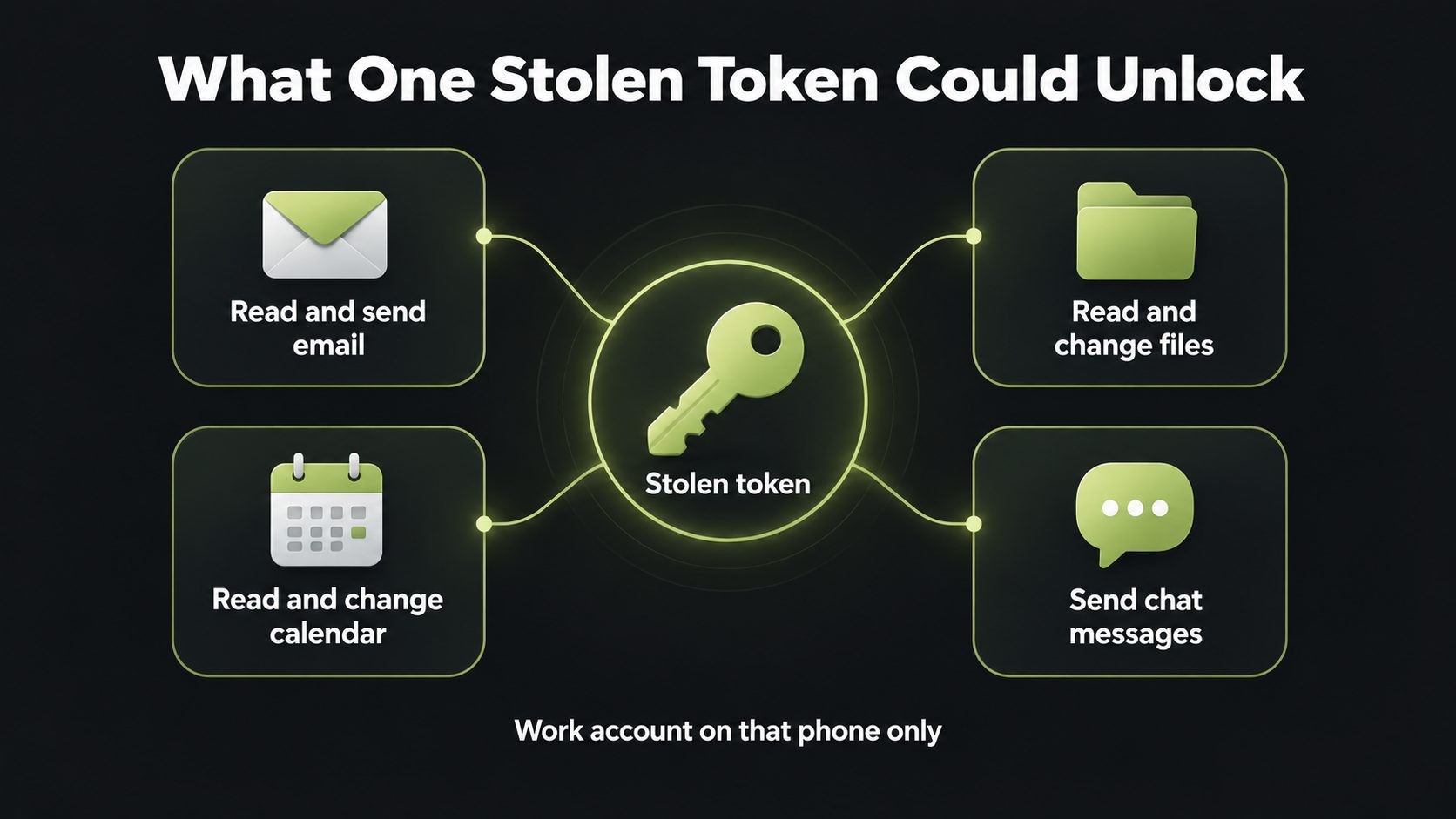
In plain English, the Teams disguise alone meant someone could:
- Read your work email and send email as you.
- Read and change your OneDrive and SharePoint files.
- Read and change your calendar.
- Send Teams chat messages in your name.
The third disguise is worth reading carefully. The scope names suggest the ability to manage passkeys and sign-in methods on the account. Enclave lists these scopes, but it does not demonstrate further impact with them. So the honest statement is "the tokens carried passkey-related permissions", not "passkeys were stolen".
There is also a limit. The tokens covered the work account signed in on that phone only. Other accounts, and other people's accounts, were out of reach.
Did users need to tap anything? Microsoft vs Enclave
This is where the two sides disagree, and few articles explain it clearly.
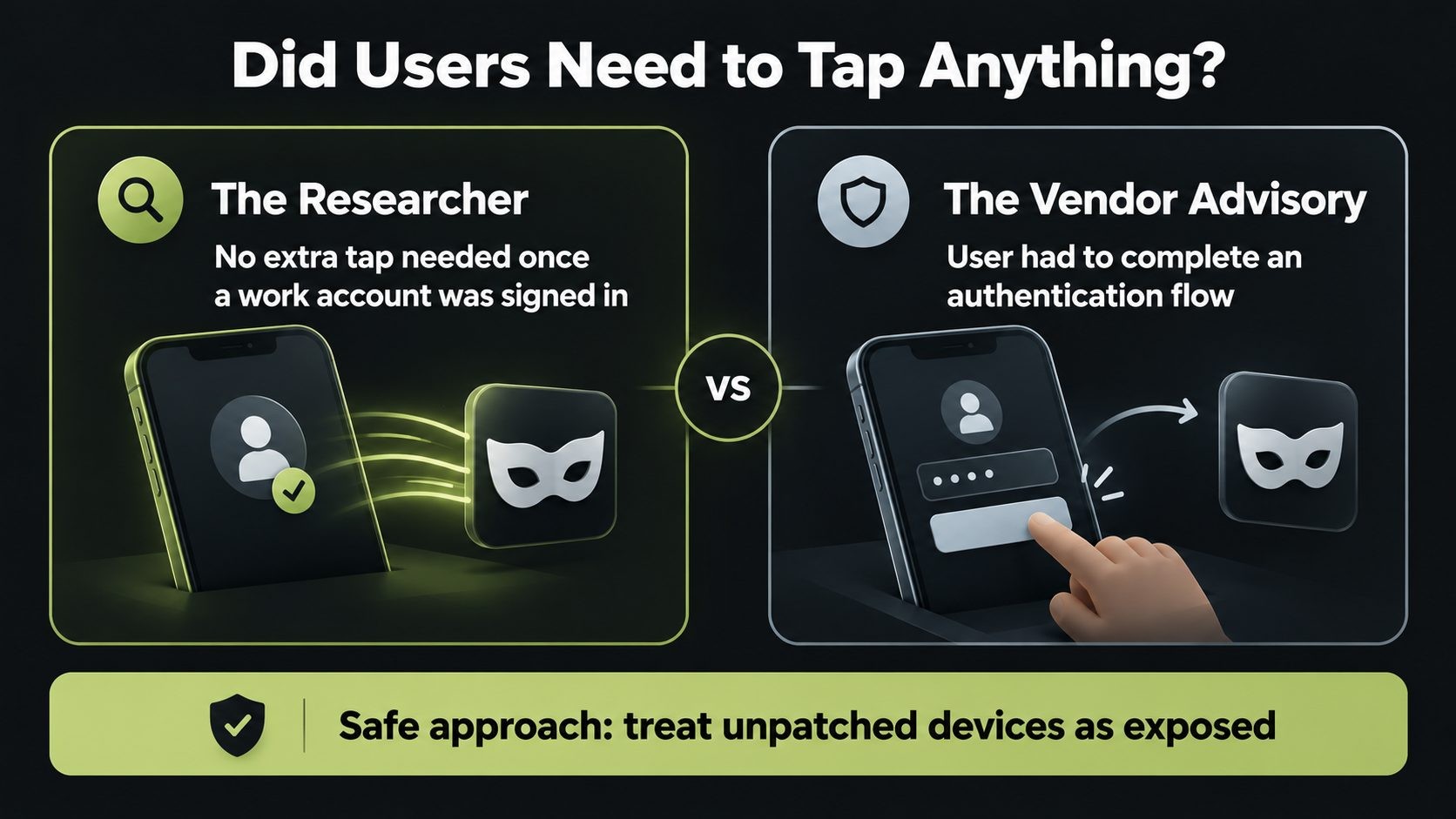
Enclave says its proof of concept returned tokens with no user interaction beyond having a signed-in work account on the phone. Microsoft's official CVE-2026-80097 advisory says something different: exploitation requires installing and running a malicious app and convincing the user to complete an authentication flow. Microsoft's CVSS vector marks user interaction as required (UI:R).
Microsoft also rates exploitation as "less likely" and says the flaw was not publicly disclosed before the fix.
My verdict: you do not need to settle the argument to act. If a phone ran a vulnerable Authenticator build and also had an app you cannot vouch for, treat it as potentially exposed, whichever side is right about the tap. That is the safe reading for anyone defending a Microsoft 365 tenant.
Who is affected by AuthMask (and who is not)
You were in the affected group if your Android phone ran Microsoft Authenticator before 6.2606.4246 and had a work or school account signed in. Exploitation also needed a malicious app on the same device.
You were not affected if you use an iPhone, if your phone is on 6.2606.4246 or later, or if you only use Authenticator for personal accounts with no work account signed in.
Most people are already safe. The Google Play listing has moved well past the fixed build (version 6.2609.6214 as of late October), so phones with auto-update on have the fix.
Are you at risk? Three quick questions:
- Is Microsoft Authenticator on an Android phone, not an iPhone?
- Is a work or school account signed in to it?
- Is the app version below 6.2606.4246, or are you unsure?
Three yeses mean you should update now and follow the steps below.
How to check and update Microsoft Authenticator on Android
This takes about two minutes.
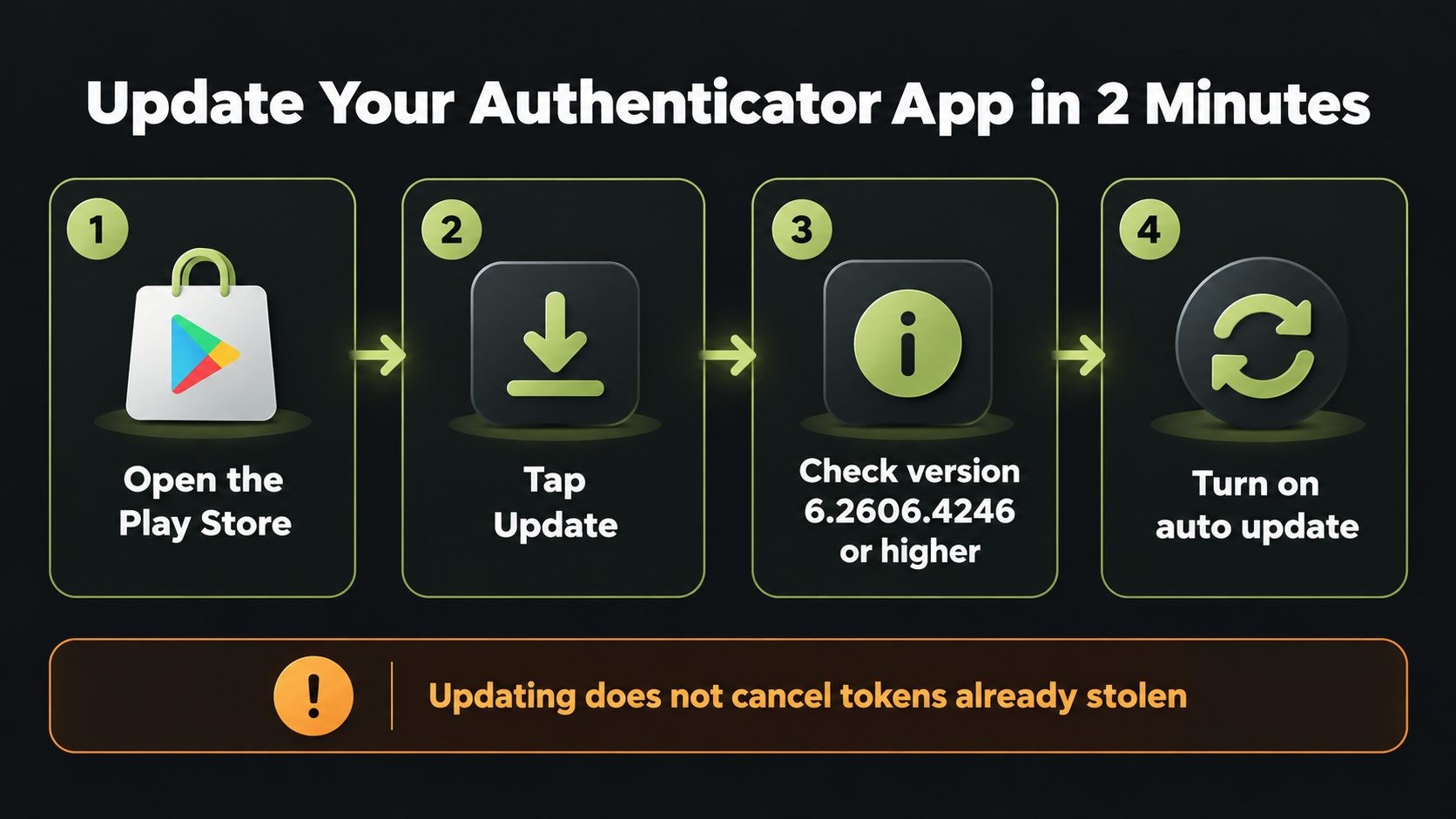
- Open the Google Play Store and search for Microsoft Authenticator.
- Tap Update if the button shows. If it shows Open, you already have the latest version.
- To confirm the version, open Authenticator, open the menu and look for Help or About. The version should be 6.2606.4246 or higher. Menu labels can differ slightly between versions.
- Turn on auto-update for Authenticator in the Play Store, so the next fix arrives without you thinking about it.
- Review your installed apps and uninstall anything you do not recognize or did not install from Google Play.
One important tip: updating stops new token theft, but it does not cancel tokens that may already have been taken. If your phone could have been exposed, tell your IT team so they can revoke your sessions. The next section explains how.
What IT admins should do now
For admins, the Microsoft Authenticator patch is step one, not the whole job. Here is a practical response plan.
Enforce the minimum version
Use Intune or your MDM to require Microsoft Authenticator 6.2606.4246 or later on managed Android devices, and flag devices that do not comply. A device compliance policy is the cleanest way to make the minimum version stick.
Revoke sessions where exposure is possible
In Microsoft Entra ID, use Revoke sessions for affected users. This invalidates their refresh tokens. Existing access tokens can stay valid until they expire, usually around an hour, so plan for that short window.
Hunt in the logs
Review Entra sign-in and audit logs for unexpected client apps using delegated permissions such as Mail.ReadWrite, Files.ReadWrite.All, Calendars.ReadWrite or UserAuthenticationMethod.ReadWrite. Look for token requests using the Teams client ID from devices with no Teams session. Check for unexpected passkey or authentication method changes. No public indicators of compromise or attacker package names have been published, so behavior is what you hunt for.
Tighten mobile access
Use Conditional Access with device compliance, restrict sideloading on corporate devices, and review your BYOD policy. Staff phones that reach company mail should meet a basic security bar.
Rotate credentials if needed
If a device had an unknown app alongside a pre-fix build, assume its tokens were reachable. Revoke sessions and rotate any credentials those sessions could reach. And if a compromised account had access to your website or Google Search Console, check those too; my technical SEO services include that check, because a hijacked account can quietly add users or change settings that hurt how your site appears in search.
What AuthMask means for small businesses
Many small businesses run on Microsoft 365 without a dedicated IT team, and staff often use their own Android phones for work. That is exactly the setup where a flaw like this slips through.
Three actions cover most of the risk:
- Ask every member of staff to update Microsoft Authenticator today.
- If you have Microsoft 365 Business Premium, turn on Intune or basic mobile management, so you can enforce updates instead of asking for them.
- Review who has admin rights, and remove the ones nobody needs.
MFA is still essential. But token theft shows why device security and app hygiene matter as well. The same lesson came up in the UpdraftCentral backdoor attack this month, where a stolen key let attackers act as a trusted system. If you want a second pair of eyes on your setup, my IT and website security services start with exactly these checks.
Attackers are also using AI to find weak spots faster than ever, as the CyberStrikeAI attacks on Japan showed, so the gap between a fix and an attack keeps shrinking.
The developer lesson: never trust the caller's claims
The root cause fits in one sentence: the broker made its trust decision from values the caller supplied, instead of the verified caller identity it already had. That is a textbook case of CWE-287 Improper Authentication.
If you build Android apps, the lessons are direct:
- Do not export activities that handle sensitive actions unless you have to.
- Protect exported components with permissions.
- Verify the real caller with
getCallingActivity()or the Binder calling UID, and base the decision on that. - Never treat a package signature the attacker can read as proof of identity.
This is how I approach secure Android app development: the sensitive path checks who is really calling, not who says they are. The same rule applies on the web, which is why custom application development with security built in treats every request's identity as something to verify, never something to accept.
Tokens are only one of the secrets a developer's machine holds. Our developer laptop security checklist covers sessions, secrets, SSH keys and extensions in one place.
AuthMask timeline
- August 25, 2026: CVE-2026-80097 reserved.
- September 8, 2026: Microsoft publishes the advisory and the fix (version 6.2606.4246).
- October 23, 2026: Enclave publishes the AuthMask research and a proof of concept.
- October 26 to 27, 2026: wide media coverage; Google Play shows version 6.2609.6214.
- As of October 27, 2026: not listed in the CISA Known Exploited Vulnerabilities catalog.
This alert is part of our website security for small business guide, which puts every 2026 incident into a layer-by-layer plan you can follow.
Not sure if this affects you? I've recovered 50+ attacked websites. Request a security review.
Frequently asked questions
Final word
The AuthMask vulnerability is patched, but it shows how one weak trust check in an authentication broker can expose a whole work account, MFA and all. Update Microsoft Authenticator on your Android phone today. If you manage a Microsoft 365 tenant, enforce the minimum version, revoke sessions where exposure is possible and review your sign-in logs. For the latest WordPress security news, see the WordPress 7.2 release guide, browse more cybersecurity guides, or get a security review for your business.
Get new posts by email
New guides and alerts, sent when they are published. No spam. Unsubscribe anytime.


Comments (0)